Better Xbox360 Controller - 8 hotkeys quicksave -load
⚪ Last updated 2012⚠️ Install Order · 3 steps
Install in this order, then this mod last — most mods fail to load without their framework and dependencies in place.
Preview
🔍 Analysis
- 👍 4.5% endorsement rate — high engagement, a strong quality signal
- 🏆 #10 of 55 User Interface mods in this game by downloads
📋 About This Mod
- -----===>) WHAT IS THIS (<===-----
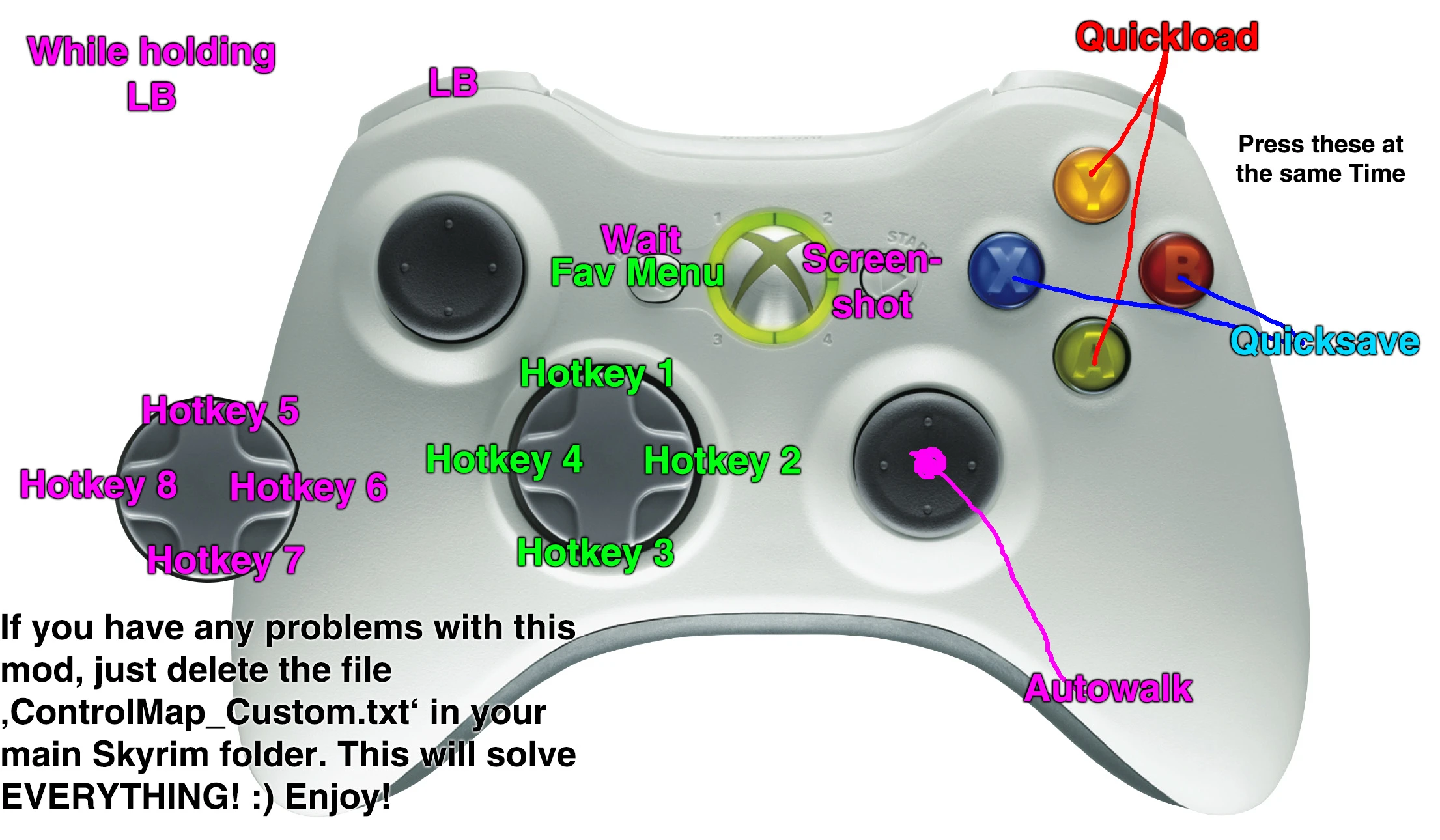
- If you use the xbox360-controller with the pc-version you normally have only two hotkeys for your favourites. Those are Left and Right on the d-pad. You hold those and assign them to items, spells or shouts that way.
This file adds 6 more on the D-pad to that. The new hotkeys are:
D-pad-Up D-pad-Down LB + D-pad-Left LB + D-pad-Right LB + D-pad-Up LB + D-pad-Down
You have to enter the Favourites Menu by pressing Back on your Controller. If you want to Wait you have to press LB+Back.
For the Quicksave Function you have to press X+B. Hold X then press B. Quicksaved :) To Quickload press A+Y
Taking Screenshots happens by pressing LB+Start To Autowalk press LB+Right Stick
There is also another Version for Lefthanded People where I swapped Looking and Moving
- -----===>) TROUBLESHOOTING (<===-----
- Delete the ControlMap_Custom.txt in your Skyrim mainfolder.
- -----===>) INSTALLATION (<===-----
- To Install, just extract the zip inside your Skyrim-Data-folder under X:programssteamsteamappscommonskyrimData. Or just use the Nexus Mod Manager.
To be able to make screenshots add this in your skyrim.ini under C:/users/documents/my games/skyrim bAllowScreenshot=1
- -----===>) DEINSTALLATION (<===-----
- Just delete the file controlmap.txt in X:programssteamsteamappscommonskyrimDataInterfaceControlsPC. Or use the Nexus Mod Manager.
To be able to make screenshots add this in your skyrim.ini under C:/users/documents/my games/skyrim
bAllowScreenshot=1
- --
- Also available in the Steam Workshop: http://steamcommunity.com/sharedfiles/filedetails/?id=212383355
This mod enhances Xbox 360 controller support in the PC version by adding six additional hotkeys on the D-pad, bringing the total to eight, and enabling quicksave and quickload functions. It's a utility mod for controller users who want more quick access to favorites and save functions. With over 2,000 endorsements and 48,000 downloads, it's a well-received quality-of-life improvement, though it hasn't been updated since 2012.
✨ Key Features
📊 Pros & Cons
✅ Pros
- Community-approved with 2,174 endorsements and 48,524 downloads.
- Solves a real pain point: limited hotkeys for controller users.
- Adds quicksave/quickload, which is a huge convenience for controller play.
⚠️ Cons
- Last updated in 2012 — may not work with current game versions.
- Only adds hotkeys and save functions; no other UI improvements.
For PC players who prefer using an Xbox 360 controller and want more than the default two D-pad hotkeys for favorites. Also for anyone who wants quick save/load without reaching for the keyboard. Skip if you play with mouse and keyboard or if you're on a newer game version that might break compatibility.
💡 Beginner Tips
- Make sure your controller is set up before installing; the mod only works with Xbox 360 controllers.
- Test the new hotkeys in a safe area first to avoid accidental quicksaves during combat.
- Since the mod is old, check if your game version is compatible; if not, look for community patches.
📊 Mod Details
- Game
- Skyrim LE Mods
- Author
- Waldkoenig
- Version
- 14
- Downloads
- 48,524
- Endorsements
- 2,174
- Category
- User Interface
- Created
- 11/15/2011
- Updated
- 11/14/2012
🔧 How to Install Skyrim LE Mods
Download from Nexus.
📖 Full step-by-step install guide for Skyrim LE →
Visit the official mod page for specific installation instructions for this mod.
🎮 Need cheat codes or console commands? Check ur gaming wiki for Skyrim LE commands, item IDs, and more.
Keep browsing — more Skyrim LE mods await