TFC Installer for UE2-UE3
🟢 Updated this monthPreview
🔍 Analysis
- 👍 1.5% endorsement rate — high engagement, a strong quality signal
- ✅ Updated 84 days after the latest game patch — actively maintained
- 🏆 #7 of 172 Universal Tools mods in this game by downloads
📋 About This Mod
This tool allows you to install texture packs and game patches created with UPK Explorer for UE2-UE3
Instructions video by Wastelander121:
PhtrqdVis-w
This tool is compatible with most Unreal Engine 2/3 games (and their DLCs) and currently does the following:
-
[]Injects textures and other modifications via texture packs / game patches (generated by UPK Explorer for UE2-UE3)[/]
[]Automatically disables SHA Checks in certain games' exe upon installing a texture pack.[/]
[]Backs up the original UPKs for risk-free installation and uninstallation of mods.[/]
[]Maintains UPK package compression upon installing a texture pack, reducing the space taken up on your drive.[/]
[]Easily uninstalls mods with a click of a button and restores the backed up UPK, should a user change their mind.[/]
How to use:
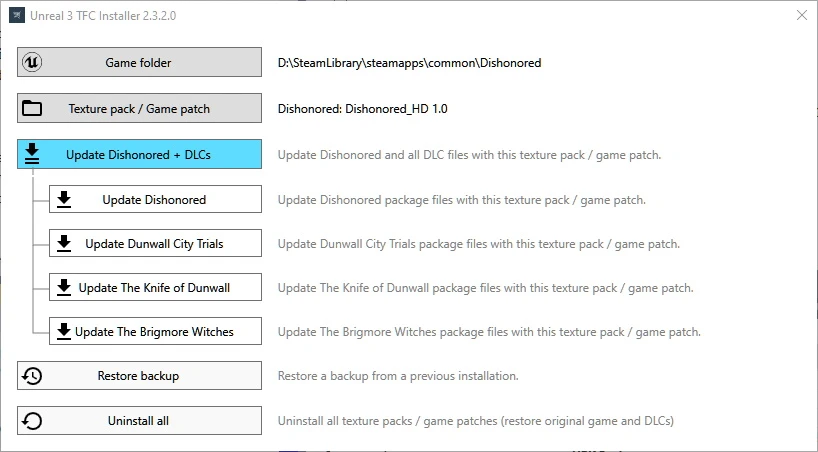
1. Set your game folder
Ex: D:\SteamLibrary\steamapps\common\\
2. Set your mod folder
Open the folder where your mod is stored. This will be the folder with a GameProfile.xml inside. If it is contained in a zip or rar archive, make sure to extract it first.
3. Install the mod
Once you have selected the, it will detect if the mod also affects DLCs, and which DLCs you have installed.
Depending on this you will have one or more "Update xxx" button, where xxx is either the main game or one of the DLCs. If you wish to update the game and any DLCs you have, "Update All" is the recommended option.
Restore Backup
Use this to uninstall specific mods (in reverse installation order):
Uninstall all
During the installation, your original game files will be backed up (inside the game folder).
Clicking uninstall all will restore your game to its original state, uninstalling all texture packs.
Requirements
You will need . Net runtime 6 installed your computer to use this tool
Note: Mods that require this tool for installation were created using UPK Explorer for UE2-UE3
📊 Mod Details
- Game
- Site Mods
- Author
- FCH823
- Version
- 2.5.5.0
- Downloads
- 387,730
- Endorsements
- 5,903
- Category
- Universal Tools
- Created
- 6/8/2023
- Updated
- 9/11/2026
- Tags
- Gameplay, English, Music, Sound FX, Voice Acting, Models/Meshes, Textures, Tutorials for Modders, Tutorials for Players, User Interface
🔧 How to Install Modding Tools Mods
Install via a mod manager (Vortex or Mod Organizer 2). Most mods drop into the game folder.
📖 Full step-by-step install guide for Modding Tools →
Visit the official mod page for specific installation instructions for this mod.
🎮 Need cheat codes or console commands? Check ur gaming wiki for Modding Tools commands, item IDs, and more.
Keep browsing — more Modding Tools mods await