Fluffy Mod Manager
🟢 Updated this monthPreview
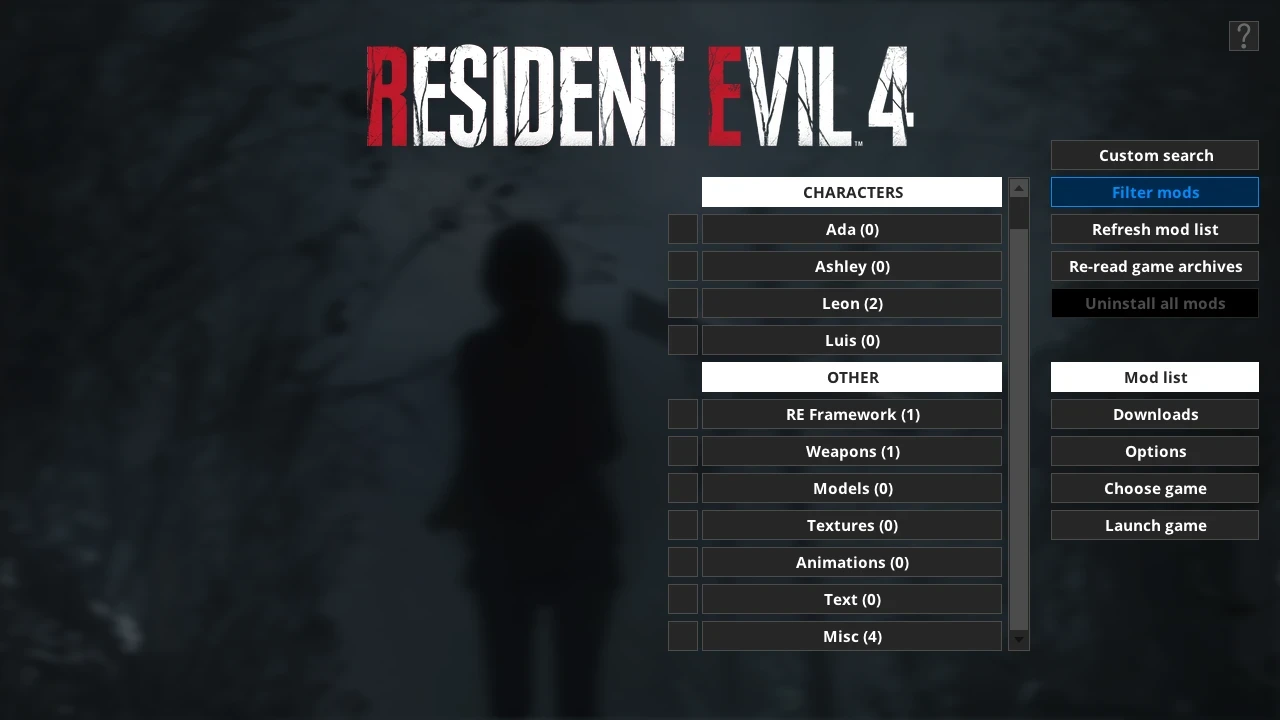
🔍 Analysis
- 👍 1.4% endorsement rate — high engagement, a strong quality signal
- ✅ Updated 78 days after the latest game patch — actively maintained
- 🏆 #2 of 33 Mod Managers mods in this game by downloads
📋 About This Mod
Mod manager that can automatically take backups of files when installing mods for games. Has support for multiple unique modding methods for RE Engine titles.
Troubleshooting guide: Read through this if you encounter any problems
Detailed information about the mod manager with several guides: https://www.patreon.com/posts/36745578
You can support me on Patreon if you find my mods and modding tools useful: https://www.patreon.com/fluffyquack
Alternatively, you can support me on ko-fi: https://ko-fi.com/fluffyquack
--- QUICK AND DIRTY GUIDE FOR ALL RE ENGINE GAMES ---
-
[]https://www.patreon.com/posts/113314784
--- USAGE INFORMATION FOR DRAGON'S DOGMA 2 ---
- [
[]Run the mod manager once and choose Dragon's Dogma 2 as game.
[]You can drag'n'drop mods in PAK format onto the mod manager window while it's running to copy them to the mod manager OR manually copy mods to "\Games\DragonsDogma2_Chara\Mods"
[]Click on mods in the mod list to install them. Click again to uninstall.
Info for mod creators:
-
[]Guide on how to create PAK mods for Dragon's Dogma 2: https://www.patreon.com/posts/100042893
[]Note that the modinfo.ini file is optional (and all entries within it are optional too).
[]Mod manager will always check for a "screenshot.jpg" or "screenshot.png" to use as mod preview image even if modinfo.ini doesn't exist.
[]You can add an "AddonFor=ModName" entry to a mod's modinfo.ini if a mod is intended as an addon for another mod and then they'll be organized as a single menu button in the mod list. Replace "ModName" with the exact name for a mod this mod's an addon for.
[]Alternatively, you can add an entry like "NameAsBundle=NameHere" to a collection of mods to organize them into the same menu button. Replace "NameHere" with a name for the collection of mods, and make sure each mod in the collection has the exact name entry.
--- USAGE INFORMATION FOR OLDER RE ENGINE TITLES (RE7, RE8, RE2R, RE3R, RE4R, MHR, DMC5 AND A FEW OTHERS) AND UNCHARTED 4/LAST OF US PART 1 ---
-
[]Extract the mod manager anywhere (if you're upgrading from an old version, simply extract it over the older version).
[
]Before running the mod manager for the first time, ensure all PAK files in your game install install are unmodified (to easily do this, right-click the game in Steam and choose "verify file integrity").[]Run the mod manager once and make sure the appropriate game is selected.
[]You can drag'n'drop mods in RAR, 7Zip, or ZIP format onto the mod manager window while it's running to copy them to the mod manager OR manually copy mods to "\Games\\Mods"
[]Click on mods in the mod list to install them. Click again to uninstall.
What to do if if the game gets gets patched when you don't have mods installed, or after installing DLC:
-
[]Click on "Re-read Game Archives" in the "manage mods" menu in the mod manager.
[]Installing and uninstalling mods should work again. Note that some mods may not be compatible with a new version of the game.
What to do if the game gets patched when you have mods installed:
-
[]Try to uninstall a mod via the mod manager. You should get an error message about a PAK file being different.
[]Turn on the "force uninstall" option at the top of the manage mods menu.
[]Click on "uninstall all mods".
[]This shouldn't be necessary, but just as a precaution, I suggest right-clicking the game in Steam and selecting "verify file integrity".
[]Click on "re-read game archives" in the "manage mods" menu in the mod manager.
[]Installing and uninstalling mods should work again. Note that some mods may not be compatible with a new version of the game.
Info for mod creators:
[]As an example on how to package a mod, download this mod and look at its files: https://www.nexusmods.com/streetfighter6/mods/1
[]Mods can be packaged into RAR, ZIP, or 7Zip archives.
[]Note: When packaging mods as RAR and 7Zip, I highly recommend creating them as non-solid archives to ensure single-file extraction is fast. WinRAR does this by default.
[]Note that the modinfo.ini file is optional (and all entries within it are optional too).
[]Mod manager will always check for a "screenshot.jpg" o
-
[]Try to uninstall a mod via the mod manager. You should get an error message about a PAK file being different.
-
[]Click on "Re-read Game Archives" in the "manage mods" menu in the mod manager.
-
[]Extract the mod manager anywhere (if you're upgrading from an old version, simply extract it over the older version).
📊 Mod Details
- Game
- Site Mods
- Author
- FluffyQuack
- Version
- 3.083
- Downloads
- 2,199,749
- Endorsements
- 30,872
- Category
- Mod Managers
- Created
- 3/18/2024
- Updated
- 9/5/2026
- Tags
- English, Utilities for Modders, Utilities for Players
🔧 How to Install Modding Tools Mods
Install via a mod manager (Vortex or Mod Organizer 2). Most mods drop into the game folder.
📖 Full step-by-step install guide for Modding Tools →
Visit the official mod page for specific installation instructions for this mod.
🎮 Need cheat codes or console commands? Check ur gaming wiki for Modding Tools commands, item IDs, and more.
Keep browsing — more Modding Tools mods await