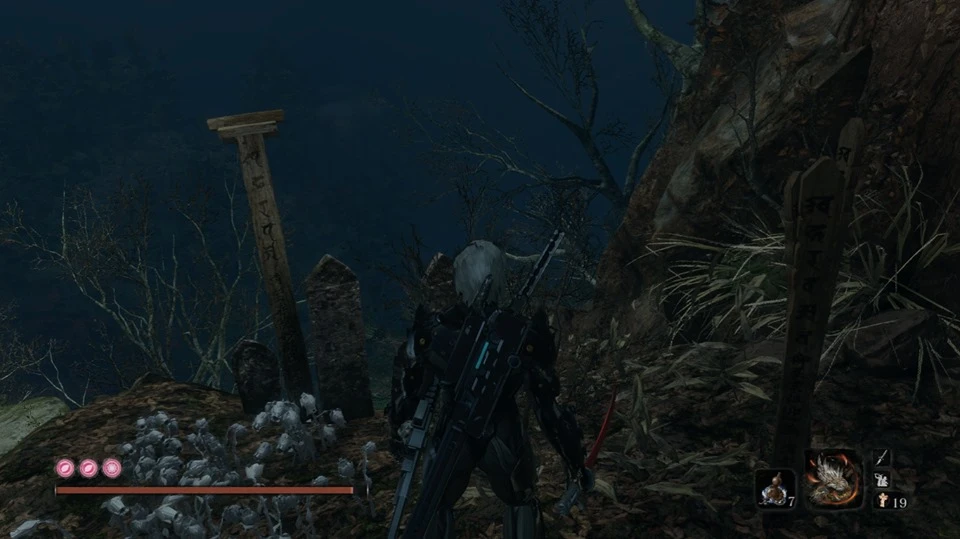
Jetstream Sam's Murasama and Raiden High Frequency Blade
⚪ Last updated 2019⚠️ Install Order · 1 step
Install in this order, then this mod last — most mods fail to load without their framework and dependencies in place.
Preview
🔍 Analysis
- 👍 4.2% endorsement rate — high engagement, a strong quality signal
- 🏆 #80 of 624 Weapons and Armour mods in this game by downloads
📋 About This Mod
The main file containts Murasama as Kusabimaru and Raiden's HF Blade as the Mortal Blade
You can also download and choose 3 different lenghts for the Murasama in the option file
Raiden's HF Blade as Kusabimaru is also included
Update v1. 02
Fixed the problem that the small tanto turning white after being soaked in blood
The models are made by Abyss Leo: https://www.deviantart.com/abyssleo
Huge thanks to buddy97 for helping me with the texture problems
And thanks to forsakensilver for his FLVER Editor
TKGP for his UXM and Yabber apps
How to Install
1. Ensure you have the Sekiro mod engine installed. You can grab that here: https://www.nexusmods.com/sekiro/mods/6
2. Once the mod engine is in place, simply drag the mod folder into the location where sekiro.exe is located
This mod replaces two existing weapons in Sekiro: Kasabimaru becomes Jetstream Sam's Murasama, and the Mortal Blade becomes Raiden's High Frequency Blade. It's a simple cosmetic swap for fans of Metal Gear Rising, with 376 endorsements and 8,960 downloads, last updated in July 2019.
✨ Key Features
📊 Pros & Cons
✅ Pros
- Community-approved with 376 endorsements and nearly 9k downloads
- Directly swaps two iconic blades for MGR fans
- No complex dependencies—just a model replacement
⚠️ Cons
- Last updated in 2019—may not be compatible with the latest Sekiro patches
- Only affects two weapons, so it's a niche cosmetic change
For Sekiro players who are also Metal Gear Rising fans and want to see Sam's Murasama or Raiden's HF Blade in place of the game's default katanas. Skip if you're looking for new weapon mechanics or broader visual overhauls—this is purely a cosmetic swap.
💡 Beginner Tips
- Make sure to back up your original game files before replacing them, so you can revert if needed.
- Check the mod's file structure and place the files in the correct directory (usually the game's 'parts' folder) to ensure the swap works.
- If the mod doesn't work after a game update, verify your game version and look for community patches.
📊 Mod Details
- Game
- Sekiro Mods
- Author
- Various
- Version
- 1.00
- Downloads
- 8,960
- Endorsements
- 376
- Category
- Weapons and Armour
- Created
- 7/5/2019
- Updated
- 7/6/2019
🔧 How to Install Sekiro Mods
Download from Nexus.
📖 Full step-by-step install guide for Sekiro →
Visit the official mod page for specific installation instructions for this mod.
🎮 Need cheat codes or console commands? Check ur gaming wiki for Sekiro commands, item IDs, and more.
Keep browsing — more Sekiro mods await