Better Keybinds (In-Game Menus with WASD)
⚪ Last updated 2020⚠️ Install Order · 1 step
Install in this order, then this mod last — most mods fail to load without their framework and dependencies in place.
Preview
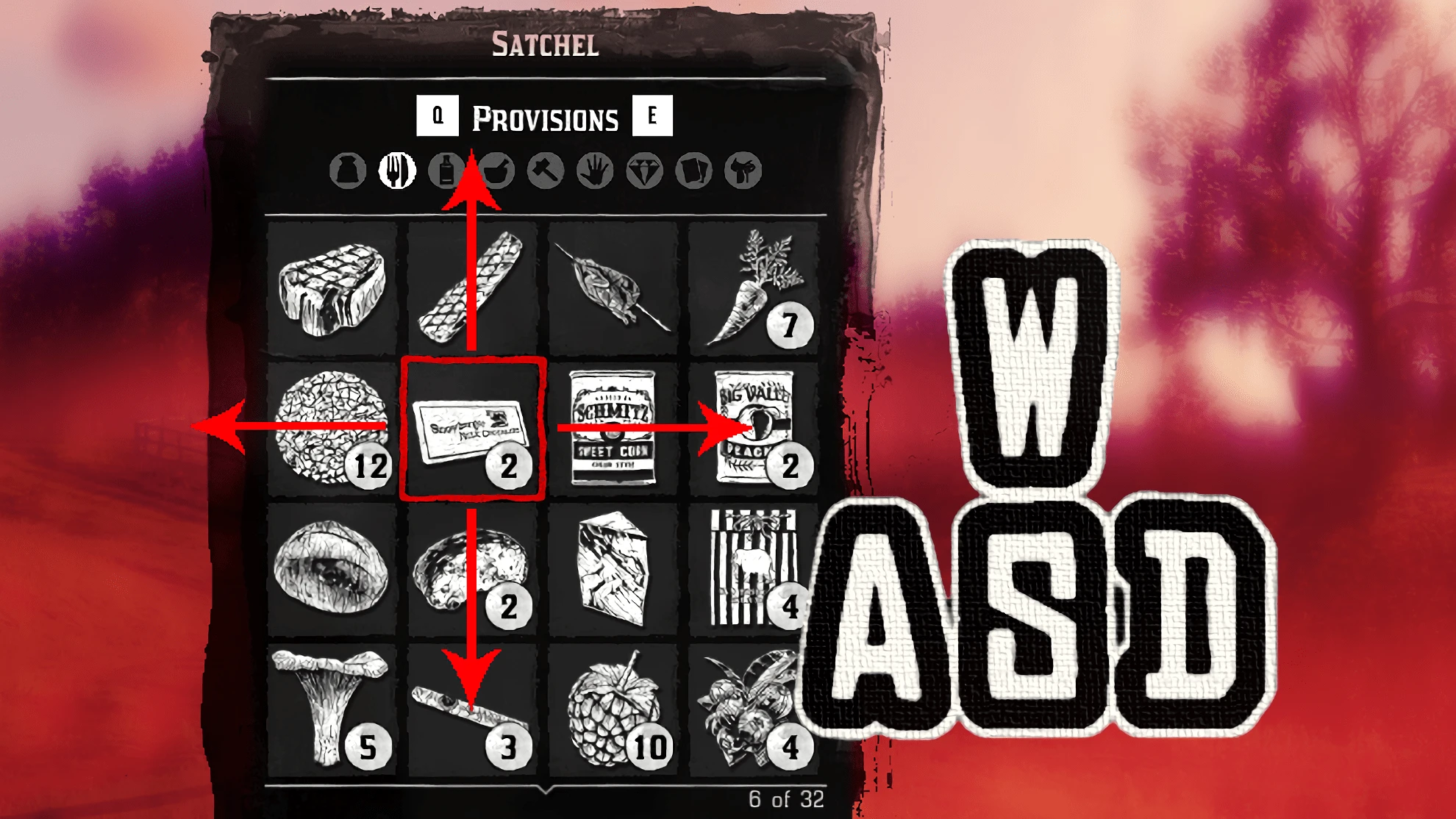
🔍 Analysis
- 👍 4.3% endorsement rate — high engagement, a strong quality signal
- 🏆 #69 of 113 Miscellaneous mods in this game by downloads
📋 About This Mod
I dont understand English. I'm sorry if my English is difficult to understand.
By the way, "KeyMappings" file can be modified with a binary editor.
Description:
This mod allows you to interact in In-Game Menus with WASD keys. And other keybinds Wil be changed to be smarter too.
Installation:
Copy "KeyMappings" File into the Savedata Folder.
If you have the Rockstar launcher version, typically this will be:
%USERPROFILE%\Documents\Rockstar Games\Red Dead Redemption 2\Profiles\\KeyMappings
Major Changes:
Down = S, Down
Left = A, Left
Right = D, Right
Accept = Space, Return
Cancel = F, Backspace
Eagle Eye/Dead Eye = Q
Dead Eye Tag Enemies = Space, C
Aim in the Air = Z
Change Camera Shoulder View = X
Switch Weapon Firing Mode = MMB, B
Weapon Zoom In = Mouse Wheel Up
Weapon Zoom Out = Mouse Wheel Down
Next Weapon = >
Previous Weapon = <
Look Behind = MMB
Look Behind = MMB
Enter/Exit Cover = C
Interact with Feed Message = X
Whistle for Horse = Z
Ineract with Animal = X
Headlight = F
Train Whistle = X
Change Vehicle Seat = X
Next Wheel Menu = Q, R
Next Wheel Menu Item = Mouse Wheel Up
Previous Wheel Menu Item = Mouse Wheel Down
Open Item Wheel = T
Next Prompt Page = Mouse Wheel
Quick Use Item = X, I
-------------------------------------------------------------------------------------------------------------------------------------
このmodを使用するとインゲームメニューの項目をWASDで操作できるようになります。
また、他のキーバインドもより洗練されたものになります。
"KeyMappings"ファイルをセーブデータフォルダに移動します。
ロックスターランチャー版の場合、セーブデータフォルダは
%USERPROFILE%\Documents\Rockstar Games\Red Dead Redemption 2\Profiles\<ユーザーID>\KeyMappings
決定 = Space、Return
キャンセル= F、Backspace
イーグルアイ/デッドアイ= Q
デッドアイタグの敵=Space, C
肩越しカメラの変更= X
武器発射モードの切り替え= MMB、B
武器ズームイン=マウスホイールアップ
武器ズームアウト=マウスホイールダウン
カバーアクション= C
フィードメッセージを確認= X
Better Keybinds lets you navigate in-game menus with WASD and improves other keybinds for smarter controls. A compact utility mod with 543 endorsements and over 12,700 downloads, last updated in March 2020.
✨ Key Features
📊 Pros & Cons
✅ Pros
- Community-approved with 543 endorsements and over 12k downloads.
- Solves a common annoyance: menu navigation with WASD.
- Lightweight and focused—does one thing well.
⚠️ Cons
- Last updated in 2020, so may be outdated for newer game versions.
- Potential conflicts with other mods that alter keybinds or UI.
- Limited feature set; only affects menu navigation and keybind tweaks.
For players who hate using arrow keys or mouse in menus and want a more fluid WASD experience. Also for those who want smarter keybind defaults. Skip if you're happy with default menu controls or if you use mods that heavily customize UI.
💡 Beginner Tips
- Check if your game version is compatible, since the mod hasn't been updated since 2020.
- If you use other keybind mods, load Better Keybinds after them to avoid conflicts.
- Test in the main menu first to ensure WASD works before diving into gameplay.
📊 Mod Details
- Game
- RDR2 Mods
- Author
- juncus0134
- Version
- 1.0.1
- Downloads
- 12,718
- Endorsements
- 543
- Category
- Miscellaneous
- Created
- 3/18/2020
- Updated
- 3/23/2020
🔧 How to Install RDR2 Mods
Install Script Hook RDR2 first. Most mods go in game directory.
📖 Full step-by-step install guide for RDR2 →
Visit the official mod page for specific installation instructions for this mod.
🎮 Need cheat codes or console commands? Check ur gaming wiki for RDR2 commands, item IDs, and more.
Keep browsing — more RDR2 mods await