Inventory Storage Search 1.0.1
🟡 Updated this year⚠️ Install Order · 1 step
Install in this order, then this mod last — most mods fail to load without their framework and dependencies in place.
Preview
🔍 Analysis
- ✅ Updated 266 days after the latest game patch — actively maintained
- 🏆 #21 of 25 UE4SS, Utilities, Gameplay, User Interface mods in this game by downloads
📋 About This Mod
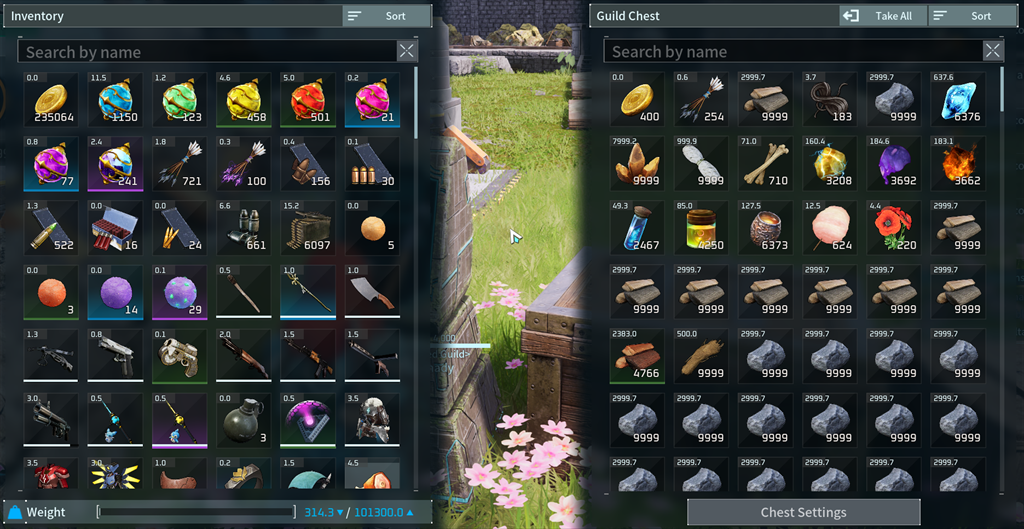
Inventory and Storage Search Got a packed inventory and tired of scrolling through hundreds of slots just to find one item? This mod adds search bars to your player inventory, regular storage, and Guild Storage that look like they belong in the game. Click a search bar and start typing. You can search using any part of an item's name or description, and the player and storage sides can be searched separately. Features Search your main player inventory, regular storage, and Guild Storage. Use separate search bars for your inventory and the storage you have open. Find items using a full or partial item name or description. Capitalization does not matter. Clear the search to bring every item back exactly where it was. Use slots, tooltips, drag and drop, quick move, and normal item transfers like usual. While the storage search is active, Take All and its shortcut only move the matching items. Clear the storage search and Take All goes back to its normal behavior. Typing in the search bar will not accidentally trigger your other game or mod shortcuts. Item description popups will not kick you out of the search bar while you are typing. Empty storage slots are skipped when possible, which helps with large containers that only have a few items in them. The mod does nothing in the background while your inventory and storage menus are closed. No custom items, item changes, or save edits. Requirements This mod requires UE4SS Experimental. Subscribe to it, then enable both UE4SS Experimental and Inventory and Storage Search in Palworld's Mod Management menu. Single Player Installation Subscribe to UE4SS Experimental and Inventory and Storage Search. Launch Palworld. Go to Options, then Mod Management. Turn on mod support, UE4SS Experimental, and Inventory and Storage Search. Save your changes and restart the game if it asks you to. How To Use Open your inventory or a storage container and use the new search bar below the usual header. Type any part of an item
📊 Mod Details
- Game
- Palworld Mods
- Author
- 76561198107252487
- Version
- N/A
- Downloads
- 287
- Endorsements
- 0
- Category
- UE4SS, Utilities, Gameplay, User Interface
- Created
- 8/12/2026
- Updated
- 8/15/2026
🔧 How to Install Palworld Mods
Subscribe on Steam Workshop. Mods auto-download and install. Launch the game to activate.
📖 Full step-by-step install guide for Palworld →
Visit the official mod page for specific installation instructions for this mod.
🎮 Need cheat codes or console commands? Check ur gaming wiki for Palworld commands, item IDs, and more.
Keep browsing — more Palworld mods await