Oblivion Xbox Controller (Xpadder Profile joystick compatible)
⚪ Last updated 2017⚠️ Install Order · 2 steps
Install in this order, then this mod last — most mods fail to load without their framework and dependencies in place.
Preview
🔍 Analysis
- 👍 2.6% endorsement rate — high engagement, a strong quality signal
- 🏆 #264 of 330 Gameplay Effects and Changes mods in this game by downloads
📋 About This Mod
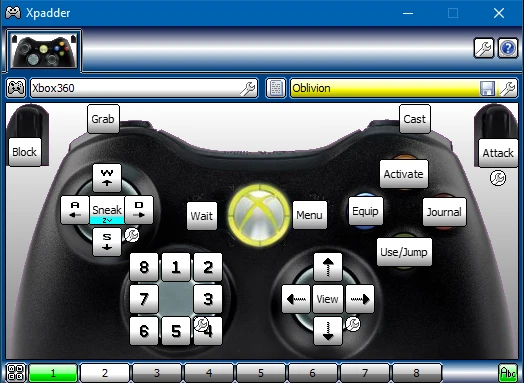
First, you need Xpadder to use this. Second, you need to delete the control binds for "Joystick" in the controls menu. Personally I click the button bind then hold the start button down to delete it. If you can't delete your joystick binds in game then I have my oblivion.ini packaged with the xpadder profile.
L3 enables vanity view, A and B zoom in/out. (R3 still changes your View, and L3 still changes sneak mode. However it takes 0. 15 seconds to enable Vanity view) Y button is used to talk to people. *X button is to interact with menus and jump. (Takes 0. 06 seconds to input jump)
The rest is straight forward. If you're getting an issue of your Cycle hotkey popping up when inputting certain buttons then delete your oblivion profile, and make sure you delete all joystick keybinds. If none of this works hopefully my oblivion.ini will work. (Oblivion.ini is located at Documents\My Games\Oblivion)
This Xpadder profile lets you play Oblivion with an Xbox controller using the game's built-in joystick support. It's a simple config file for players who prefer gamepad controls. With 72 endorsements and 2,802 downloads, it has a modest following. Last updated in 2017, it may not work with all versions.
✨ Key Features
📊 Pros & Cons
✅ Pros
- Decent community adoption with 72 endorsements and 2,802 downloads.
- Lets you play Oblivion with a controller without extra mods.
- Lightweight and easy to set up if you already use Xpadder.
⚠️ Cons
- Last updated in 2017, so it may not be compatible with newer Oblivion patches or Windows versions.
- Requires Xpadder, which is not included and must be purchased separately.
- No detailed instructions or troubleshooting provided by the author.
For Oblivion players who prefer gamepad controls and already own Xpadder. If you're comfortable configuring controller profiles, this saves you time. Skip if you don't use Xpadder or prefer keyboard and mouse.
💡 Beginner Tips
- Make sure Xpadder is running and the profile is loaded before launching Oblivion.
- Check that the game's joystick option is enabled in the settings menu.
- If the controller doesn't respond, try running Xpadder as administrator.
📊 Mod Details
- Game
- Oblivion Mods
- Author
- me
- Version
- 1
- Downloads
- 2,802
- Endorsements
- 72
- Category
- Gameplay Effects and Changes
- Created
- 5/27/2017
- Updated
- 5/27/2017
🔧 How to Install Oblivion Mods
Download from Nexus.
📖 Full step-by-step install guide for Oblivion →
Visit the official mod page for specific installation instructions for this mod.
🎮 Need cheat codes or console commands? Check ur gaming wiki for Oblivion commands, item IDs, and more.
Keep browsing — more Oblivion mods await