Night Eye Shader Switcher
⚪ Last updated 2008⚠️ Install Order · 3 steps
Install in this order, then this mod last — most mods fail to load without their framework and dependencies in place.
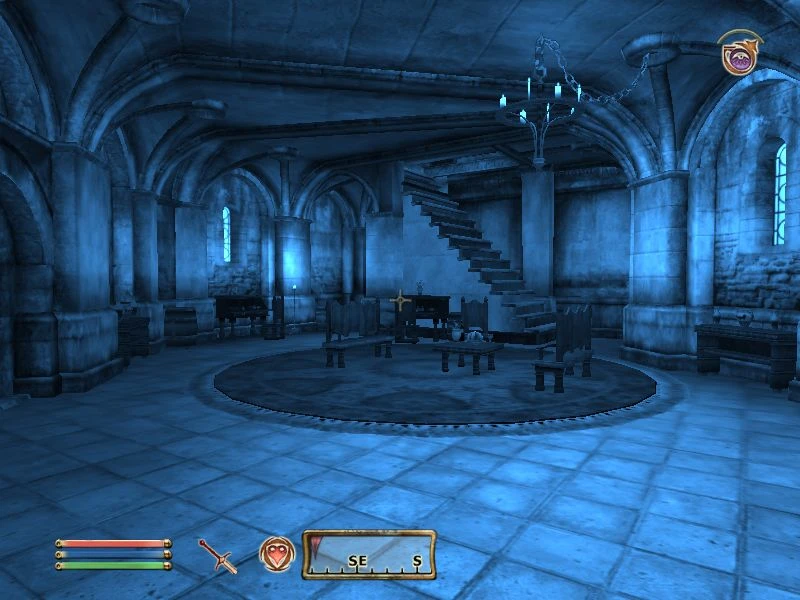
Preview
🔍 Analysis
- 👍 4.4% endorsement rate — high engagement, a strong quality signal
- 🏆 #14 of 35 Visuals and Graphics mods in this game by downloads
📋 About This Mod
Name: SwitchNightEyeShaders
Version: 5. 0
Date: 13 September 2008
Category: Modders Resource
Requirements: Oblivion Script Extender (OBSE) version 13 or greater, Oblivion version 1. 2. 0. 416
Author(s): scanti
Source:
Description
===========
This is an OBSE plug-in that allows you to add your own nighteye shaders and swap them at will during the game.
Any shaders you create must be in the pso file format and be placed in the data\\shaders\\nighteye folder and the data\\shaders\\hdr.nighteye folder. Each shader must have 2 versions. One normal shader in the data\\shaders\\nighteye folder and another for when the game is using HDR in the data\\shaders\\hdr.nighteye folder.
(If you miss out the hdr version of the shader and the player is using hdr then the screen will black-out or white-out while night eye is active).
To create the shader files you can use the Oblivion shader editor utility by Timeslip. http://timeslip.chorrol.com/
I\'ve also added a HLSL shader development system. Write your shader in HLSL, name it
An OBSE plug-in for Oblivion that lets you switch between several different night eye shaders while the game is running. A niche utility for players who want to customize the night eye effect without restarting, with 401 endorsements and last updated in 2008.
✨ Key Features
📊 Pros & Cons
✅ Pros
- Community-trusted with 401 endorsements and over 9k downloads.
- Adds real-time shader switching—no more restarting the game to change night eye.
- Tiny plug-in that does one job without bloat.
⚠️ Cons
- Last updated in 2008—likely outdated and may not work with modern Oblivion setups or patches.
- Requires OBSE, so you'll need to install that first if you haven't already.
- No documentation or screenshots provided, so you're on your own for setup.
For Oblivion modders who want to tweak the night eye effect on the fly and don't mind fiddling with OBSE. Skip if you're on a vanilla playthrough or want a more modern, maintained alternative.
💡 Beginner Tips
- Make sure OBSE is installed correctly—launch the game through obse_loader.exe, not the default launcher, or the plug-in won't load.
- Since the mod is from 2008, test it on a clean save to avoid conflicts with other shader or visual mods.
- Check the mod's comments section on Nexus for any user-reported compatibility notes with newer Oblivion patches.
📊 Mod Details
- Game
- Oblivion Mods
- Author
- scanti
- Version
- 5.0
- Downloads
- 9,151
- Endorsements
- 401
- Category
- Visuals and Graphics
- Created
- 8/29/2008
- Updated
- 9/13/2008
🔧 How to Install Oblivion Mods
Download from Nexus.
📖 Full step-by-step install guide for Oblivion →
Visit the official mod page for specific installation instructions for this mod.
🎮 Need cheat codes or console commands? Check ur gaming wiki for Oblivion commands, item IDs, and more.
Keep browsing — more Oblivion mods await