DarkUI DarN Recolored - Black and Gold
⚪ Last updated 2008⚠️ Install Order · 3 steps
Install in this order, then this mod last — most mods fail to load without their framework and dependencies in place.
Preview
🔍 Analysis
- 👍 3.9% endorsement rate — high engagement, a strong quality signal
- 🏆 #58 of 85 User Interfaces mods in this game by downloads
📋 About This Mod
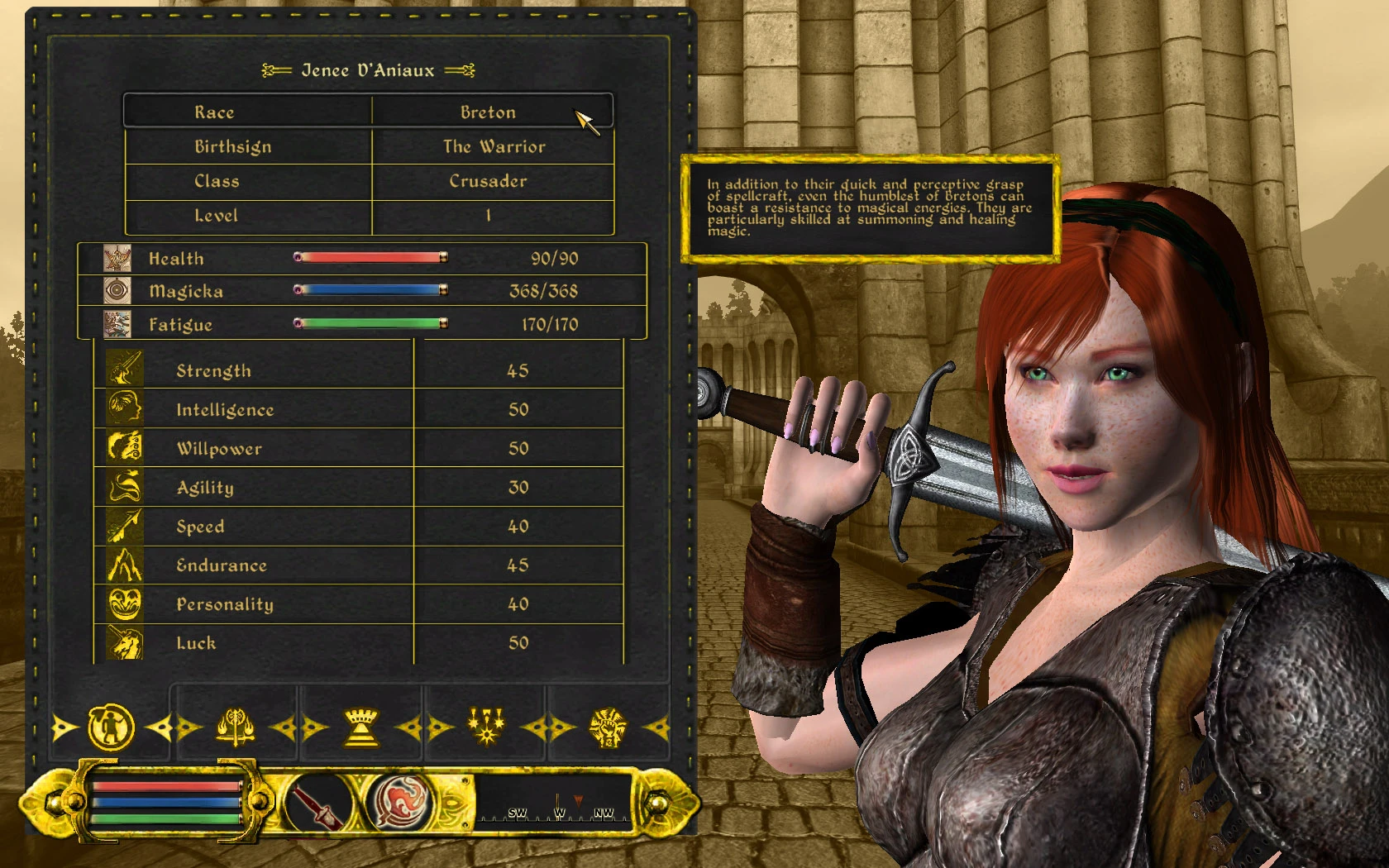
This mod is for people who like a darker User Interface (based on Darnified UI) but aren\'t fond of the dark red of the original DarkUI. This is a black and gold replacer. This is ONLY a texture replacer! You must have the original DarkUI Darn installed. Get it here! Once that\'s installed and configured, just unzip the \"DarkUI_BlackGold\" into your \"Oblivion/Data/\" folder, overwriting when prompted. Files are included for easy reversion to the original DarkUI any time you want. All credit for this UI mod goes to Darn, Darkbirdy, and Gothic251 - all I did was recolor their work! Note: This will not work properly at low resolutions - anything under 1024x768 (and maybe not even at that one). To pre-emptively answer the following questions I get every time: - The inventory idle pose is from a Japanese idle mod called 1-2HandIdle. The link where I got it is dead. No, I don\'t know where you can get it. - The world map is this one: Cyrodiil Terrain Map - To get the colored local map, open your oblivion.ini and change bLocalMapShader=1 to bLocalMapShader=0 - Yes, the character in the screenshots has custom face and body textures. No, they\'re not available for download.
A texture replacer for DarkUI DarN 1.5.5 that swaps the dark red theme for a black and gold palette. For Oblivion players who want a more regal UI. With 247 endorsements and 6,342 downloads, it's a niche but appreciated cosmetic tweak.
✨ Key Features
📊 Pros & Cons
✅ Pros
- Community-approved with 247 endorsements and over 6,000 downloads.
- Gives your UI a classy black and gold look that stands out from the default red.
- Lightweight texture swap—no performance hit.
⚠️ Cons
- Requires DarkUI DarN 1.5.5, so you need to install that first.
- Last updated in 2008—may have compatibility issues with modern Oblivion setups.
- Only changes the color theme; if you want more UI overhauls, this won't add new features.
For Oblivion players who already use DarkUI DarN and want a more elegant, gold-accented interface. Skip if you're looking for functional UI improvements or don't want to bother with the base mod.
💡 Beginner Tips
- Install DarkUI DarN 1.5.5 first, then overwrite its textures with this mod.
- Use a mod manager like Oblivion Mod Manager (OBMM) to avoid file conflicts.
- Check the mod's readme for any specific installation notes, as it's an older mod.
📊 Mod Details
- Game
- Oblivion Mods
- Author
- Luchaire
- Version
- 1.0
- Downloads
- 6,342
- Endorsements
- 247
- Category
- User Interfaces
- Created
- 4/30/2008
- Updated
- 4/30/2008
🔧 How to Install Oblivion Mods
Download from Nexus.
📖 Full step-by-step install guide for Oblivion →
Visit the official mod page for specific installation instructions for this mod.
🎮 Need cheat codes or console commands? Check ur gaming wiki for Oblivion commands, item IDs, and more.
Keep browsing — more Oblivion mods await