DarNifiedUI Additions
⚪ Last updated 2012⚠️ Install Order · 4 steps
Install in this order, then this mod last — most mods fail to load without their framework and dependencies in place.
Preview
🔍 Analysis
- 👍 4.7% endorsement rate — high engagement, a strong quality signal
- 🏆 #2 of 85 User Interfaces mods in this game by downloads
📋 About This Mod
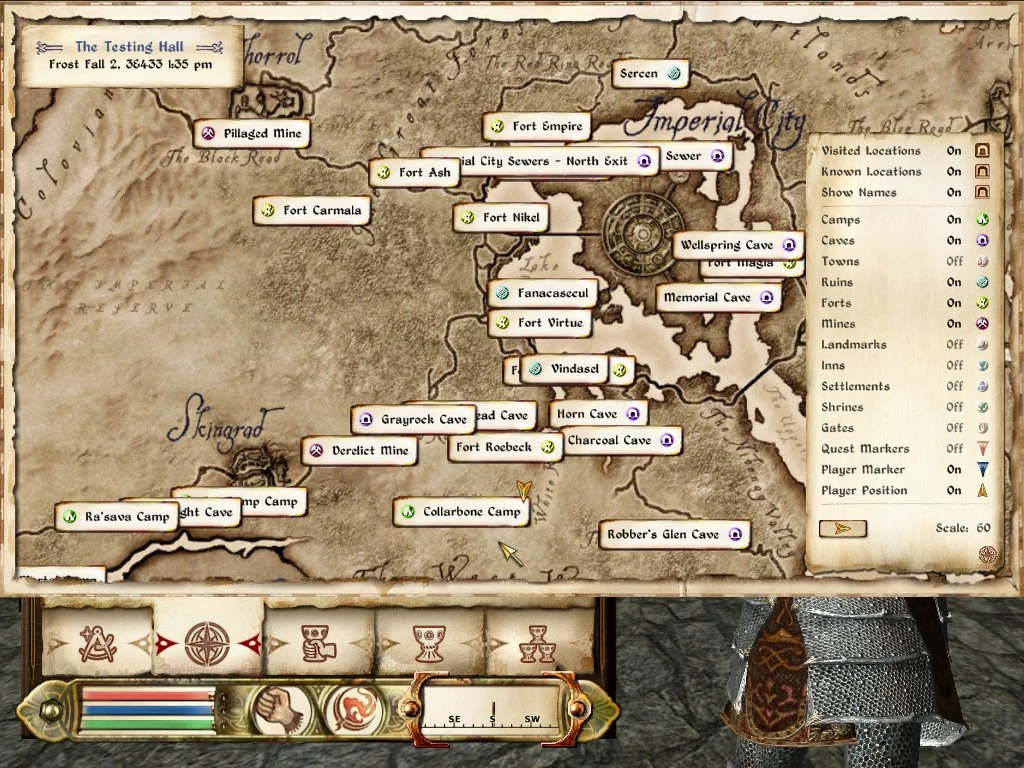
====================== DarNifiedUI Additions Version 2. 3. 3 ====================== 1. Description - Sneak and Crosshair - Lockpick Auto Attempt - Map Additions 2. Install 3. Compatibility 4. Version History 5. Contact and Feedback 6. Credits ============== 1. Description ============== This Additon package has multiple parts that can be used independant from one another. If you have other (small) suggestions on things I should add then let me know! - ReticleMenu: Sneak and Crosshair - You can put a limit on how transparent your sneak icon will/can be. If you don\'t want to know when you are detected or if you want to make it less obvious this Addition is just the thing for you. You can configure the exact limit by opening up \"menus\\prefabs\\darn\\hudreticle_config.xml\" and adjust the \"_sneakicon_limit\" value. The recommended value is 100 and it should be close to how transparent the icon is under normal non-detected circumstances, if you still notice a bit of difference try adjusting the value. Setting it to 255 means it will be ignored. The detailed crosshair can be configured in the same file, look near the bottom for the \"_t_crosshair\" value. - MapMenu: Map Marker Filters - Do you always hate it that when you are looking for Fort XYZ you need to hover over each map marker to find it? Well no more, this component expands the already existing features for the Map Menu from DarNifiedUI. It consists of two parts which expand the filtering feature for the Map Menu. A new filter to toggle the names of all the visible map markers. So instead of hovering over each fort marker, you toggle the names on and look it up. It is recommended you first hide all the other mapmarker types else your map will be cluttered with names you aren\'t interested at that moment. For those that do not know this yet, go to the map menu and click the small button in the lower right corner of the map. Then a menu pops up where you can toggle the names (along with all the other possible filters from DarNifiedUI or DarkUI\'d DarN). See screenshots for more info if needed. When you toggle the map marker names on, some may overlap. You can mouseover a name that is behind something to put it on top. The position of the names (left or right of the map marker icon) depends on the position of the map marker on the screen. So you can also try moving the map a bit. A second component of the Map Additions is the ability to expand or create new map marker filters. After playing with the Map Marker Overhaul mod for a while I noticed that the awesome new icons were unaffected by any of the existing filters. Thus I set out to explore my options and with good results. By default the filters are the same as in standard DarNifiedUI with the additions of the new mapmarkers for Ayleid Wells, Wayshrines and Magic Stones added by Map Marker Overhaul. To configure things further open up \"menus\\prefabs\\darn\\map_config.xml\" an
DarNifiedUI Additions is a UI enhancement package for Oblivion that expands DarNifiedUI and DarkUI'd DarN with extra map menu options, crosshairs, sneak icons, and more. With 594 endorsements and 12,624 downloads, it's a well-received companion mod for players who want to customize their interface further.
✨ Key Features
📊 Pros & Cons
✅ Pros
- Solid community backing with 594 endorsements and over 12k downloads
- Extends two popular UI mods, so if you use either, this is a no-brainer
- Adds practical tweaks like map menu and crosshair options that improve QoL
⚠️ Cons
- Last updated in 2012 — might have compatibility issues with newer Oblivion setups or mods
- Requires DarNifiedUI or DarkUI'd DarN as a base, so it's useless without them
For Oblivion players who already use DarNifiedUI or DarkUI'd DarN and want extra customization for their HUD. If you're a UI tweaker who loves fine-tuning every element, this is right up your alley. Skip if you don't use the base mods or prefer a vanilla interface.
💡 Beginner Tips
- Make sure you have either DarNifiedUI or DarkUI'd DarN installed first, as this mod builds on them.
- Use a mod manager like OBMM or Wrye Bash to avoid overwriting files manually.
- Check the mod's file structure to see which options you want to install, since it's a package of additions.
📊 Mod Details
- Game
- Oblivion Mods
- Author
- kyoma
- Version
- 2.3.3
- Downloads
- 12,624
- Endorsements
- 594
- Category
- User Interfaces
- Created
- 1/25/2009
- Updated
- 4/21/2012
🔧 How to Install Oblivion Mods
Download from Nexus.
📖 Full step-by-step install guide for Oblivion →
Visit the official mod page for specific installation instructions for this mod.
🎮 Need cheat codes or console commands? Check ur gaming wiki for Oblivion commands, item IDs, and more.
Keep browsing — more Oblivion mods await