CrazyChao Better Fog Color
⚪ Last updated 2009⚠️ Install Order · 2 steps
1🛠️ OBSE — Oblivion Script Extender Download ↗
2🔧 UOP — Unofficial Oblivion Patch Download ↗
Install in this order, then this mod last — most mods fail to load without their framework and dependencies in place.
Preview
🔍 Analysis
- 👍 3.4% endorsement rate — high engagement, a strong quality signal
- 🏆 #25 of 35 Visuals and Graphics mods in this game by downloads
📋 About This Mod
✅ - By CrazyChao (My First \"Real\" Mod!) --
✅ - Basic Description --
✅ - Installation --
✅ Extract fog.esp into your Oblivion\\Data folder. In the Oblivion launcher, enable fog.esp. Enjoy!
✅ - Uninstallation --
✅ To uninstall the mod, either delete fog.esp or disable it in the Oblivion launcher.
- - By CrazyChao (My First \"Real\" Mod!) --
- - Basic Description --
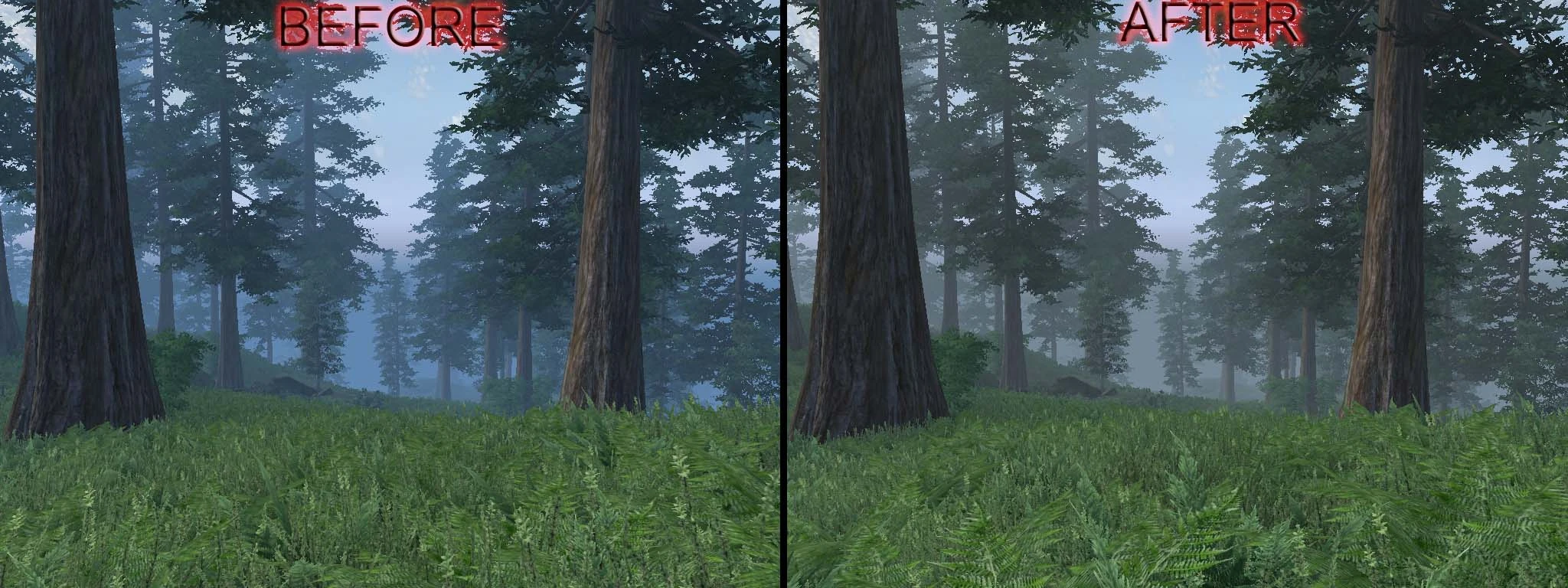
- Ever thought that blue fog off in the distance during your trek through the Great Forest was strange? Never fear! It has been changed to a more grayish (yet still just a little bit blue) color.
- - Installation --
- Extract fog.esp into your Oblivion\\Data folder. In the Oblivion launcher, enable fog.esp. Enjoy!
- - Uninstallation --
- To uninstall the mod, either delete fog.esp or disable it in the Oblivion launcher.
- - Issues/Incompatibilities --
- Most likely incompatible with other fog mods; no known problems.
- - Tools Used --
- TES Construction Set
- - Credits --
- Bethesda Softworks
- CrazyChao
- - Contact --
- crazychao@herzeleid.net
- Please let me know if you discover any problems with this mod. I will do my best to fix it.
- CrazyChao
🤖 AI-enhanced — based on mod data
CrazyChao Better Fog Color is a simple visual tweak for Oblivion that replaces the blue fog in the Great Forest with a more natural grayish-blue tone. It's a lightweight cosmetic mod with 223 endorsements, last updated in 2009, ideal for players seeking a subtle atmosphere change.
✨ Key Features
Changes the blue fog in the Great Forest to a grayish-blue color
Lightweight cosmetic tweak with no gameplay impact
Simple installation—just drop the file into your Data folder
📊 Pros & Cons
✅ Pros
- Community-approved with 223 endorsements and over 6,600 downloads
- Subtle change that improves realism without altering gameplay
- Works with the original game—no extra dependencies needed
⚠️ Cons
- Last updated in 2009—may not be compatible with newer mods or patches
- Only affects the Great Forest fog, so other areas remain unchanged
- No screenshots or detailed instructions provided by the author
🎯 Is This For You?
For Oblivion players who notice the odd blue fog in the Great Forest and want a more natural look. Skip if you're looking for major visual overhauls or gameplay changes—this is a tiny, focused tweak.
For Oblivion players who notice the odd blue fog in the Great Forest and want a more natural look. Skip if you're looking for major visual overhauls or gameplay changes—this is a tiny, focused tweak.
📦 Install:Easy· Under 1 minute
💡 Beginner Tips
- Place the .esp file in your Oblivion Data folder and enable it in the launcher's Data Files menu.
- If you use a mod manager like Wrye Bash or OBMM, you can install it with one click.
- Load order doesn't matter much for a simple color tweak, but keep it near other environmental mods for consistency.
📊 Mod Details
- Game
- Oblivion Mods
- Author
- CrazyChao
- Version
- 1.0
- Downloads
- 6,608
- Endorsements
- 223
- Category
- Visuals and Graphics
- Created
- 8/17/2009
- Updated
- 8/17/2009
🔧 How to Install Oblivion Mods
Download from Nexus.
📖 Full step-by-step install guide for Oblivion →
Visit the official mod page for specific installation instructions for this mod.
🎮 Need cheat codes or console commands? Check ur gaming wiki for Oblivion commands, item IDs, and more.
Keep browsing — more Oblivion mods await