Binoculars
⚪ Last updated 2008⚠️ Install Order · 2 steps
Install in this order, then this mod last — most mods fail to load without their framework and dependencies in place.
Preview
🔍 Analysis
- 👍 2.8% endorsement rate — high engagement, a strong quality signal
- 🏆 #10 of 28 Items and Objects - Player mods in this game by downloads
📋 About This Mod
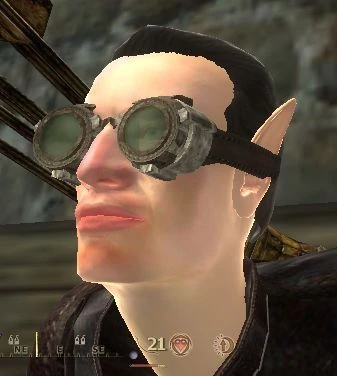
Video demo: http://media.putfile.com/oblivion-binoculars official forum thread: http://www.elderscrolls.com/forums/index.php?showtopic=560762 Binoculars 1. 1 by Mundane ---------------------------- ---------------------------- Disclaimer and credits: This is my first attempt at modding. I just wrote 1 script . You will need the OBLIVION SCRIPT EXTENDER (OBSE) installed and running to use this mod. I use the version v0008 Download page: http://obse.silverlock.org/ I literraly stole the model and textures made by KafeiDotour and included in the excellent Dwemer Spectacles v3 mod. Take a look at it, it adds glasses, eye patches and many more nice eye wears. Download Page: http://www.tessource.net/files/file.php?id=5198 ---------------------------- ---------------------------- Version history: 1. 1 -Right mouse button to activate the zooming -Zoom can be controlled with mouse wheel. -Added \"tic\" sounds ---------------------------- ---------------------------- Description: -Adds a pair of functional binoculars to the game. -There are no quests but I placed the binoculars in the house of it\'s owner, you will need to steal them! (The item will not appear as stolen in inventory). -A clue can be found at the copius coin purse, in the market district of the imperial city. -You probably already know the owner if you played the game for a while. If not, you WILL meet him. ---------------------------- ---------------------------- Controls: -When equipped, press the right mouse button(RMB) to activate the zooming. (The default action of the RMB is deactivated) -Zooming in and out: With RMB pressed, use the mouse wheel. -Display zooming factor: With RMB pressed, press MMB. ---------------------------- ---------------------------- Installation: Extract to your Oblivion/Data folder and check the esp. file. If prompted, allow files to overwrite. You need to use the OBLIVION SCRIPT EXTENDER (OBSE) for this to work (see http://obse.silverlock.org/). ---------------------------- ---------------------------- Conflicts/Bugs: Nothing so far, should not interfere with other mods since its only 1 short script. ---------------------------- ----------------------------
Adds functional binoculars to Oblivion, allowing players to zoom in on distant objects. A simple utility mod with 210 endorsements, last updated in 2008. For players seeking a basic scouting tool without gameplay overhauls.
✨ Key Features
📊 Pros & Cons
✅ Pros
- Functional and straightforward—does exactly what it says
- Decent community support with 210 endorsements
- Lightweight and likely compatible with most setups
⚠️ Cons
- Last updated in 2008—may have compatibility issues with newer Oblivion versions or mods
- Limited to a single item; no additional features or enhancements
For Oblivion players who want a simple, lore-friendly way to scout ahead without magic or console commands. Skip if you're looking for a comprehensive overhaul or modern features.
💡 Beginner Tips
- Place the mod files in your Oblivion Data folder and activate via the launcher or OBMM.
- Check the included video demo to see how the binoculars work in-game.
- If you use other mods that alter the inventory or UI, test for conflicts early.
📊 Mod Details
- Game
- Oblivion Mods
- Author
- Mundane
- Version
- 1.1
- Downloads
- 7,385
- Endorsements
- 210
- Category
- Items and Objects - Player
- Created
- 9/17/2006
- Updated
- 1/7/2008
🔧 How to Install Oblivion Mods
Download from Nexus.
📖 Full step-by-step install guide for Oblivion →
Visit the official mod page for specific installation instructions for this mod.
🎮 Need cheat codes or console commands? Check ur gaming wiki for Oblivion commands, item IDs, and more.
Keep browsing — more Oblivion mods await