Automagic Bags
⚪ Last updated 2012⚠️ Install Order · 2 steps
Install in this order, then this mod last — most mods fail to load without their framework and dependencies in place.
Preview
🔍 Analysis
- 👍 5.9% endorsement rate — high engagement, a strong quality signal
- 🏆 #9 of 28 Items and Objects - Player mods in this game by downloads
📋 About This Mod
Automagic Bags v4. 03
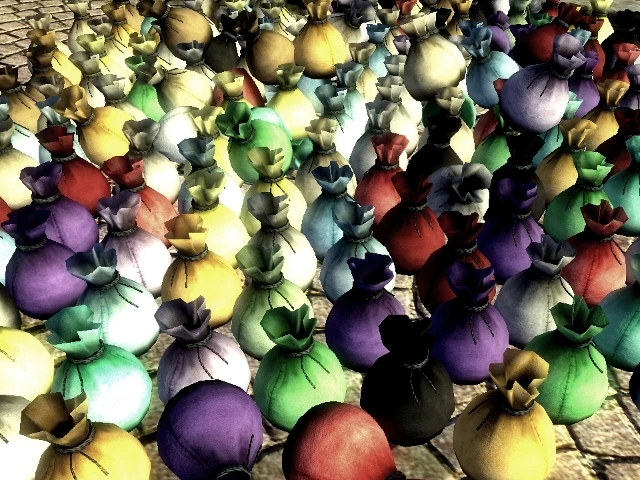
================================== DESCRIPTION ================================== Simple to install, get, and use! Automagic Bags gives you... yep, you guessed it, bags! Not just ordinary bags, however - these Bags can Automagically fill themselves with items from your inventory!
Ever wished, for example, your Bag of Holding could just swallow up all your ingredients with a couple of clicks, instead of a hundred clicks, or that you could take your ingredient storage shelves with you? Get tired of scrolling through all those keys and potions to find the one thing you really want? Or maybe you just want a solution to those long menu load times ever since you installed that encumbrance x 100 mod? Automagic Bags can do that. Yeah!
You can get an Automagic Bag for ingredients, potions & poisons, keys, scrolls, and ammo - the things that really clutter your inventory the most, but you don't really want to leave at home.
To get your Bags, check the crates outside of Mystic Emporium in the Imperial City, and relish just how easily Norbet Lelles does get taken in.
All meshes have been pyffi'd for best performance, all resources have unique file paths, and the plugin has been cleaned with TES4Edit for best compatibility.
================================== WHAT MEANS THIS "AUTOMAGIC?!?" ================================== From the inventory menu, click on, say, the Keys Bag. It will ask: Do you want to put your keys away, just open the bag, or nevermind? If you choose to open the Bag, it will open as a normal container, and you can add/remove any item as you please. If you choose, however, to put your keys away, it will take every key from your inventory and put it in the Bag. AUTOMAGICALLY.
Bags look for item types, not specific items. Therefore, they will Automagically pick up items added by mods of the type appropriate to the Bag.
If you would like to skip the menu when you click on an Automagic Bag and just open it normally, hold down your left ALT key while you click on it.
Bags can be hotkeyed. An Automagic Bag will present its menu when used this way - hold your left ALT key when using it via hotkey to bypass this.
You can also acquire a large variety of non-Automagic labeled bags to help you stay organized and lightfooted. You can find them in the Market District with the Automatic Bags.
30 unlabeled non-Automagic Bags have also been included. You can use the enclosed .ini file to assign your choice of names, icons, and world models to any Bags included in this mod. Easy instructions and visual guides have been included - just open Automagic Bags.ini with your favorite text editor & go nuts!
================================== FAQ,
Automagic Bags adds portable sacks that automatically fill with matching items from your inventory, plus a variety of non-automagic bags for organization. With 439 endorsements and 7,400 downloads, this 2012 mod remains a popular utility for Skyrim players seeking inventory management.
✨ Key Features
📊 Pros & Cons
✅ Pros
- Community favorite with 439 endorsements and 7,400 downloads—clearly a well-loved utility.
- Automagic filling saves time sorting loot, especially for hoarders.
- Non-automagic bags offer lightweight organization options for different playstyles.
⚠️ Cons
- Last updated in 2012—may have compatibility issues with current Skyrim versions and DLC.
- Description is cut off, so full feature list and setup instructions are incomplete.
- No mention of compatibility with popular mods like SkyUI or inventory overhauls.
For Skyrim players who hate inventory management and want a hands-off sorting solution. Also great for roleplayers who want immersive bag items. Skip if you prefer manual sorting or use heavy inventory mods that might conflict.
💡 Beginner Tips
- Since the mod is from 2012, check if it requires SKSE or any script extender—if so, ensure you have the correct version.
- Test the automagic bags with a few item types first to see how they categorize—some items might not be recognized.
- If you use a mod manager, install manually or via manager and check load order to avoid conflicts with other inventory mods.
📊 Mod Details
- Game
- Oblivion Mods
- Author
- Khettienna
- Version
- 4.03
- Downloads
- 7,400
- Endorsements
- 439
- Category
- Items and Objects - Player
- Created
- 2/6/2009
- Updated
- 3/20/2012
🔧 How to Install Oblivion Mods
Download from Nexus.
📖 Full step-by-step install guide for Oblivion →
Visit the official mod page for specific installation instructions for this mod.
🎮 Need cheat codes or console commands? Check ur gaming wiki for Oblivion commands, item IDs, and more.
Keep browsing — more Oblivion mods await