SpaceStation Main Hall Retexture
⚪ Last updated 2016⚠️ Install Order · 1 step
Install in this order, then this mod last — most mods fail to load without their framework and dependencies in place.
Preview
🔍 Analysis
- 👍 3.8% endorsement rate — high engagement, a strong quality signal
- 🏆 #18 of 37 Visuals and Graphics mods in this game by downloads
📋 About This Mod
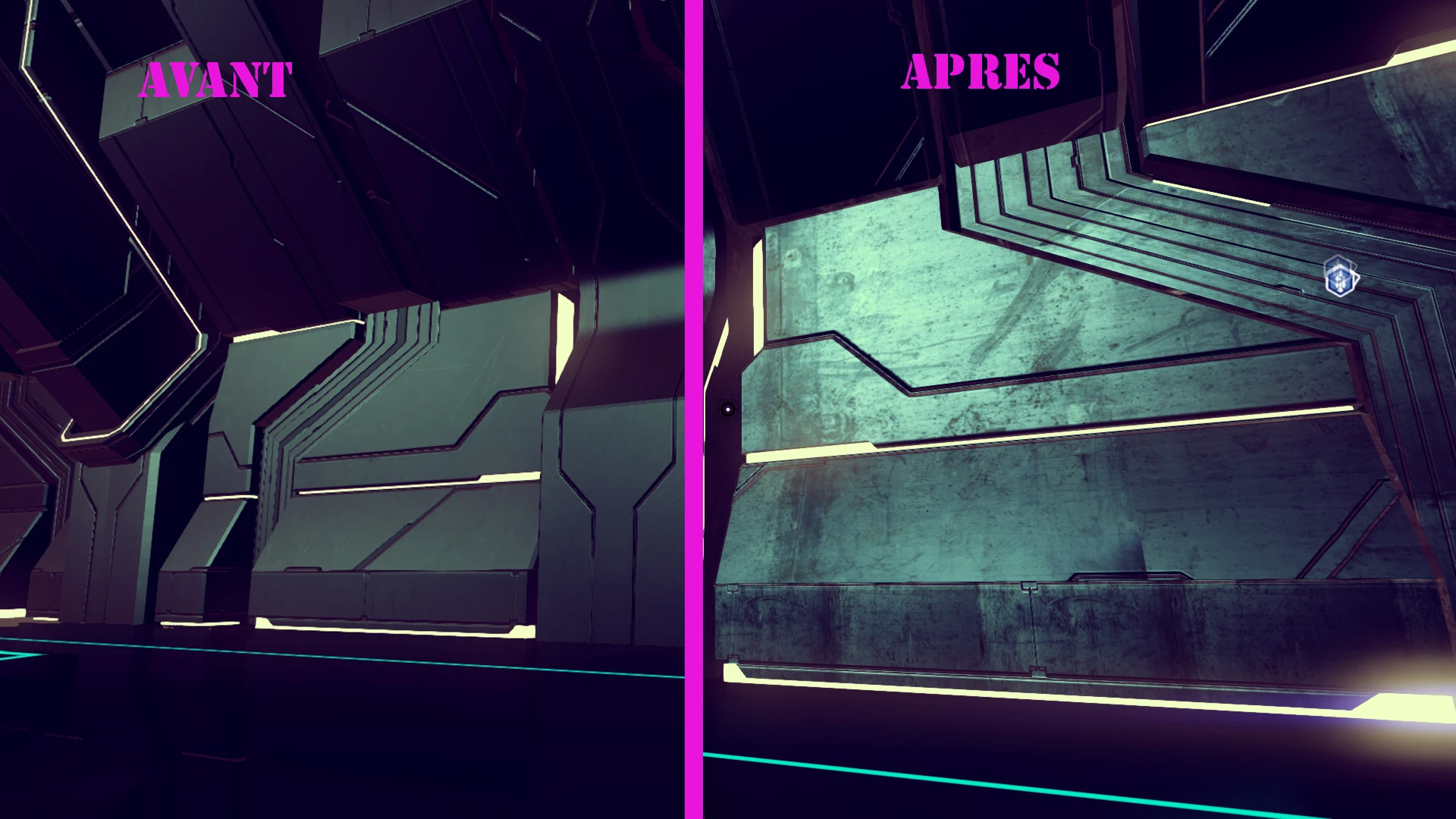
Replace the plain boring 512512 texture of SpaceStation main hall with a 10241024 scratched and more realistic one
Now with up to 4096 resolution and red-ish version that suit the Damply RedLight mod !
Installation: Choose a version of the mod (got 0 frames drop with the 4096 on GTX980) Unrar in /No Man's Sky/GAMEDATA/PCBANKS
Shared_Common and Floor files are optional. - Shared_common retexture the ramps and balcony in SpaceStation but also the landpad on planets. - Floor reskin the... SpaceStation floor.
For MOAR retexture, check my other mod Vy'Keen buildings Korvax Buildings Gek Buildings LandPads
0. 4 Added forgotten 1024 Red colorswap Add optional file for floor (Red/Bleu 1024 > 4096)0. 3 Moar resolution Blue/Red variant 0. 2 Add an optional file for the ramp and balcony Deleted files that was added in mod by mistake, causing conflicts with next mod 0. 1 Release
This mod replaces the default 512x512 SpaceStation main hall texture with higher-resolution scratched and more realistic versions, up to 4096x4096, including a red variant for the Damply RedLight mod. It offers optional files for ramps, balconies, and floors, and is designed for No Man's Sky players seeking visual upgrades. With 500 endorsements and 13,160 downloads, it's a popular choice for those wanting improved station aesthetics.
✨ Key Features
📊 Pros & Cons
✅ Pros
- Community-approved with 500 endorsements and over 13k downloads.
- Big visual upgrade from blurry 512 to crisp 4096 textures.
- Optional files let you customize exactly what gets retextured.
⚠️ Cons
- Last updated in 2016 — may not work with current game versions.
- Red variant only suits the Damply RedLight mod, limiting its use otherwise.
For No Man's Sky players who want sharper, more detailed space stations without performance hits. If you use the Damply RedLight mod, the red variant is a must-have. Skip if you prefer vanilla textures or play on a potato PC.
💡 Beginner Tips
- Back up your original texture files before replacing them, just in case.
- If you use other mods, check for conflicts with shared files like Shared_Common.
- Start with the 1024 version if you're unsure about performance, then try 4096.
📊 Mod Details
- Game
- No Mans Sky Mods
- Author
- ScavangeR
- Version
- 0.4
- Downloads
- 13,160
- Endorsements
- 500
- Category
- Visuals and Graphics
- Created
- 8/25/2016
- Updated
- 8/29/2016
🔧 How to Install No Man\ Mods
Create /MODS/ folder in /GAMEDATA/PCBANKS/. Delete DISABLEMODS.TXT.
📖 Full step-by-step install guide for No Man\ →
Visit the official mod page for specific installation instructions for this mod.
🎮 Need cheat codes or console commands? Check ur gaming wiki for No Man\ commands, item IDs, and more.
Keep browsing — more No Man\ mods await