Atmosphere Hover and Reverse - Pulse Speed Adjustments
🟡 Updated this year⚠️ Install Order · 1 step
Install in this order, then this mod last — most mods fail to load without their framework and dependencies in place.
Preview
🔍 Analysis
- 👍 2.5% endorsement rate — high engagement, a strong quality signal
- 🏆 #3 of 43 Tweaks & Fixes mods in this game by downloads
📋 About This Mod
^ Check Changelogs right above to see updated changes ^
Updated for NMS Patch 6. 11 (BREACH)
Fully compatible with NMS Patch 6. 11 (BREACH)
Currently waiting for MBINCompiler to be updated for 5. 50 (WORLDS PT. 2)
Modding is changing a lot with this update, please be patient as the new modding structure gets figured out.
Added Vortex FOMOD installer support
Added .lua script for merging - you can define your own pulse speeds by editing the .lua file as well.
Look in the Optional Files section for the .lua script.
Welcome everybody looking for a combined mod for atmosphere hover and pulse speed adjustment.
Reversing option now available.
Please remember to choose only 1 option still - so it's either you want AtmoHover or AtmoReverse.
You can still hover with AtmoReverse, it just takes a slight amount of finesse.
Options are...
■ AtmoHoverOnly (default pulse speed)
■ AtmoHover-PulseSpeed(x0. 5)
■ AtmoHover-PulseSpeed(x1. 5)
■ AtmoHover-PulseSpeed(x2. 0)
■ AtmoHover-PulseSpeed(x4. 0)
■ AtmoHover-PulseSpeed(x6. 0)
■ AtmoHover-PulseSpeed(x8. 0)
■ AtmoHover-PulseSpeed(x10)
Reverse options
■ AtmoReverseOnly (Reverse only - with default pulse speed)
■ AtmoReverse-PulseSpeed(x0. 5)
■ AtmoReverse-PulseSpeed(x1. 5)
■ AtmoReverse-PulseSpeed(x2. 0)
■ AtmoReverse-PulseSpeed(x4. 0)
■ AtmoReverse-PulseSpeed(x6. 0)
■ AtmoReverse-PulseSpeed(x8. 0)
■ AtmoReverse-PulseSpeed(x10)
Please remember to choose only ONE folder option inside the downloaded .zip
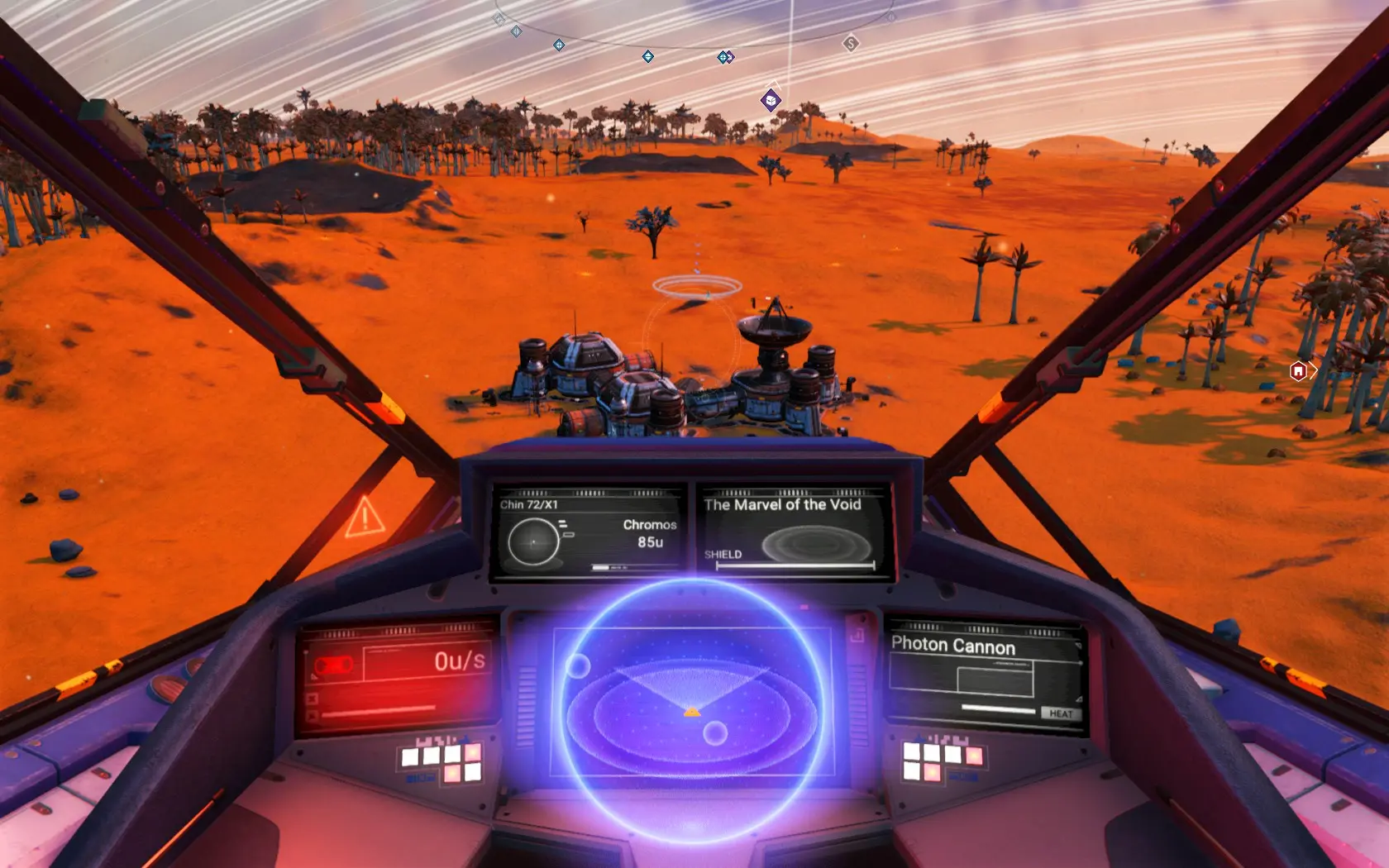
TIP: Do not continuously hold the brake/reverse key or button while in the atmosphere or your ship will eventually start moving forward slowly. Just slow down to 0u/s and then let off the brake/reverse.
This tip only applies to the hover version.
To Install...
> Choose ONE option above and put it into your MODS folder. (if this is your first mod, create the folder, if missing)
steamapps\common\No Man's Sky\GAMEDATA\MODS
Refer to this Google Doc if you need further help & troubleshooting...
https://docs.google.com/document/d/18k5VfvzLXbpBrAGGO7LK30c2Ta_lWQ5F5YgEpuwKZ6M/edit?usp=sharing
Mod conflict info...
GCSPACESHIPGLOBALS. GLOBAL. MBIN
is the file used in this mod. Do not use any other mod that also uses this file as they will conflict with one another.
You can use the .lua script located in Optional Files to merge with other mods.
Thank you monkeyman192 & others who contribute to MBINCompiler
Thank you thmsn (Helped with Vortex FOMOD support)
Thank you to the awesome people who helped me over on the NMS Modding Discord.
Ideas came from
Thank you ClearanceClarence (Stand-alone Pulse Speed Mod) https://www.nexusmods.com/nomanssky/mods/1693
Thank you tamagotchii2003 (Stand-alone Hover Mod) https://www.nexusmods.com/nomanssky/mods/642
If your going to donate or endorse these mods then head on over to their respective links above and do so over there. I simply made this mod for convenience of being able to use them both at the same time.
If you still feel the urge to donate to me, for keeping the mod update and to help out for my well being, that would be greatly appreciative.
Happy Gaming!
Atmosphere Hover and Reverse - Pulse Speed Adjustments is a No Man's Sky tweak mod that adds atmospheric hover and reverse capabilities to starships, with adjustable pulse speeds ranging from 0.5x to 10x. It offers separate hover-only and reverse-only options, updated for NMS Patch 6.11 (BREACH), and includes a FOMOD installer for Vortex. With over 2,600 endorsements and 107k downloads, it's a popular choice for players wanting finer ship control.
✨ Key Features
📊 Pros & Cons
✅ Pros
- Huge community trust with 2,654 endorsements and over 107k downloads
- Flexible options: pick hover or reverse, then dial in pulse speed from 0.5x to 10x
- FOMOD installer makes setup a breeze for Vortex users
⚠️ Cons
- You must pick only one option from the zip — no combining hover and reverse at different speeds
- Hover mode requires finesse: holding brake/reverse too long makes your ship creep forward
- Author notes MBINCompiler isn't updated for 5.50 yet, so future compatibility is uncertain
For No Man's Sky pilots who want more control in atmosphere — perfect for precision landing or stylish low-altitude flying. If you're tired of the default hover behavior and want to tweak pulse speeds to your liking, this is your mod. Skip if you prefer vanilla flight mechanics or don't want to fiddle with options.
💡 Beginner Tips
- When using hover mode, don't hold the brake/reverse key continuously — slow to 0u/s then release to avoid drifting forward.
- Use the Vortex FOMOD installer to pick your preferred option during installation; it handles the file placement for you.
- If you want custom pulse speeds, grab the .lua script from Optional Files and edit it before merging.
📊 Mod Details
- Game
- No Mans Sky Mods
- Author
- BigEx20 AKA Chromos
- Version
- 6.11.0
- Downloads
- 107,982
- Endorsements
- 2,654
- Category
- Tweaks & Fixes
- Created
- 8/3/2018
- Updated
- 10/24/2025
🧩 Commonly Used Together
Users add these mods to the same collections — a real compatibility signal, not an AI guess.
🔧 How to Install No Man\ Mods
Create /MODS/ folder in /GAMEDATA/PCBANKS/. Delete DISABLEMODS.TXT.
📖 Full step-by-step install guide for No Man\ →
Visit the official mod page for specific installation instructions for this mod.
🎮 Need cheat codes or console commands? Check ur gaming wiki for No Man\ commands, item IDs, and more.
Keep browsing — more No Man\ mods await