Skynet Fallout 1 and 2 Classic Robobrain model (MODDERS RESOURCE)
⚪ Last updated 2021⚠️ Install Order · 5 steps
Install in this order, then this mod last — most mods fail to load without their framework and dependencies in place.
Preview
🔍 Analysis
- 👍 6.0% endorsement rate — high engagement, a strong quality signal
- 🏆 #26 of 31 Ammo mods in this game by downloads
📋 About This Mod
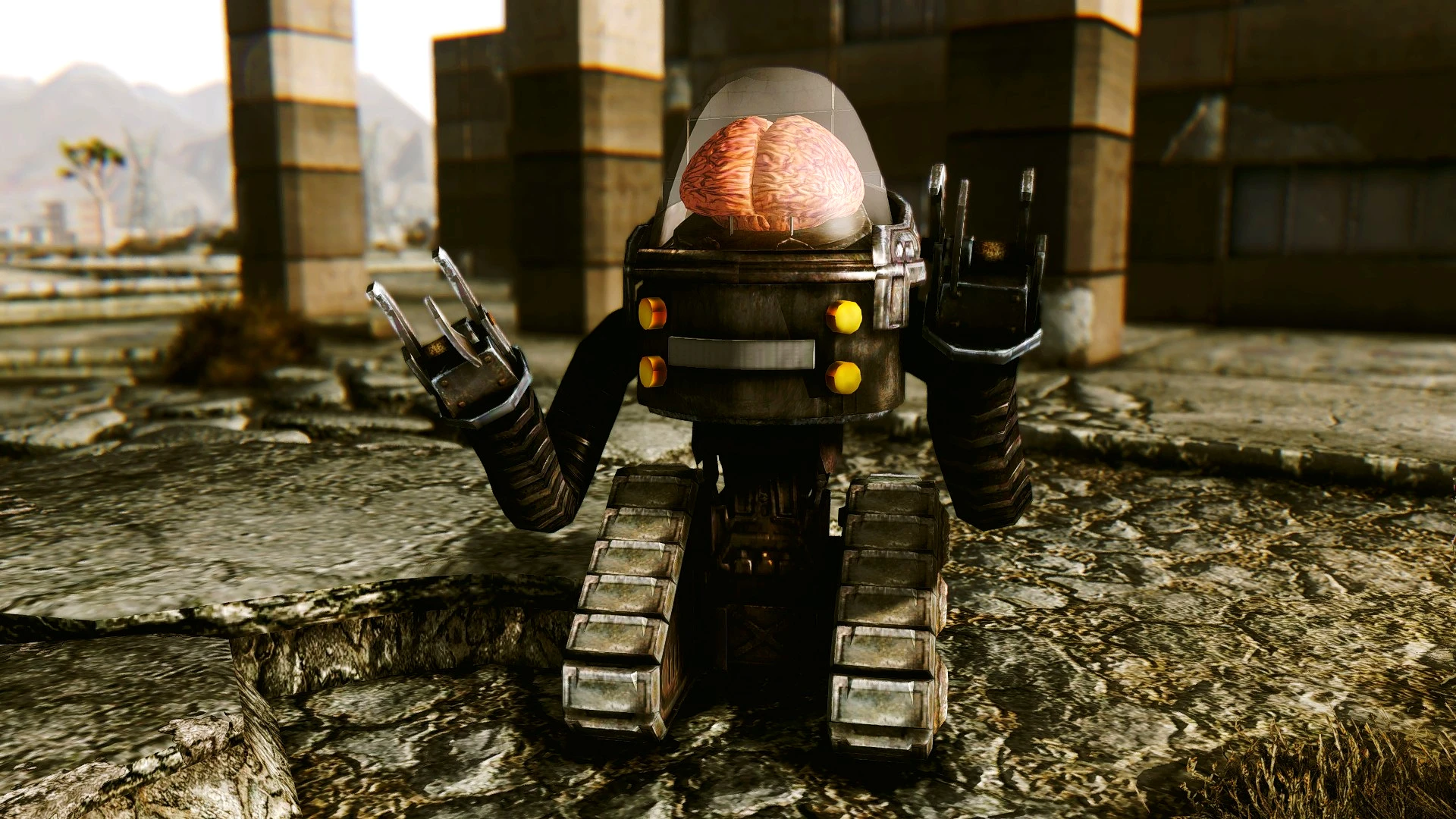
Skynet, Fallout 1 and 2 Classic Robobrain model (MODDERS RESOURCE)
---DESCRIPTION---
This brings to the game a robot that resembles the classic Robobrain from Fallout 1 and 2 games. It can be found wandering outside Repconn Headquarters.
---FEATURES---
- A robot that resembles the classic Robobrain model from Fallout 1 and 2 games.
- Dismemberment parts functionality included.
---LIMITATIONS---
Skynet's head can't turn around.
Skynet can be found only outside Repconn Headquarters with the mere purpose of showcasing the model.
---PLUGINS---
--REQUIREMENTS--
Fallout New Vegas.
---INSTALLATION---
1) Download the file called Skynet.zip
2) Unzip the file.
3) Open the folder called Skynet.
4)Grab both Meshes and Textures folders and the plugin called Skynet.esp and drop them into your Data Folder
(the one where your FalloutNV.exe and FalloutNVLauncher.exe are located).
5) Open Fallout Mod Manager or any other Mod Manager you're using, find the plugin Skynet.esp you dropped in the Data folder and tick it. Start the game.
---UNINSTALLATION---
1)Go to your Data folder (the one where your FalloutNV.exe and FalloutNVLauncher.exe are located), open your meshes
folder, then open your creatures folder, then open your RoboBrain folder and erase the file Skynet.nif; then open your textures folder and erase the one called 1prodlimenbox; 4)Go to your Data folder again and erase the plugin called Skynet.esp
---TOOLS USED---
Blender 2. 49 (Reshapping).
GIMP 2. 10. 10 (Modeling, Reshapping and Retexturing).
---CREDITS---
Prodlimen for crafting the model with the use of vanilla resources.
RageBear for his great help, time and patience while learning the Skinning process.
Weijiesen for the Game Dev and Modding Tutorial Character Limb Dismemberment tutorial, which can be found here:
https://www.youtube.com/watch?v=tLoWpUNrAKs
Nexus Mods Wiki for the Rigging skinning and dismemberment Tutorial, which can be found here: wiki.tesnexus.com/index.php/Rigging_skinning_and_dismemberment 18/
Obsidian for creating Fallout New Vegas and the original asset.
Blender and GIMP development teams for creating such amazing tools.
-PERMISSIONS-
You're allowed to use/modify this assets as long as you give proper credit.
📊 Mod Details
- Game
- New Vegas Mods
- Author
- prodlimen
- Version
- 1.1
- Downloads
- 873
- Endorsements
- 52
- Category
- Ammo
- Created
- 3/4/2021
- Updated
- 3/4/2021
🔧 How to Install New Vegas Mods
Download from Nexus.
📖 Full step-by-step install guide for New Vegas →
Visit the official mod page for specific installation instructions for this mod.
🎮 Need cheat codes or console commands? Check ur gaming wiki for New Vegas commands, item IDs, and more.
Keep browsing — more New Vegas mods await