A Familiar Friend - Pip-Boy 2500 - Handheld Pipboy
⚪ Last updated 2013⚠️ Install Order · 5 steps
Install in this order, then this mod last — most mods fail to load without their framework and dependencies in place.
Preview
🔍 Analysis
- 👍 3.2% endorsement rate — high engagement, a strong quality signal
- 🏆 #37 of 621 Models and Textures mods in this game by downloads
📋 About This Mod
This mod requires New Vegas Script Extender!
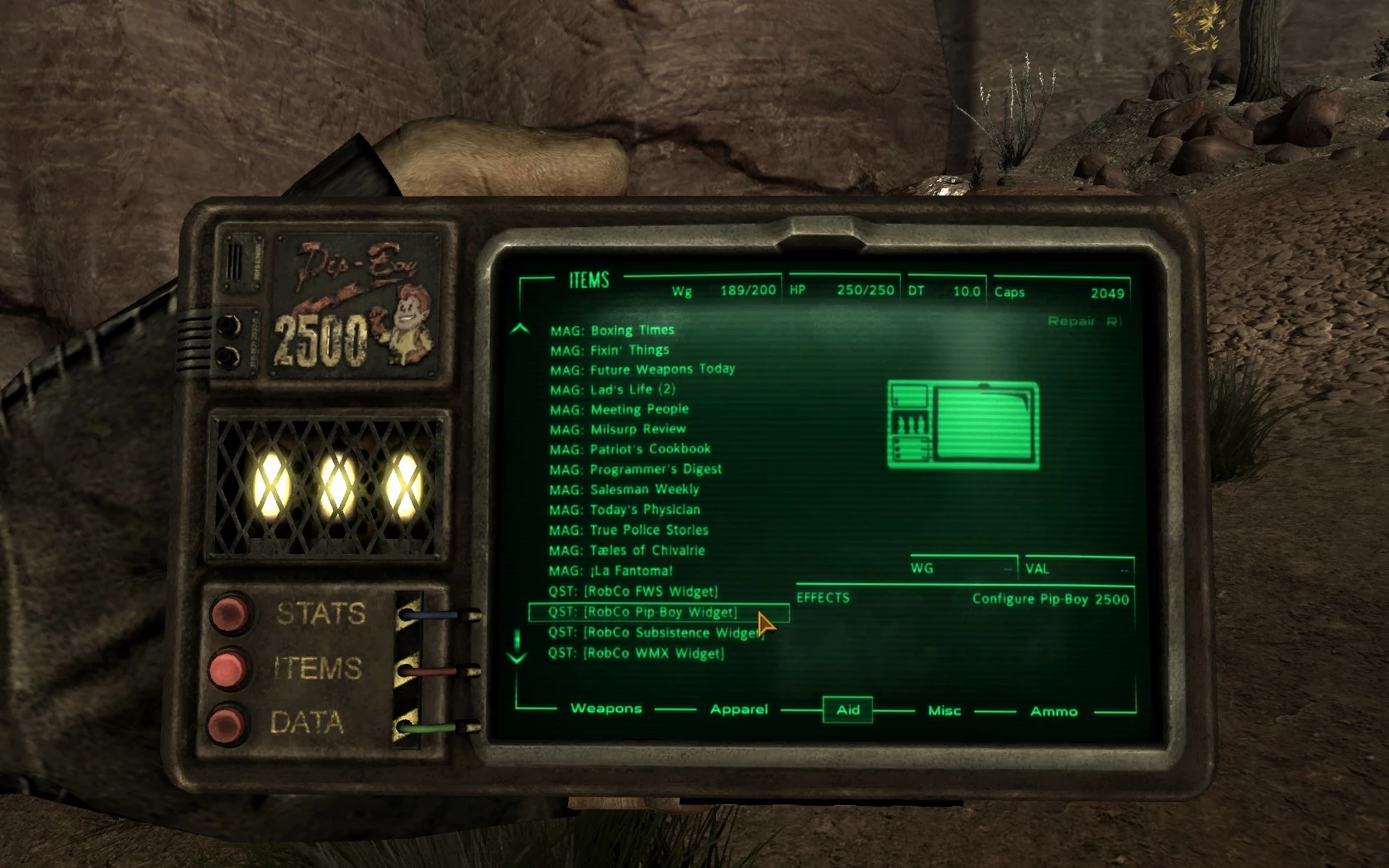
Are you a classic Fallout fan? Or do you just want a change of scenery when you press your personal information processor to your face? No matter the reason, you owe it to yourself to try the Pip-Boy 2500 today!
The Pip-Boy 2500 is the successor of the rugged Pip-Boy 2000 and the predecessor to the more recent Pip-Boy 3000. This mod will replace your arm-mounted Pip-Boy 3000 with the handheld Pip-Boy 2500. The 3000's accompanying glove will also be removed.
The Pip-Boy 2500 was designed with a larger and wider screen than the 2000 model. The 2500, unlike the 3000, operates using a series of visible vacuum tubes and boasts a more traditional design.
INSTALLATION:
If you're having trouble with NVSE or just don't like animations in this version, try the Pip-Boy 2500A instead.
1. Start the Nexus Mod Manager. 2. Download the file and install/enable it in the Mod Manager. 3. Load your game and wait for a message to appear in the top-left corner that tells you the Pip-Boy 2500 has been activated. 4. Press your Pip-Boy key (Default: Tab) to view your "new" Pip-Boy 2500. 5. Go to the ITEMS section and enter the AID tab. Find and use the to configure your new PIP. You will be able to activate various fixes as well as modify how large the Pip-Boy appears on-screen (FOV) when you use this widget.
Don't forget that you can change your Pip-Boy screen colour in your Options > Display menu. Change it to GREEN for the retro look!
If you're running on a low resolution, you may not be able to hit the STATS/ITEMS/DATA buttons with your mouse. If so, use the F1/F2/F3 keys to switch between these menus to get to the to change the FOV.
UNINSTALLATION:
You must follow these instructions exactly, or your Pip-Boy may become glitched!
1. Use the in-game tool to uninstall. Quick-save and quit the game. Uninstall the mod in your mod manager, this should remove the . ESP and the animation files (. KF). 2. Start the game again and confirm that the Pip-Boy 3000 and your original wrist-look animations have returned.
If so, skip to step 4. If not, continue on to step 3.
3. If your original Pip-Boy wrist look animations have not returned, do NOT save, quit the game, and manually delete following folders and files: textures\pipboy2500 meshes\pipboy2500 meshes\characters\_1stperson\locomotion\female\pipboyfemale.kf meshes\characters\_1st
A cosmetic mod for Fallout: New Vegas that replaces the Pip-Boy 3000 with the handheld Pip-Boy 2500, a lore-friendly predecessor from the classic Fallout games. Highly popular with over 27,000 endorsements, it offers a nostalgic alternative for players who prefer the handheld design.
✨ Key Features
📊 Pros & Cons
✅ Pros
- Huge community favorite with 27,747 endorsements and nearly 900k downloads
- Gives a classic Fallout feel with the handheld Pip-Boy design
- Lightweight cosmetic change that doesn't affect gameplay
⚠️ Cons
- Last updated in 2013, so may have compatibility issues with newer mods or game patches
- Only changes the appearance, not functionality or animations
- No additional customization options beyond the base model
For Fallout: New Vegas players who want a nostalgic handheld Pip-Boy instead of the arm-mounted version. Perfect for lore enthusiasts and those who enjoy classic Fallout aesthetics. Skip if you want gameplay changes or a fully animated Pip-Boy.
💡 Beginner Tips
- Use a mod manager like Nexus Mod Manager or Mod Organizer 2 to install and manage this mod easily.
- Check for compatibility patches if you use other Pip-Boy overhaul mods to avoid conflicts.
- Make sure to load this mod after any mods that alter the Pip-Boy model to ensure it takes effect.
📊 Mod Details
- Game
- New Vegas Mods
- Author
- EdisLeado
- Version
- 12
- Downloads
- 879,029
- Endorsements
- 27,747
- Category
- Models and Textures
- Created
- 12/19/2010
- Updated
- 5/28/2013
🔧 How to Install New Vegas Mods
Download from Nexus.
📖 Full step-by-step install guide for New Vegas →
Visit the official mod page for specific installation instructions for this mod.
🎮 Need cheat codes or console commands? Check ur gaming wiki for New Vegas commands, item IDs, and more.
Keep browsing — more New Vegas mods await