HD Ingame Music (320kbps)
⚪ Last updated 2020⚠️ Install Order · 2 steps
Install in this order, then this mod last — most mods fail to load without their framework and dependencies in place.
Preview
🔍 Analysis
- 👍 2.2% endorsement rate — high engagement, a strong quality signal
- 🏆 #52 of 74 Audio mods in this game by downloads
📋 About This Mod
This replaces the game's 128kbps music with 320kbps versions of the same tracks from the Morrowind Special Edition soundtrack. Should be a win-win no-brainer replacer.
There are two versions: Matched Volume, and Untouched. For the volume-matched version I have roughly matched the volume of each track to the original game's music. To do this, I had to put about two-thirds of the files through Audacity's MP3 exporter, which may have incurred a slight generational loss, despite using "320kbps Insane" quality. Thus, if you'd prefer the untouched files without any volume alterations, they're also available - just bear in mind that if you do pick the untouched version, some tracks will be significantly quieter than you're used to.
There's also an optional file which replaces the main title music (on the main menu, not ingame) with Jeremy Soule's reprise of it, apparently composed just before the Skyrim soundtrack.
I uploaded a "modder's resource" containing the background music for the cutscenes too. I don't think clean audio exists for Azura's narration, so I can't put this into the cutscenes.
Are these actually better?
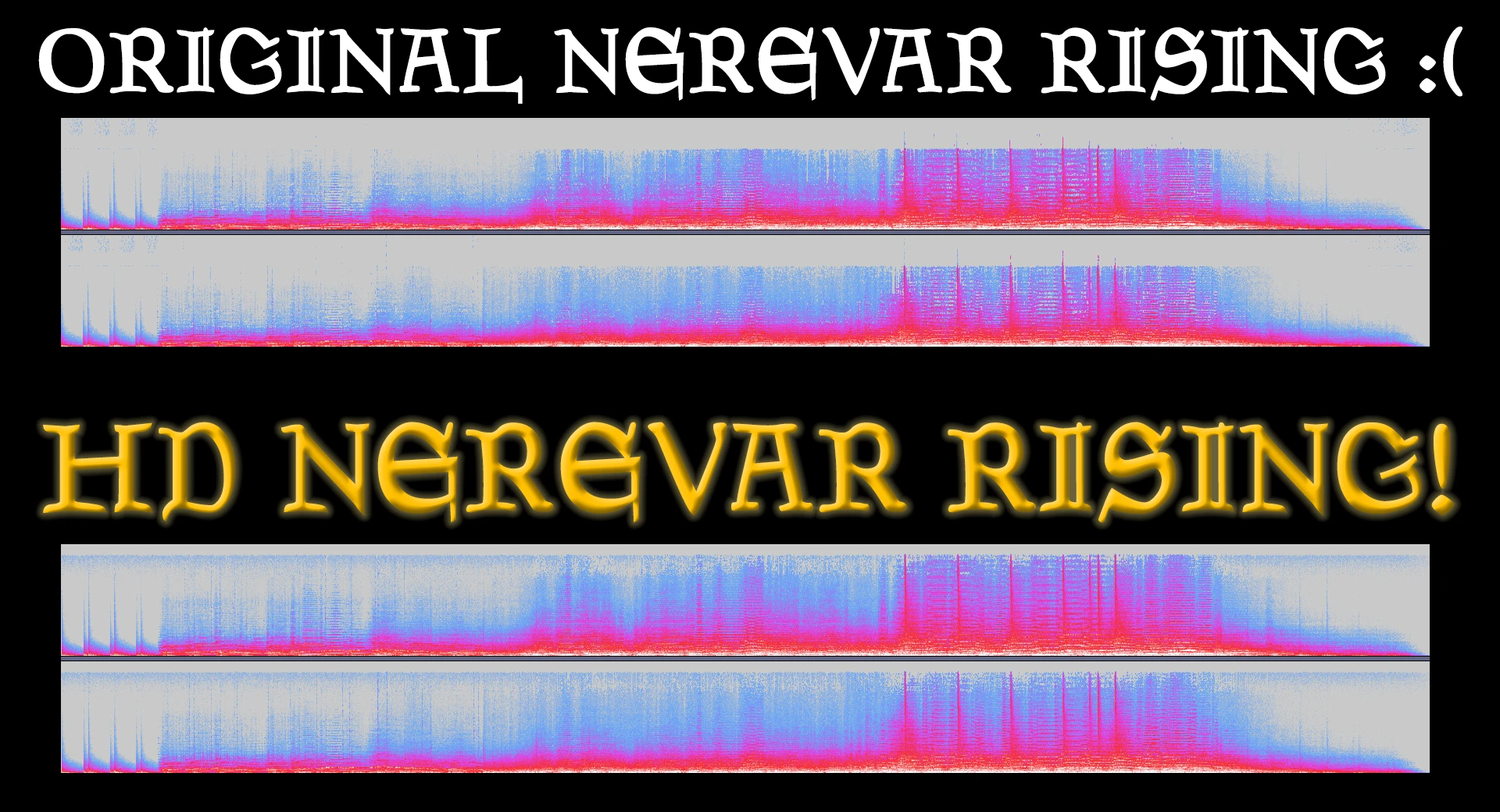
Comparing the spectrograms suggests that this replacer is indeed higher quality than the 128kbps files that shipped with the game. The frequencies cut off at around 20khz rather 16khz. Luckily you can't hear frequencies above 20khz most of the time, so that cutoff should be alright. I hope this mod will please Pherim, unlike an earlier "HD" music mod.
There are also some dynamics differences. For instance, some of the loudest peaks of the original music are not as dramatic. I think these tracks may have been differently (re)mastered, or perhaps the change was made to make the OST easier to listen to. The UESP suggests these may be Soule's Remastered files from DirectSong due to the titles, but I have heard that those may not have been real 320kbps files, whereas I'm fairly certain these are.
Can you hear the difference?
Maybe? I have fairly poor hearing, and am currently using a pair of £20 headphones, so I'm absolutely no authority on the matter. Disclaimer aside, I think they do, just a little bit. I'm not sure I could reliably distinguish them in a blind test though. Let me know your experiences in the comments.
Is this piracy?
No more than this is. All the music is in the game's files anyway, albeit in a lower quality than this.
This mod replaces all of the game's music with 320kbps versions of the same tracks, offering a potential audio quality improvement. It's a simple, lightweight audio enhancement for players who notice the difference in bitrate. With 175 endorsements and 8,126 downloads, it has a modest but active user base.
✨ Key Features
📊 Pros & Cons
✅ Pros
- Straightforward upgrade: if you're an audiophile, this is a no-brainer for better sound.
- Community-tested (175 endorsements) and widely downloaded (8k+), so it's proven to work.
- Lightweight and doesn't touch gameplay, so it's safe to install alongside other mods.
⚠️ Cons
- Only 175 endorsements out of 8k downloads—some users may have had issues or moved on.
- Last updated in 2020, so it might not be compatible with the latest game patches.
- The improvement is subtle; if you're not using high-end headphones, you might not notice a difference.
For players who care about audio fidelity and want to squeeze better sound out of the game without changing the music itself. If you're a casual player who doesn't notice bitrate differences, you can skip this—it's purely a quality-of-life audio tweak.
💡 Beginner Tips
- Make sure to replace the original music files in the game's audio folder, and back up the originals if you want to revert.
- If you're using a mod manager, check if it supports audio mods; otherwise, manual installation is straightforward.
- Test the mod in-game to see if you notice the quality difference—if not, you can safely remove it.
📊 Mod Details
- Game
- Morrowind Mods
- Author
- EssTwelve
- Version
- 1.0
- Downloads
- 8,126
- Endorsements
- 175
- Category
- Audio
- Created
- 7/4/2020
- Updated
- 7/4/2020
🔧 How to Install Morrowind Mods
Download from Nexus.
📖 Full step-by-step install guide for Morrowind →
Visit the official mod page for specific installation instructions for this mod.
🎮 Need cheat codes or console commands? Check ur gaming wiki for Morrowind commands, item IDs, and more.
Keep browsing — more Morrowind mods await