HD Forge
⚪ Last updated 2023⚠️ Install Order · 2 steps
Install in this order, then this mod last — most mods fail to load without their framework and dependencies in place.
Preview
🔍 Analysis
- 👍 0.4% endorsement rate
- 🏆 #74 of 544 Models and Textures mods in this game by downloads
📋 About This Mod
Part of Morrowind May Modathon 2019
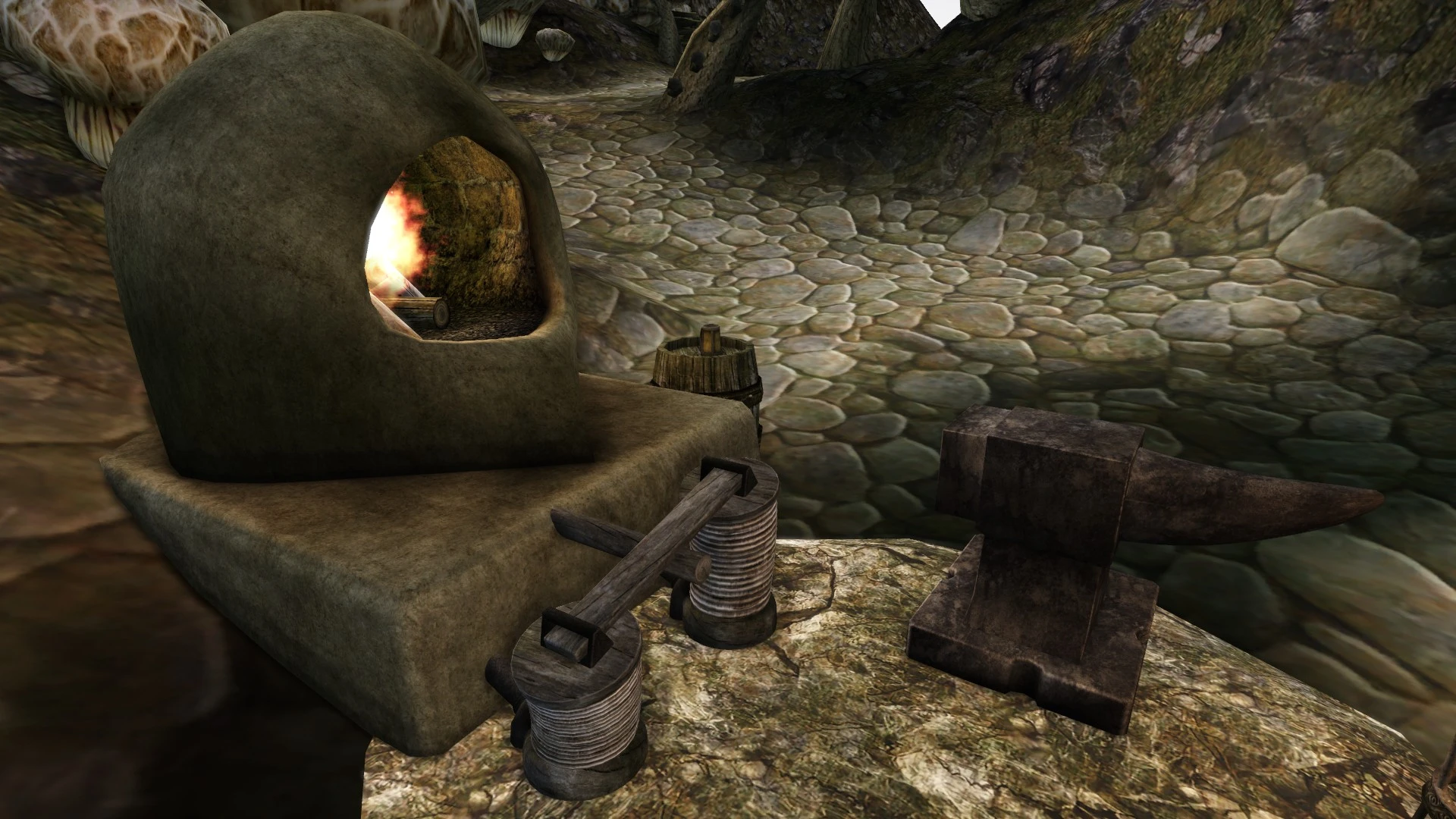
Improved Meshes and Textures for the forge, bellows, spearholder and anvil for a more modern Morrowind experience. Meshes are detailed and smoothed, but retain the vanilla measurements. Textures are remade specifically for these meshes, and most are given unique names and paths so they don't conflict with vanilla textures that are used on other meshes as well.
Changes and improvements in detail:
-
[] Anvil has rounded edges with custom vertex colors, remade uv map, new HD texture with unique path
- [
- [] Forge has been smoothed and uvs were remade, custom vertex colors. New brick texture for interior surface with unique path (the vanilla firebrick texture is only used in this mesh and in an unused fireplace, but the uv mapping in this mesh is completely different so I decided to play it safe), new ash texture (replacer). Make sure you have no other Tx_ash_firepit texture installed to keep the transition with bricks intact, as they have ash at the bottom. There is an optional texture for firepits with glowing ash (Tx_ash_firepit_01) that is not used by the meshes in this mod, but can be installed for visual consistency. No texture for outer surface included, the tx_wall_adobe_brown_01 from your installation will be used. I recommend Tyddy's Vivec and Velothi - Arkitektora Vol. 2.
- An optimized forge mesh for MGE XE distant land can optionally be installed. It has much fewer polygons than the original and only consists of a single NiTriShape instead of three. You must generate Distant Statics with a minimum static size of 150 or less for it to appear in the game.
-
[] Bellows has been smoothed and partially remade, with additional details. New atlased HD texture for wood and cloth. Metal/Pipes texture not included, will use the tx_metal_pewter_04 from your installation. New, simple collision mesh added, the vanilla model didn't have one.
There are two optional animated versions of the bellows, one with sound and one without. The version without sound is a pluginless replacer and can simply be installed on top of the main mod, no extra steps are required. The version with sound comes with a plugin, because only activators can play sounds, so the plugin adds the activator and the sounds themselves to the game and changes all bellows statics in the main game and Tribunal to activators. This plugin is incompatible with all other mods that edit these instances, but the worst thing that can happen is probably that they end up in the wrong place, if a mod changes their position. Also, bellows added by other mods are not affected (they are still animated, though). If you encounter a
HD Forge by Pherim upgrades the forge, bellows, spearholder, and anvil with improved meshes and HD textures. It includes an optional animated bellows model with optional sounds. With 447 endorsements and over 115,000 downloads, it's a popular visual enhancement for players seeking better crafting station details.
✨ Key Features
📊 Pros & Cons
✅ Pros
- Community favorite with 447 endorsements and over 115k downloads.
- Covers multiple crafting station items in one mod.
- Optional animated bellows adds life to your forge area.
⚠️ Cons
- Last updated in July 2023 — may not be compatible with the latest game version.
- No screenshots or detailed install instructions provided by the author.
- Optional animated bellows might require extra setup or performance cost.
For Skyrim players who want their crafting stations to look sharper and more detailed without overhauling the whole game. Great for modders who appreciate subtle visual upgrades. Skip if you're looking for gameplay changes — this is purely cosmetic.
💡 Beginner Tips
- Use a mod manager like Vortex or MO2 to install and manage this mod easily.
- If you opt for the animated bellows, make sure to load this mod after other texture overhauls to avoid conflicts.
- Check the mod's posts section for any compatibility notes with other popular texture mods.
📊 Mod Details
- Game
- Morrowind Mods
- Author
- Pherim
- Version
- 1.3
- Downloads
- 115,619
- Endorsements
- 447
- Category
- Models and Textures
- Created
- 5/10/2019
- Updated
- 7/24/2023
🔧 How to Install Morrowind Mods
Download from Nexus.
📖 Full step-by-step install guide for Morrowind →
Visit the official mod page for specific installation instructions for this mod.
🎮 Need cheat codes or console commands? Check ur gaming wiki for Morrowind commands, item IDs, and more.
Keep browsing — more Morrowind mods await