Comberry Bush and Ingredient Replacer
⚪ Last updated 2018⚠️ Install Order · 2 steps
Install in this order, then this mod last — most mods fail to load without their framework and dependencies in place.
Preview
🔍 Analysis
- 👍 1.4% endorsement rate — high engagement, a strong quality signal
- 🏆 #52 of 544 Models and Textures mods in this game by downloads
📋 About This Mod
Description
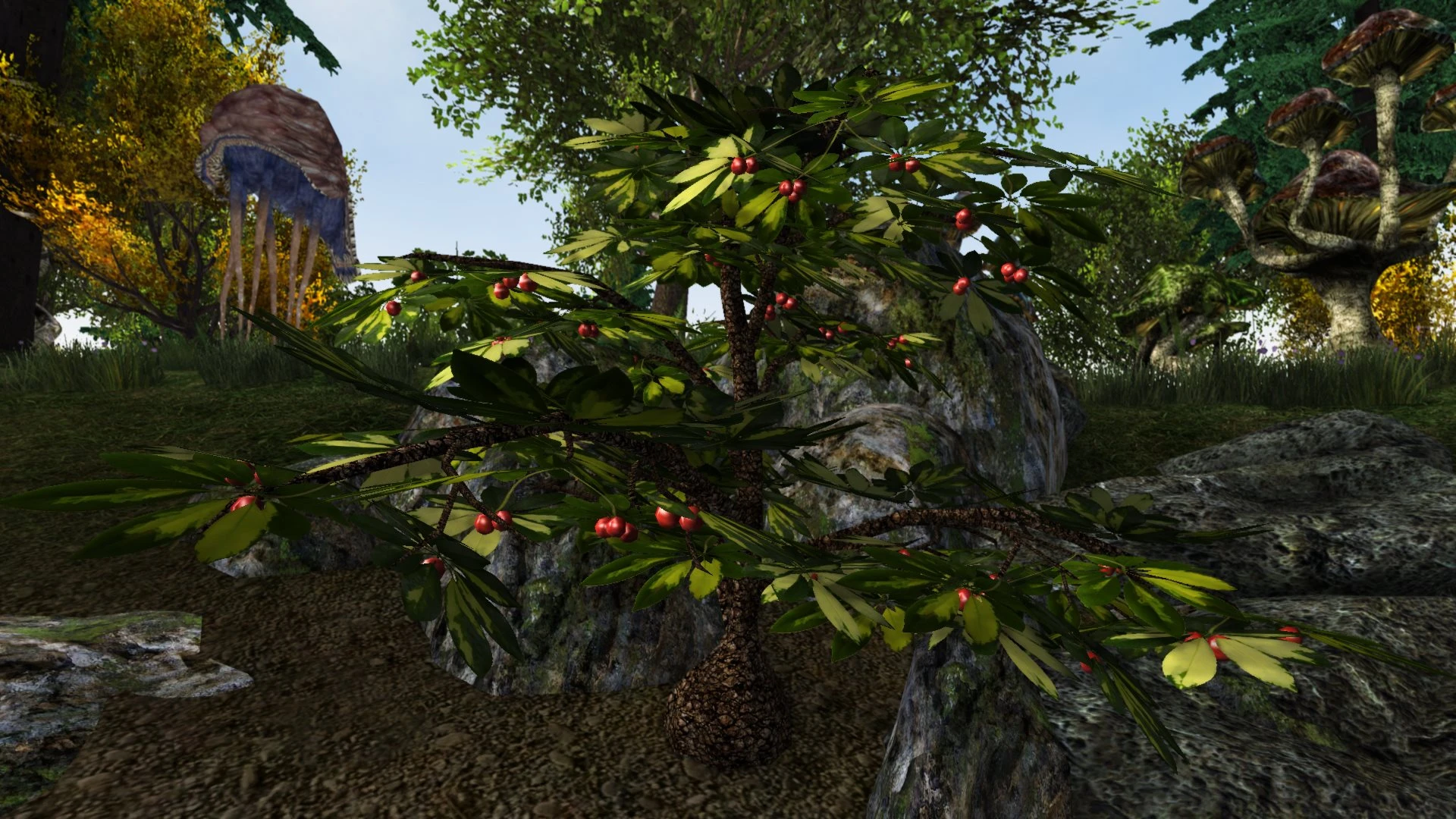
This is a replacer for the comberry bush and ingredient in "The Elder Scrolls 3: Morrowind". The original model was not very detailed and had very low-res textures, but I was unable to find a replacer that I really liked. So I decided to make my own. This is a completely remodeled mesh with real 3D branches and 3D berries with reflection maps. Additionally, there are a matching new mesh and textures for the associated alchemy ingredient. All textures made by me using free images from cgtextures.com and burningwell.org.
I decided to give it a tropical appearance, but I have included optional textures that are more similar to the original look. Also, bark textures from other replacers can be used with my mesh.
This is my first published mod for TES3: Morrowind.
Installation
Copy the "meshes" and "textures" folders into your "... Morrowind\Data Files" folder. Overwrite existing files. My new meshes are only compatible with my new textures, you should not use other textures which have not been made for these meshes. The bark texture is an exception, it can be substituted by other seamless textures. This is a simple replacer without an .esp file.
If you like the original look more than my tropical version, copy the textures from the "Vanilla Style Textures" folder into your "... Data Files\Textures" and overwrite the existing files.
The "Extras" folder contains a harvested mesh to be used with Graphic Herbalism. There is no harvested texture as the berrys are 3D objects which have simply been removed for the harvested version. To install the Graphic Herbalism mesh, simply copy the "meshes" folder within the "Extras" Folder to "... Morrowind\Data Files" and overwrite the existing file.
For Graphic Herbalism - MWSE and OpenMW Edition (recommended) use the compatible meshes from its optional file "GH Patches and Replacers". Install this mod first and overwrite with the corresponding mesh(es). You don't need to install the meshes for the old "Graphic Herbalism" included in this mod!
It is highly recommended to use the "Bump/reflect Map local lighting" fix from Morrowind Code Patch with this mod. It doesn't use bump maps at the moment, but without the fix the reflection map on the berries may appear overly bright.
Uninstallation
Remove the files flora_comberry_01.nif in "Data Files\Meshes\f", ingred_comberry_01.nif in "Data Files\Meshes\n" as well as berry.dds, Tx_comberry01.dds, Tx_comberry_02.dds, and b_ref.dds in "Data Files\Textures" in order to restore the original meshes and textures. To remove the Graphic Herbalism mesh, replace the file Comberry_01_P.nif in "DataFiles\Meshes\Gherb" with the original mod file.
Conflicts
This will conflict wit
Comberry Bush and Ingredient Replacer by Pherim replaces the comberry bush with a new 3D mesh featuring real branches and berries, plus optional vanilla-style textures. It's a visual overhaul for Skyrim, popular with over 1,900 endorsements, though it hasn't been updated since 2018.
✨ Key Features
📊 Pros & Cons
✅ Pros
- Community-approved with 1,906 endorsements—clearly a favorite among visual modders.
- The new 3D mesh adds real depth to comberry bushes, making them pop in the world.
- Optional vanilla-style textures give you flexibility to match your preferred aesthetic.
⚠️ Cons
- Last updated in 2018—might have compatibility issues with newer Skyrim versions or other mods.
- Only affects comberry bushes, so it's a narrow visual tweak, not a broad overhaul.
For Skyrim players who want to enhance the look of alchemy ingredients without a full flora overhaul. If you're a completionist who loves detailed environments, this is a quick win. Skip if you're looking for gameplay changes—this is purely cosmetic.
💡 Beginner Tips
- Since it's a simple replacer, just drop the files into your Data folder or use a mod manager—no load order worries.
- If you use other flora mods, test in-game to see if they conflict; you can always load this mod after to override.
- Check the optional textures folder if you want the vanilla look—it's a separate file choice.
📊 Mod Details
- Game
- Morrowind Mods
- Author
- Pherim
- Version
- 2.4
- Downloads
- 132,524
- Endorsements
- 1,906
- Category
- Models and Textures
- Created
- 7/25/2013
- Updated
- 11/27/2018
🔧 How to Install Morrowind Mods
Download from Nexus.
📖 Full step-by-step install guide for Morrowind →
Visit the official mod page for specific installation instructions for this mod.
🎮 Need cheat codes or console commands? Check ur gaming wiki for Morrowind commands, item IDs, and more.
Keep browsing — more Morrowind mods await