World Of Transmog
⚪ Last updated 2021⚠️ Install Order · 1 step
Install in this order, then this mod last — most mods fail to load without their framework and dependencies in place.
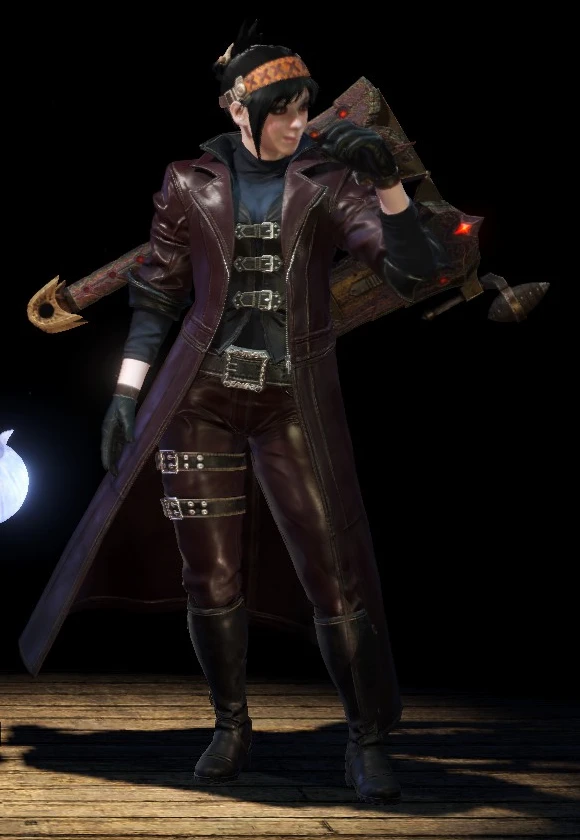
Preview
🔍 Analysis
- 👍 3.5% endorsement rate — high engagement, a strong quality signal
- 🏆 #11 of 69 Visuals and Graphics mods in this game by downloads
📋 About This Mod
Swaping weapons parts(make unique weapons looks):
dkgSXFUZCMs
So you make a build but it looks horrible? or you don't like the look of your weapon? or you want that male armor so badly on your female character? Install a custom mod on any armor you want? fear no more because now you can change the apparence of armors and weapons in the game use uplayable armors and much more.
This is a tool that will make it easier for you to model swap armors & weapon along with using unplayable armors.
It doesn't mess with anything else except copy and move the origianl files outside the chunk#.bin, so your game files and save should be safe.
The original game files are still intouched inside the chunk#.bin so you can revert changes without any change just by clicking delete all transmog in armors and weapons interface.
Only and only you can see the apparence you made from swaping models it mean that other players will see the original apparence that you are wearing.
You will also see peoples with the swaped parts if they wear or use them.
You don't need to run the tool each time you play the game and no need to save your game or worry about save corruption or game not launching.
In order for this tool to work you will need the extracted armors & weapons game files and to get them there is two ways:
1. Head to optional files and download Extracted Chunk armors & weapons this is the easiest way.
Due to some copyright infringement I can no longer provide you with the exracted weapons and armors folders on the nexus page, you will need to extract them yourself from your game, I made a video tutorial on how to do this using the second way bellow.
2. Head to this mod page download the tool and extract the chunk files follow the video tutorial for guidance.
How to extract weapons & armors:
l6ucjF-m8IE
Video tutorials:
How to use with Samurai Layered Armor:
295sooL4Pag
How to use without Samurai Layered Armor:
L4Sm4lp6RAQ
How to use Weapons transmog:
TUtzRcMCA4c
How to use gender swap transmog:
Am065CzPxxo
How to use advanced weapons transmog:
89cy0SeFgTk
How to install and use moded armors:
TahVxnJkio4
Issues:
Sometimes armor recolor in the game doesn't work as intended.
Greatsword 12 also doesn't work.
Some armors and weapons are missing because they don't have dedicated files and are generated in the game.
If the weapon you are trying to change doesn't have a part then you can't give it a part.
If you switch your switchaxe skin with something like say a longsword and use the elemental discharge which would mount the monster, it instantly freezes and then crashes the game.
About custom armor mods:
This only work with new armors or unplayable armors it doesn't work with mods that do texture replacement(see bellow for textures replacement mods).
Downloaded mods need to be placed in the mods folder near the application .exe(see the corresponding video for guide).
Each mod need to be placed in 1 folder and having the desired name.
You can make screenshot of each part of the armor and put them inside the downloaded mod folder to be able to preview the armor pieces in the tool.
The pictures need to be PNG format and named as following :
preview.png (for full armor preview)
wst.png (waist)
Texture replacer mods:
Texture replacer mods should not be installed as custom armor mods, you will need to install them in the game folder.
I take an example this mod here is texture replacement it has only .tex files and this mod is not texture replacement it has it own mod3 file.
In order to use the texture replacer mods with the tool you will need to put the files in the game directory not in the out folder and not in the mods folder.
Then with the tool all the armors that you
World Of Transmog lets you change the appearance of armors and weapons, use unplayable armors, and equip armors on the opposite gender. It's a popular cosmetic mod with over 4,000 endorsements and 116,000 downloads, last updated in August 2021.
✨ Key Features
📊 Pros & Cons
✅ Pros
- Huge community trust with 4,120 endorsements and 116k downloads.
- Opens up tons of fashion options by letting you use unplayable and opposite-gender armors.
- Simple concept that adds massive replay value for fashion-focused players.
⚠️ Cons
- Last updated in 2021 — may not work with newer game patches or DLC.
- Cosmetic only — no gameplay changes, so if you want stats or effects, look elsewhere.
For transmog enthusiasts who want to mix and match armor and weapon looks without stat penalties. Also for players who want to wear armor locked to the opposite gender or use NPC-only gear. Skip if you're after gameplay tweaks — this is purely visual.
💡 Beginner Tips
- Since the mod is from 2021, check if your game version is compatible before installing — older mods often break after updates.
- If you're using a mod manager, install it through that to keep track of files and easily disable if issues arise.
- Test the transmog on a single piece of gear first to see how it works before applying to your whole loadout.
📊 Mod Details
- Game
- Monster Hunter World Mods
- Author
- Hakim3i
- Version
- 0.971
- Downloads
- 116,563
- Endorsements
- 4,115
- Category
- Visuals and Graphics
- Created
- 8/20/2018
- Updated
- 8/22/2021
🔧 How to Install MHW Mods
Install Stracker\
📖 Full step-by-step install guide for MHW →
Visit the official mod page for specific installation instructions for this mod.
🎮 Need cheat codes or console commands? Check ur gaming wiki for MHW commands, item IDs, and more.
Keep browsing — more MHW mods await