Reduced Blue Tint LUT (Not Reshade)
🟠 Updated over a year ago⚠️ Install Order · 1 step
Install in this order, then this mod last — most mods fail to load without their framework and dependencies in place.
Preview
🔍 Analysis
- 👍 2.4% endorsement rate — high engagement, a strong quality signal
- 🏆 #38 of 69 Visuals and Graphics mods in this game by downloads
📋 About This Mod
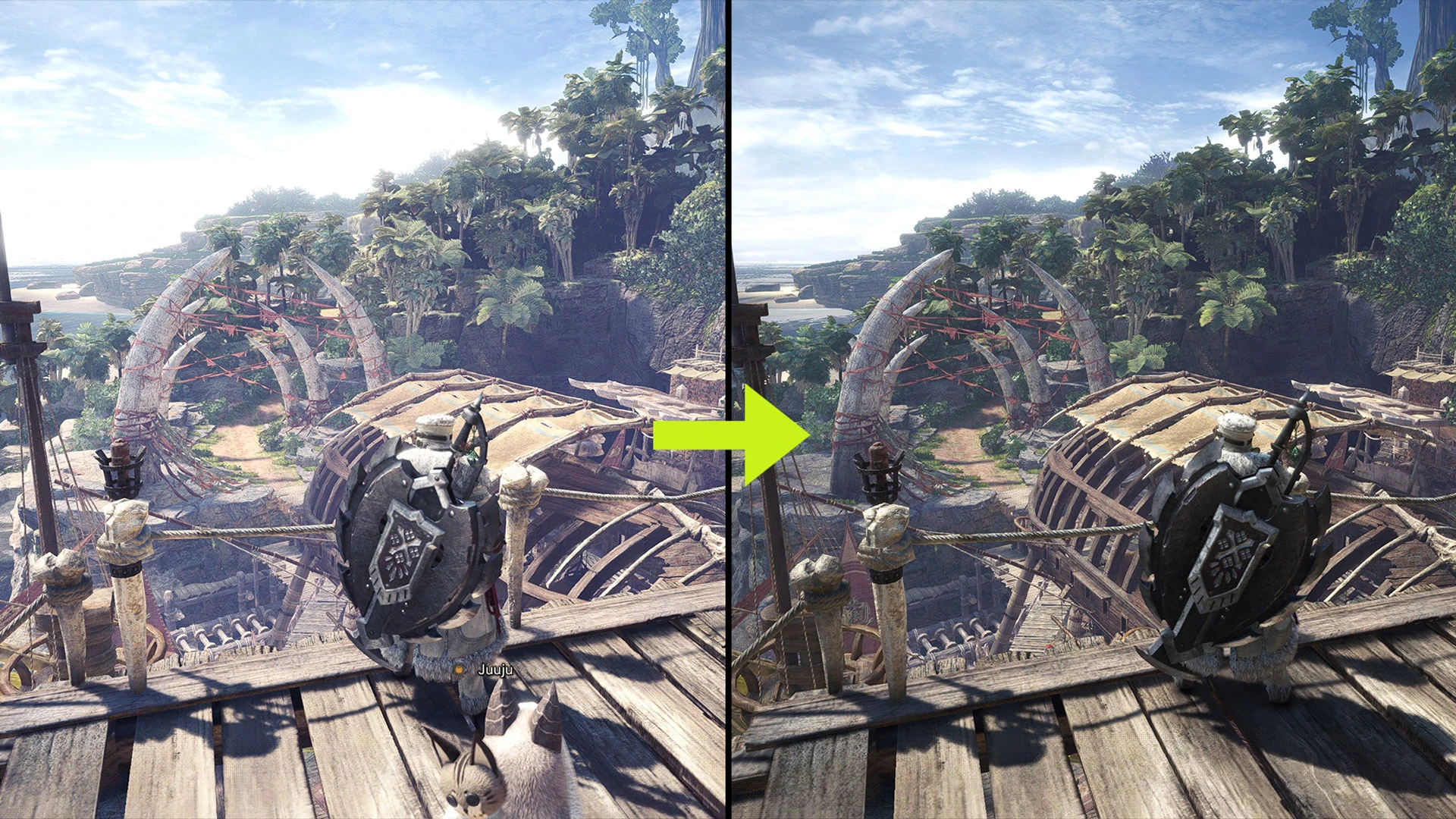
Screenshots comparison with slider:
Comparison 1
Comparison 2
Installation:
Drop the nativePC folder in "Steam\Steamapps\common\Monster Hunter World\".
Please set the in-game brightness back to default and readjust the brightness to your preference.
The left and right brightness symbol guide can be ignored.
Uninstallation:
Delete the "LUT" folder in "Steam\Steamapps\common\Monster Hunter World\nativePC\light\".
Tools used in modding:
CrappyLUTStudio by AsteriskAmpersand
MHWNoChunk by JodoZT
MHW CC Studio by Dave uRrr
This mod removes the bluish tint and overexposed lighting from the game's default LUT, offering a more natural color palette. It's performance-friendly since it only modifies game files and doesn't require Reshade. Ideal for players who want a cleaner look without extra software.
✨ Key Features
📊 Pros & Cons
✅ Pros
- Community-approved with 562 endorsements and over 23k downloads
- No Reshade needed, so it's lightweight and won't tank your FPS
- Simple file swap gets you a more natural color palette
⚠️ Cons
- Only affects the default LUT, so if you want deeper color grading you'll need other mods
- May not match the look you want if you're used to Reshade presets
- Compatibility risk with other LUT or lighting mods that alter the same files
For players who find the default blue tint annoying and want a quick, performance-friendly fix. Also great for those who avoid Reshade due to performance or complexity. Skip if you're happy with the default look or want dramatic visual overhauls.
💡 Beginner Tips
- Make sure to back up your original LUT files before replacing them, just in case you want to revert.
- If you use other visual mods, check load order to ensure this LUT override works as intended.
- Test in different lighting conditions (day/night) to see if the reduced tint looks good everywhere.
📊 Mod Details
- Game
- Monster Hunter World Mods
- Author
- Teuthidaa06
- Version
- 1.4
- Downloads
- 23,256
- Endorsements
- 561
- Category
- Visuals and Graphics
- Created
- 11/16/2024
- Updated
- 1/18/2025
🔧 How to Install MHW Mods
Install Stracker\
📖 Full step-by-step install guide for MHW →
Visit the official mod page for specific installation instructions for this mod.
🎮 Need cheat codes or console commands? Check ur gaming wiki for MHW commands, item IDs, and more.
Keep browsing — more MHW mods await