MHWSaveTransfer
⚪ Last updated 2024⚠️ Install Order · 1 step
Install in this order, then this mod last — most mods fail to load without their framework and dependencies in place.
Preview
🔍 Analysis
- 👍 3.1% endorsement rate — high engagement, a strong quality signal
- 🏆 #23 of 64 Utilities mods in this game by downloads
📋 About This Mod
Compatible with Iceborne
MHWSaveTransfer
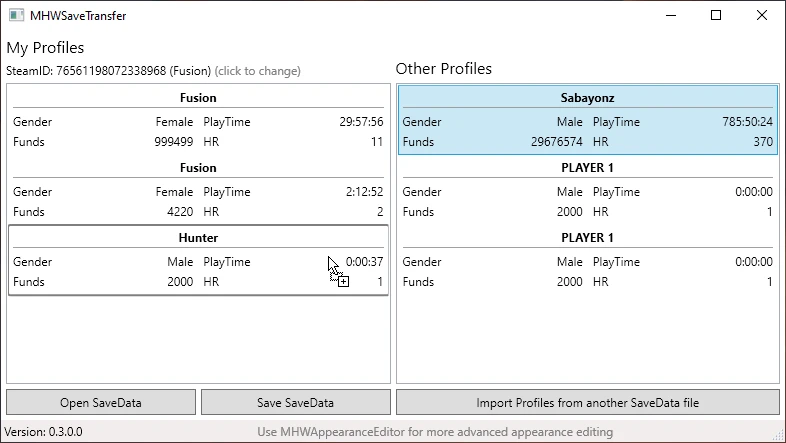
Import saveslots from a different savedata into your savedata.
Usage:
File -> Open SavaData to select the SaveData you want to import saveslots into
File -> Import SaveData / SaveSlots to select from which SaveData you want to import saveslots
Drag and drop the saveslots so that the left panel shows them how you want them to appear in-game (obviously limited to 3 slots)
File -> Save SaveData to save the edited SaveData (make a backup of your current save)
You can also edit the SteamID by clicking on the SteamID. Use this site to find your ID and copy the steamID64 number.
By default the tool will just use the SteamID already present in your save, so you usually don't want to edit it.
Troubleshooting:
Q: The game throws a 'Failed to load save data' at me.
A: You either used the wrong SteamID or this tool is broken, if you think it is an issue with my tool then please send me your SaveData so that I can investigate.
Q: The tool doesn't open or crashes
A: Install . NET 5. 0, click on the Download x64 button underneath Run desktop apps.
Q: I can't download this, it gives me a "Failed - Virus detected"
A: Yeah, I don't know why, but as a workaround you could temporarily disable your Real-time scanning under Windows Security Center -> Virus & threat protection settings.
Q: Can this transfer my savegame from/to a PS4?
A: No, you can import your PS4 savegame using this tool if your PS4 is jailbroken (which it most likely isn't). Read the posts here if you want to know why it isn't possible.
Please tell me about any issues you might find, or improvements you'd like to see.
As always, source is here.
MHWSaveTransfer is a utility mod for Monster Hunter World that lets you import save slots from a different savedata file into your own. With 2,422 endorsements and 77,728 downloads, it's a popular tool for players who want to merge or transfer progress between save files. Last updated in January 2024, it remains a go-to for save management.
✨ Key Features
📊 Pros & Cons
✅ Pros
- Community-approved with 2,422 endorsements—clearly a trusted tool.
- High download count (77,728) shows it's widely used for save transfers.
- Simple purpose: move save slots between files, no bloat.
⚠️ Cons
- No detailed instructions or feature list provided by the author.
- Last updated in January 2024—may not be compatible with future game updates.
- Utility mods like this can be risky if used incorrectly—no safety warnings in description.
For Monster Hunter World players who want to transfer save slots between different save files, perhaps to merge progress or move characters. If you're a completionist with multiple saves, this is a handy tool. Skip if you're looking for gameplay or visual changes—this is purely a save management utility.
💡 Beginner Tips
- Always back up your original savedata before using this mod—save corruption is a real risk.
- Make sure the save files you're importing from are compatible with your game version to avoid errors.
- Test the transfer on a secondary save slot first to ensure it works as expected.
📊 Mod Details
- Game
- Monster Hunter World Mods
- Author
- FusionR
- Version
- 0.3.0
- Downloads
- 77,724
- Endorsements
- 2,417
- Category
- Utilities
- Created
- 1/19/2019
- Updated
- 1/29/2024
🔧 How to Install MHW Mods
Install Stracker\
📖 Full step-by-step install guide for MHW →
Visit the official mod page for specific installation instructions for this mod.
🎮 Need cheat codes or console commands? Check ur gaming wiki for MHW commands, item IDs, and more.
Keep browsing — more MHW mods await