Appearance Editor
⚪ Last updated 2023⚠️ Install Order · 1 step
Install in this order, then this mod last — most mods fail to load without their framework and dependencies in place.
Preview
🔍 Analysis
- 👍 3.5% endorsement rate — high engagement, a strong quality signal
- 🏆 #12 of 64 Utilities mods in this game by downloads
📋 About This Mod
Appearance Editor
Works on Windows and Steam Deck/Linux
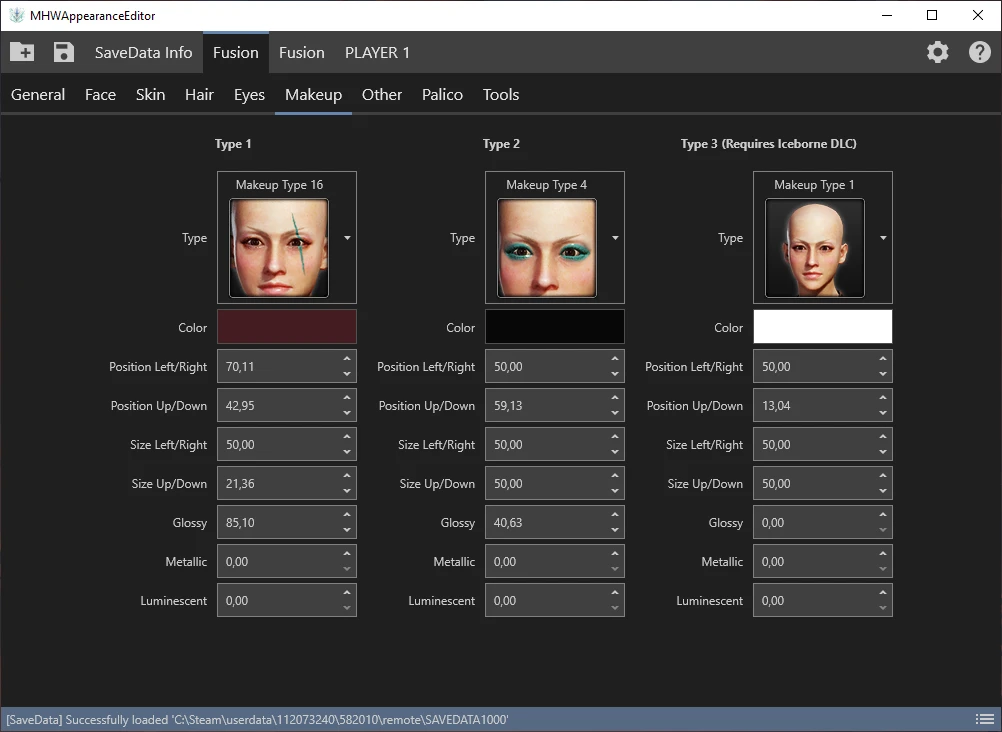
This tool allows you to edit the appearance of your hunter and palico.
You can change everything you could also change when first creating your hunter/palico. This includes hair, face, colors, voice types and your palico.
Click here to see a list of all the hairstyle IDs. The program currently does NOT have a dropdown for hairstyles, which means that you'll have to manually enter the hairstyle ID.
Known issues
- None?
To do
- Hairstyle selector instead of manually entering IDs
Advanced features
- Import/export json hunter appearance
- Import/export cmp hunter appearance (preset/npc)
- Import appearance from other saveslot (e.g. copy slot 1 appearance to slot 3)
Will I get banned?
If they really wanted to then they could probably find out that you changed your character outside of the game, but at the moment there is no indication that they are.
Furthermore:
- Appearance editing has been a thing already for a while (using Cheat Engine)
- Custom models/items also have been a thing for a while
- Inventory/stat editing also has been a thing for a while
There haven't been any bans for the actions mentioned above, in fact there hasn't been a single ban in MHW yet as far as I know (feel free to correct me).
Can I use this to unlock DLC cosmetics (hair, facepaint, etc) that I don't own?
No, you can't.
While my tool doesn't check for that the game itself validates your character on startup.
If you were to use a DLC cosmetic which you don't own (e.g The Admiral) the game would simply reset your hair to the default value.
Troubleshooting:
Q: The tool doesn't open or crashes
A: Install . NET Framework 4. 7. 2 or a newer version. . NET 4. 7. 2 is available for Windows 7 SP1 and higher, this also means that this program does NOT work on Vista and lower.
Q: I can't change my hair.
A: True, I'm still working on a selector with preview images etc. For now you can manually enter the hair ID. You can find an (incomplete) id list here -> https://pastebin.com/5wtu0GPW
Q: How to restore my savedata?
A: Copy the latest file from "%appdata%\MHWAppearanceEditor\backup" (e.g. SAVEDATA_2020-03-27_14-17-13) to "C:\Steam\userdata\{random_numbers}\582010\remote" and rename it to SAVEDATA1000.
Q: The game crashes after editing my save
A: This is probably not caused by this tool. If your SAVEDATA1000 is invalid/corrupt/whatever the game will tell you so. It will not crash. Try again after deleting/renaming your nativePC folder and if it still crashes then please make a post in the Posts tab.
The "MHWAppearanceEditor\backup" folder also has a .txt file for each savedata. These text files are only there for user convenience (they tell you your hunter's name, rank, xp, etc), you don't need to copy those text files to your "...\582010\remote" folder.
If you changed the install path of MHWAppearanceEditor then check that folder instead of %appdata%
Source
Appearance Editor is a utility for Monster Hunter: World that lets you edit your hunter and palico's appearance, including hair, face, colors, voice, and palico. It supports import/export of appearance data and works on Windows and Steam Deck/Linux. The tool is popular with over 6,300 endorsements and 182,000 downloads, last updated in October 2023.
✨ Key Features
📊 Pros & Cons
✅ Pros
- Huge community trust: 6,308 endorsements and 182k downloads show it's the go-to appearance editor.
- Cross-platform support: works on Windows and Steam Deck/Linux, which is rare for MHW tools.
- Advanced features like JSON/CMP import/export and save-slot copying make it a power-user favorite.
⚠️ Cons
- No hairstyle dropdown yet—you'll be typing in hairstyle IDs manually, which is clunky.
- Author admits there's a theoretical ban risk if Capcom decides to detect external edits, though no bans have occurred.
- Requires .NET Framework 4.7.2 or newer, which might be missing on some systems and cause crashes.
For Monster Hunter: World players who want to tweak their hunter or palico's look without restarting the game. Perfect for fashion hunters and those who want to copy a look from another save. Skip if you're fine with your current appearance or want a fully graphical interface—this one needs manual ID entry for hairstyles.
💡 Beginner Tips
- Make sure you have .NET Framework 4.7.2 or newer installed, or the tool won't open.
- When editing hairstyles, you'll need to look up the hairstyle ID from the linked list—keep that page open while using the tool.
- If you're on Steam Deck, the tool should work, but you may need to run it through Proton or a compatibility layer.
📊 Mod Details
- Game
- Monster Hunter World Mods
- Author
- FusionR
- Version
- 1.7.0
- Downloads
- 182,551
- Endorsements
- 6,308
- Category
- Utilities
- Created
- 11/6/2018
- Updated
- 10/16/2023
🔧 How to Install MHW Mods
Install Stracker\
📖 Full step-by-step install guide for MHW →
Visit the official mod page for specific installation instructions for this mod.
🎮 Need cheat codes or console commands? Check ur gaming wiki for MHW commands, item IDs, and more.
Keep browsing — more MHW mods await