MHW Mod Manager
⚪ Last updated 2022⚠️ Install Order · 1 step
Install in this order, then this mod last — most mods fail to load without their framework and dependencies in place.
Preview
🔍 Analysis
- 👍 3.2% endorsement rate — high engagement, a strong quality signal
- 🏆 #3 of 64 Utilities mods in this game by downloads
📋 About This Mod
INSTALLATION:
-You can extract the files anywhere and use it but it works best if you place them in your monster hunter world game folder. if you don't, you'll have to change the folder manually after loading the program up. Just make sure the ModManagerData folder stays by the program executable.
MH Rise Install:
-Pretty much the same but point it to your Rise folder and change the mod folder to "natives"
-Make sure to use the FirstNatives plugin for REFramework instead of fluffy manager
USAGE:
-This program requires that you keep a mod cache of all the mod archives (.zip, . 7z, .rar, etc..) for mods you have installed. (this is mostly managed for you unless you want to manually organize it).
-You can drag files to the list to add them to the mod cache. alternatively you can place them inside folders inside the mod cache folder to categorize them, if the program is open while you do this you'll probably need to hit re-scan mod cache afterwards.
FEATURES:
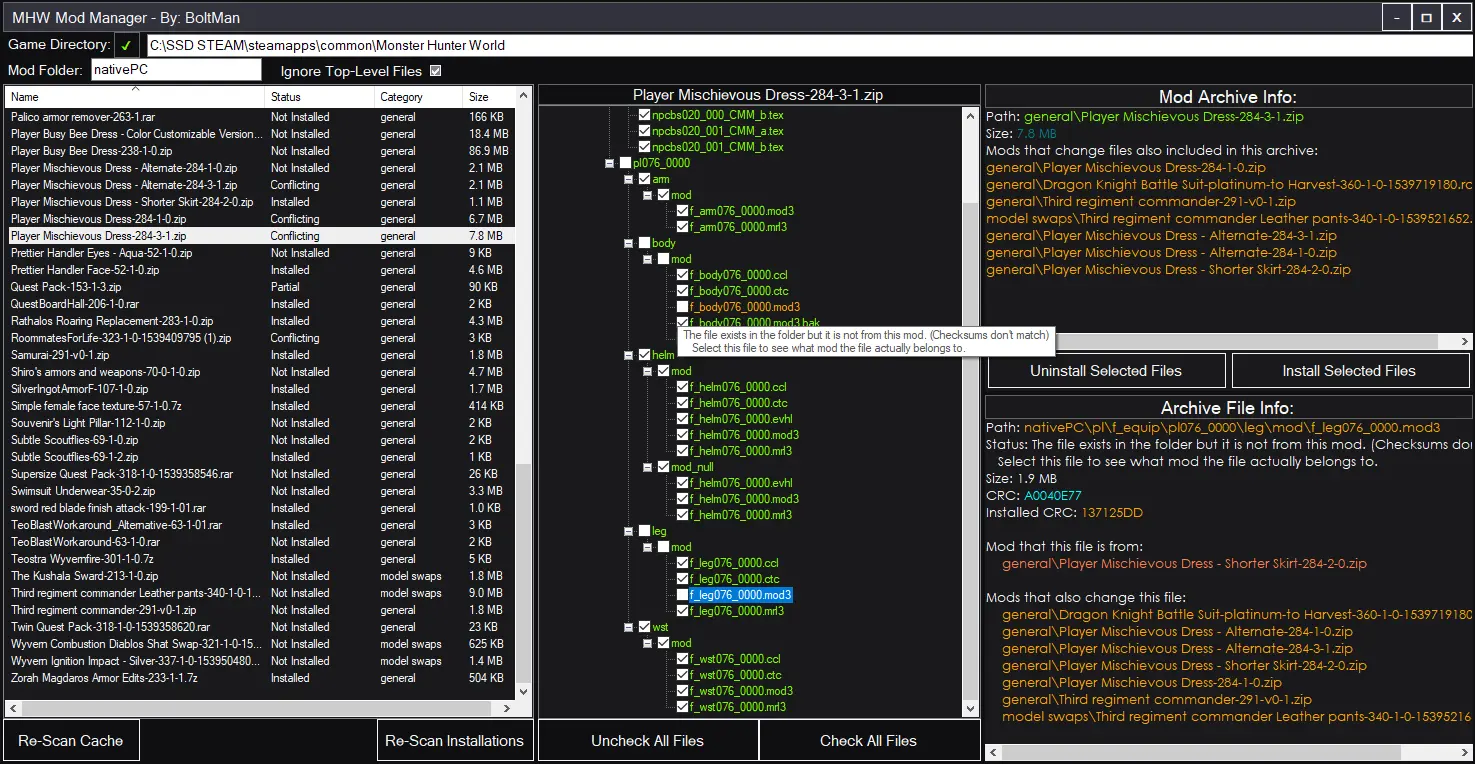
-Automatically install and uninstall all or manually selected parts of a mod archive.
-Track which files of what mods are installed
-Display what mods modify what files
-A hopefully user friendly interface
-Game agnostic: would work on any game that uses a similar mod structure.
Want to contribute?
The repository for this project is run by the nice UncleClapton
You can find it here.
If you are a mod author:
Could you please structure your mods to always have a full folder path for all the files rather than have people try and navigate to specific folders themselves?
You can have readme's and other files at the base of the archive as I've added an option to ignore files at the top level but it would be nice if you could make your mod easily compatible with this manager, thanks!
Limitations:
Only really works with mods that have a full folder structure for where they belong, or have files that go directly into nativePC, which thankfully most mods are already like that.
Its a simple program, its not going to automagically update your mods for you by checking the nexus or whatever.
As i said i kinda just made this in a few days and was working pretty fast ykno, i absolutely do not have enough hubris to say this program is bug free. And any mishaps that cause harm to your mod installs and cache are not of my responsibility.
That being said i have tested it and it has worked fine in all situations I've thrown at it.
If you are concerned about your mods, please back up your nativePC folder.
I'm not super interested in continuing work on this that much, just wanted to make something that worked nicely and be done with it.
But if there's enough desire for a certain feature request or something i might think about it.
However there is an open source repository that anyone can contribute at.
Anyway, any questions, comments, ideas, and bugs reports are welcome in the comments.
MHW Mod Manager is a robust generic mod management tool for Monster Hunter: World, designed to simplify installing and managing mod files from archives. It also works with Monster Hunter Rise. With over 26,000 endorsements and 800,000 downloads, it's a community staple for modding both games.
✨ Key Features
📊 Pros & Cons
✅ Pros
- Huge community trust with 26,199 endorsements and over 807k downloads.
- Handles both World and Rise, so one tool covers two games.
- Generic mod management means it works with any archive-based mod, not just specific ones.
⚠️ Cons
- Last updated in August 2022, so it may not support the latest game updates or mod formats.
- As a utility, it doesn't add content—just organizes files, so it's not for players who want gameplay changes.
For Monster Hunter: World and Rise players who install multiple mods and want a straightforward way to manage them without manual file juggling. Skip if you only use a couple of mods or prefer manual installation.
💡 Beginner Tips
- Make sure to disable Steam Cloud saves for MHW to avoid conflicts with modded files.
- Use the mod manager to create a backup of your nativePC folder before installing mods.
- Check the mod's compatibility with the current game version, as it hasn't been updated since 2022.
📊 Mod Details
- Game
- Monster Hunter World Mods
- Author
- BoltMan
- Version
- 1.450
- Downloads
- 807,259
- Endorsements
- 26,133
- Category
- Utilities
- Created
- 10/19/2018
- Updated
- 8/17/2022
🧩 Commonly Used Together
Users add these mods to the same collections — a real compatibility signal, not an AI guess.
🔧 How to Install MHW Mods
Install Stracker\
📖 Full step-by-step install guide for MHW →
Visit the official mod page for specific installation instructions for this mod.
🎮 Need cheat codes or console commands? Check ur gaming wiki for MHW commands, item IDs, and more.
Keep browsing — more MHW mods await