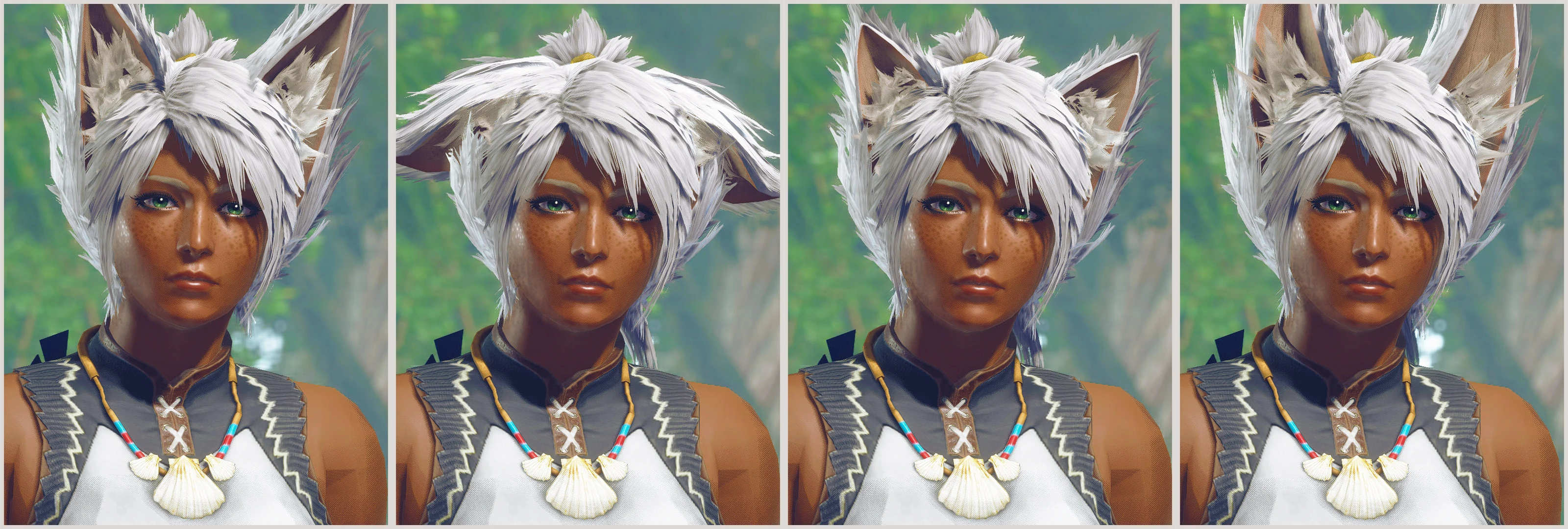
Wild Kitsune (Fox) - Neko (Cat) - Okami (Wolf)
⚪ Last updated 2022Preview
🔍 Analysis
- 👍 2.5% endorsement rate — high engagement, a strong quality signal
- 🏆 #51 of 286 Apparel mods in this game by downloads
📋 About This Mod
Replaces various waist armors with fluffy fox, cat, or wolf ears. The tail wags and ears flick randomly thanks to the new engine's chain physics system (can be disabled if you prefer no secondary motion)! Material file can also be renamed to allow darkened tips of ears and tail, which can be enabled on fox, cat, or wolf.
Download comes with Male and Female files for convenience. Each variation uses a different armor by default for max customization and matching with friends. If you intend on changing the armor, I HIGHLY recommend downloading Dytser's Physics Enabler mod before installing this one so it doesn't potentially lose its physics.
INSTALLATION
FLUFFY MOD MANAGER:
-
[]Open the Fluffy Mod Manager mod folder (Options > Open mods folder) and extract the .zip folder into there. The natives folder, modinfo.ini, and thumbnail .jpg should be contained within an unzipped folder in Fluffy's Mods folder!
[
]Enable the mod in the application's main menu (may need to refresh the list).[]Restart the game.
[]Equip the waist armor that the mod uses.
FIRST NATIVES:
-
[]Install REFramework and install FirstNatives.dll into its plugin folder.
[
]Open the mod's .zip folder and drop natives into the MHRise install folder (where the .exe is located).[]Reload the armor in game.
DISABLE TAIL WAG + EAR FLICK:
(you monster)
-
[]Install the mod normally and ensure it's showing properly in game.
[]Navigate to the folder the mod uses (in this case I will use female Kitsune). It will look like "...\steamapps\common\MonsterHunterRise\natives\STM\player\mod\f\pl009".
[]Rename "f_wst009.chain. 48" to something else like "f_wst009_WAG.chain. 48" to disable the physics.
[]Rename "_f_wst009_NOWAG.chain. 48" to the original name "f_wst009.chain. 48" to enable physics without wag or flicking.
[]Reload the armor in game.
ENABLE DARKENED FUR TIPS:
-
[]Install the mod normally and ensure it's showing properly in game.
[
]Navigate to the folder the mod uses (in this case I will use female Kitsune). It will look like "...\steamapps\common\MonsterHunterRise\natives\STM\player\mod\f\pl009".[]Rename "f_wst009.mdf2. 23" to something else like "f_wst009_SOLID.mdf2. 23" to disable solid coloring.
[]Rename "_f_wst009_TIP.mdf2. 23" to the original name "f_wst009.mdf2. 23" to enable darkened tip coloring.
- Reload the armor in game.- alphaZomega for his crazy support for RE Engine modding and helping me with chain files
CREDITS
- NSA Cloud for helping me with textures, for the Blender Noesis wrapper, and finding the files for the world wind boxes for me.
-
[]Install the mod normally and ensure it's showing properly in game.
-
[]Install the mod normally and ensure it's showing properly in game.
Adds fluffy fox, cat, and wolf ears and tails for both male and female characters, complete with tail wag and ear flick animations. A popular cosmetic mod with over 1,200 endorsements, last updated in September 2022.
✨ Key Features
📊 Pros & Cons
✅ Pros
- Community favorite with 1,204 endorsements and 47k downloads
- Adds lively animations—tail wag and ear flicks—for extra flair
- Covers three animal types in one mod, giving you variety
⚠️ Cons
- Last updated in 2022—might not work with the latest game patches
- Purely cosmetic—no gameplay effects, so if you want stats, look elsewhere
For roleplayers and fashion-focused players who want to add animal ears and tails to their characters. Great for screenshots and character customization. Skip if you're after gameplay changes—this is purely cosmetic.
💡 Beginner Tips
- Check if your game version is compatible since the mod hasn't been updated since 2022.
- If you use a mod manager, install via that to keep track of the files easily.
- Preview the ears and tails in-game to see how they look with your character's hair and armor.
📊 Mod Details
- Game
- Monster Hunter Rise Mods
- Author
- zStatykz
- Version
- 1.2
- Downloads
- 47,533
- Endorsements
- 1,203
- Category
- Apparel
- Created
- 8/6/2022
- Updated
- 9/30/2022
🔧 How to Install MHRise Mods
Install REFramework. Drop mod files into game directory.
📖 Full step-by-step install guide for MHRise →
Visit the official mod page for specific installation instructions for this mod.
🎮 Need cheat codes or console commands? Check ur gaming wiki for MHRise commands, item IDs, and more.
Keep browsing — more MHRise mods await