Enchanting Table Magic Circle
🟡 Updated this year🖼️ Gallery (3 images)
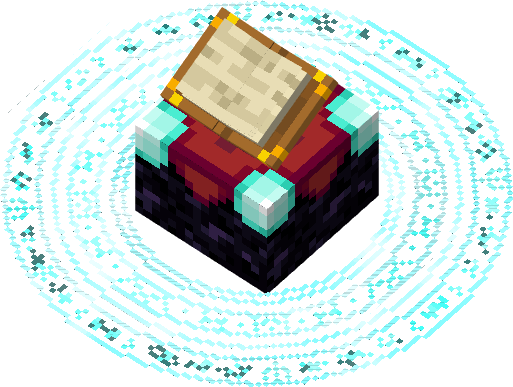


🔍 Analysis
- 👍 0.1% endorsement rate
- 🏆 #11 of 220 blocks mods in this game by downloads
📋 About This Mod
[!(https://img.shields.io/badge/modrinth-My_other_projects-00AF5C?style=for-the-badge&logo=modrinth)](https://modrinth.com/user/Jacosvaldo) [!(https://img.shields.io/badge/Discord-Jacosvaldo%27s%20_Not_Too_Cool_Server-5865F2?style=for-the-badge&logo=discord)](https://discord.com/invite/cPYyf3JqgU) [!(https://img.shields.io/badge/kofi-Tip_me-F26B2E?style=for-the-badge&logo=kofi)](https://ko-fi.com/jacosvaldo)
## 🧩 Dependencies - (https://modrinth.com/mod/entity-model-features) is required! - For color variants use (https://modrinth.com/mod/respackopts) mod - For animated textures to work on fabric use (https://modrinth.com/mod/animatica) mod
if you're playing in versions above 1. 21. 6 you can download this (https://modrinth.com/mod/animatica/version/0. 6. 1+1. 21. 5) of Animatica, it works, but if you're playing in versions above 1. 21. 8 you'll need to activete the BRUTEFORCE mode in the texture settings (more about this below)
## ✅️ Mod Support
Should work for every mod that uses a book entity, like (https://modrinth.com/mod/easy-magic) mod or (https://modrinth.com/mod/quark-oddities) mod
## 🛠️ Shaders Troubleshooting
First make sure to enable labPBR support at your shaders config normally it looks like this:
### Complementary shaders:
!(https://cdn.modrinth.com/data/cached_images/d851ca3264ebc9a606ecde25a7d0038cc0fb6a79.png)
### BSL (at the materials tab):
!(https://cdn.modrinth.com/data/cached_images/c2f41665db9817498901aab2b120a30f38e61d8c_0.webp)
If just this doesn't fix it, try disabling the animated textures, 99% of the time it works
## 🚨 BRUTEFORCE mode:
Don't use BRUTEFORCE mode if you're trying to use shaders, it was only made to make the animated textures work in versions >= 1. 21. 9
To use it you'll probably have to set RenderLayer override to Translucent, to do this go to the mods tab, enter the Entity Model Features mod config and follow this path:
Per entity settings > Enchanting Table > Textures
Now set RenderLayer override to Translucent
🎨 Color Variants
!(https://cdn.modrinth.com/data/gLbwPaHh/images/cd31fba1b84541b96451501932c6b0408e27294d.png)
▶️ Video Preview
✨ Shaders Screenshots
## BSL:
!(https://cdn.modrinth.com/data/cached_images/0c3caae6c918a32c50d2dbd9028eb0f920da93e6.jpeg)
## Complementary Shader: !(https://cdn.modrinth.com/data/cached_images/50e4341a70100a5d3b8f2ddd148b57ec0c17d130.jpeg)
!(https://cdn.modrinth.com/data/cached_images/4f301cffd38fbe41982096dcae32759f644093c5.jpeg)
## Super Duper Vanilla:
!(https://cdn.modrinth.com/data/cached_images/b6533a1987b92150a121622d77edcdc159fd1463.jpeg)
## Miniature Shader (Custom build):
!(https://cdn.modrinth.com/data/cached_images/5ec13eb048f51643bd78b5b546c345586ba72147.jpeg)
## 💼 My works


📊 Mod Details
- Game
- Minecraft Resource Packs
- Author
- Jacosvaldo
- Version
- 2.5
- Downloads
- 699,117
- Endorsements
- 363
- Category
- blocks
- Created
- 5/22/2024
- Updated
- 4/5/2026
- Game Versions
- 1.21.9, 1.21.10, 1.21.11
- Tags
- blocks, decoration, models
🔧 How to Install Minecraft Resource Packs Mods
Download from Modrinth. Use Prism Launcher or drop into your mods folder.
📖 Full step-by-step install guide for Minecraft Resource Packs →
Visit the official mod page for specific installation instructions for this mod.
🎮 Need cheat codes or console commands? Check ur gaming wiki for Minecraft Resource Packs commands, item IDs, and more.
❓ Frequently Asked Questions
Which Minecraft Resource Packs versions does Enchanting Table Magic Circle support?
The author lists 1.21.9, 1.21.10, 1.21.11. Other versions may work but are untested by the author.
What is the latest version of Enchanting Table Magic Circle?
Version 2.5, published 2026-04-05 with 699,117 downloads recorded at the source.
Keep browsing — more Minecraft Resource Packs mods await