WTB Plugin
🟡 Updated this year🖼️ Gallery (4 images)
🔍 Analysis
- 🏆 #30 of 92 economy mods in this game by downloads
📋 About This Mod
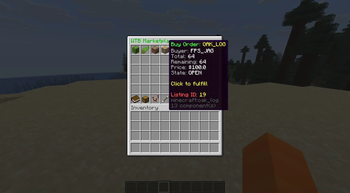
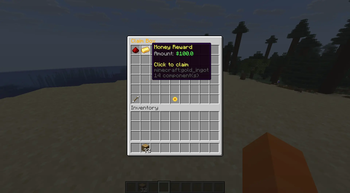
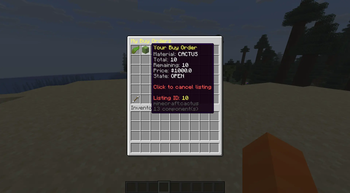
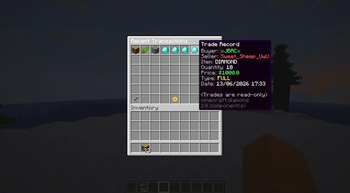
# WTB Plugin – Want‑To‑Buy Marketplace System A clean, modern, GUI‑driven buy‑order marketplace plugin for Minecraft servers. Players create buy requests, sellers fulfill them, and the economy becomes player‑driven and dynamic. Built for Spigot/Paper 1.20+ with full Vault economy support. --- ## 📘 Overview The **WTB Plugin** introduces a buyer‑driven trading system to Minecraft. Instead of auctions or chest shops, players post *buy orders* for items they want, and other players fulfill them. This creates: - A healthier server economy - More player interaction - A reason to gather resources - A clean, intuitive trading experience Perfect for Survival, Economy, and SMP servers. --- ## ✨ Features ### 🎯 Player Features - Create buy orders: `/wtb buy <material> <quantity> <price>` - Browse all listings through a GUI - Manage personal orders via **My Listings** - Claim fulfilled items through the **Claim Box** (infinite pagination) - View transaction history in the **Transactions GUI** - Cooldown system to prevent spam - Blocked‑material enforcement - Safe claim handling with no item loss ### 🛠 Admin Features - `/wtb admin list` — view all active listings - `/wtb admin cancel <id>` — force‑cancel any listing - Admin‑only listing IDs in GUIs - Admin‑only tab completion - UUID → player name resolution for readable output --- ## 🧩 Technical Details - **Platform:** Spigot/Paper 1.20+ - **Economy:** Vault - **Database:** SQLite or MySQL - **Architecture:** - `ListingService` — business logic - `ListingDAO` — database operations - GUI system built with Bukkit Inventory API - **Permissions:** - `wtb.admin` — admin commands & listing visibility --- ## 📦 Installation 1. Download the latest release from the **Releases** page. 2. Place the JAR into your server’s `plugins/` folder. 3. Start the server to generate configuration files. 4. Edit `config.yml` and `settings.yml` as needed. 5. Reload or restart the server. --- ## 📝 Commands ### Player Commands ``` /wtb buy <material> <qty> <price> /wtb ``` ### Admin Commands ``` /wtb admin list /wtb admin cancel <id> ``` --- ## 📄 Configuration Files - `config.yml` — database, cooldowns, and general settings - `settings.yml` — GUI settings and blocked materials - `plugin.yml` — plugin metadata --- ## 🛡 Stability & Safety - Safe claim handling - Pagination for large datasets - Validation for invalid or expired listings - Async database operations --- ## 🚀 Roadmap (Future Ideas) - Listing expiration system - Sorting & filtering in GUIs - Seller‑side GUI for fulfilling orders - Analytics dashboard for admins - Multi‑currency support --- ## 📬 Support Found a bug? Have a feature request? Open an Issue on GitHub — contributions and suggestions are welcome. --- ## 📜 License This project is licensed under the **MIT License**.
# WTB Plugin – Want‑To‑Buy Marketplace System
A clean, modern, GUI‑driven buy‑order marketplace plugin for Minecraft servers. Players create buy requests, sellers fulfill them, and the economy becomes player‑driven and dynamic. Built for Spigot/Paper 1. 20+ with full Vault economy support.
## 📘 Overview
The WTB Plugin introduces a buyer‑driven trading system to Minecraft. Instead of auctions or chest shops, players post buy orders for items they want, and other players fulfill them.
This creates: - A healthier server economy - More player interaction - A reason to gather resources - A clean, intuitive trading experience
Perfect for Survival, Economy, and SMP servers.
## ✨ Features
### 🎯 Player Features
- Create buy orders:
`/wtb buy
### 🛠 Admin Features
- `/wtb admin list` — view all active listings
- `/wtb admin cancel
## 🧩 Technical Details
- Platform: Spigot/Paper 1. 20+
- Economy: Vault
- Database: SQLite or MySQL
- Architecture:
- - `ListingService` — business logic
- - `ListingDAO` — database operations
- - GUI system built with Bukkit Inventory API
- Permissions:
- - `wtb.admin` — admin commands & listing visibility
## 📦 Installation
1. Download the latest release from the Releases page. 2. Place the JAR into your server’s `plugins/` folder. 3. Start the server to generate configuration files. 4. Edit `config.yml` and `settings.yml` as needed. 5. Reload or restart the server.
## 📝 Commands
### Player Commands
```
/wtb buy
### Admin Commands
```
/wtb admin list
/wtb admin cancel
## 📄 Configuration Files
- `config.yml` — database, cooldowns, and general settings
- `settings.yml` — GUI settings and blocked materials
- `plugin.yml` — plugin metadata
## 🛡 Stability & Safety
- Safe claim handling
- Pagination for large datasets
- Validation for invalid or expired listings
- Async database operations
## 🚀 Roadmap (Future Ideas)
- Listing expiration system
- Sorting & filtering in GUIs
- Seller‑side GUI for fulfilling orders
- Analytics dashboard for admins
- Multi‑currency support
## 📬 Support
Found a bug? Have a feature request? Open an Issue on GitHub — contributions and suggestions are welcome.
## 📜 License
This project is licensed under the MIT License.
📊 Mod Details
- Game
- Minecraft Plugins
- Author
- CARTER-BNW
- Version
- 2.0.0
- Downloads
- 22
- Endorsements
- 0
- Category
- economy
- Created
- 6/20/2026
- Updated
- 6/14/2026
- Game Versions
- 1.21, 1.21.1, 1.21.2, 1.21.3, 1.21.4
- Tags
- economy, management, utility
🔧 How to Install Minecraft Plugins Mods
Download from Modrinth. Use Prism Launcher or drop into your mods folder.
📖 Full step-by-step install guide for Minecraft Plugins →
Visit the official mod page for specific installation instructions for this mod.
🎮 Need cheat codes or console commands? Check ur gaming wiki for Minecraft Plugins commands, item IDs, and more.
❓ Frequently Asked Questions
Which Minecraft Plugins versions does WTB Plugin support?
The author lists 1.21, 1.21.1, 1.21.2, 1.21.3, 1.21.4, 1.21.5. Other versions may work but are untested by the author.
What is the latest version of WTB Plugin?
Version 2.0.0, published 2026-06-14 with 22 downloads recorded at the source.
Keep browsing — more Minecraft Plugins mods await