FragGuard
🟢 Updated this month🖼️ Gallery (1 images)
🔍 Analysis
- 🏆 #1 of 208 management mods in this game by downloads
📋 About This Mod
A simple and lightweight grief protection plugin that only does what it needs to do and nothing more.
# FragGuard
FragGuard is a Paper plugin that logs block changes for 30 days, lets server operators inspect block history in a radius, and rolls an area back to the state it was in at a chosen time.
## What it tracks
- Player block placement
- Player block destruction
- Explosion block changes
- Initial fire ignition and fire spread
- Blocks destroyed by fire burn events
- Lava and water flow
- Player bucket water/lava placement and removal
- Sponge absorption and dispenser bucket placement/removal
- Blocks broken by lava/water flow
- Piston extension and retraction changes
- Blocks broken or moved by pistons
- Entity-caused block changes and block formation
- Natural block growth, fading, formation, spread, and leaves decay
- Structure growth and fertilization
- Player interactions that change structural block data
- Player name and UUID when a player caused the change
- System cause labels when the server/environment caused the change
- World and block coordinates
- Time of change
- Block data before and after the change
FragGuard stores data in `plugins/FragGuard/fragguard.db` using SQLite.
## Commands
Only server operators with `fragguard.admin` can use these commands.
```text
/fg help
/fg lookup r:30
/fg lookup r:30 p:2
/fg rollback r:30 t:2d 7h 15m
/fg rollback confirm
```text /fg lookup r:30 ```
Shows recent block-change logs in a full-height cylinder around your current position. Results are paginated.
### Rollback
```text /fg rollback r:30 t:2d 7h 15m ```
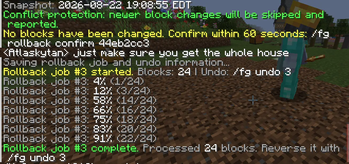
Previews every logged block change in a radius of 30 blocks back to the state it was in 2 days, 7 hours, and 15 minutes ago. The radius covers the full world height, from bedrock/minimum world height to maximum build height. The preview reports the affected block count, chunk count, and target time without changing any blocks.
To execute the preview, enter the single-use token displayed by FragGuard:
```text
/fg rollback confirm
Confirmation tokens are tied to the operator and expire after 60 seconds by default. Every confirmed rollback receives a durable job ID. Reverse a completed or failed rollback with:
```text
/fg undo
Rollback and undo progress is stored in SQLite. Interrupted jobs automatically resume after a server restart, and overlapping jobs in the same world are rejected. Changes are processed in consecutive same-chunk batches without changing saved sequence order, existing chunks load asynchronously without generating terrain, and temporary chunk tickets prevent an active chunk from unloading during audit persistence. Main-thread work respects both a per-tick time budget and block cap, and pauses automatically while server TPS is below the configured minimum.
### Storage status
```text /fg status ```
Shows database health, bounded write/control queue usage, coalesced same-tick changes, and dropped-write warnings. Block changes are written through one long-lived SQLite connection in transactional batches; lookups and rollback previews read all changes accepted before the query was submitted.
## Database upgrades and recovery
FragGuard records its SQLite schema version in `PRAGMA user_version`. Existing unversioned, version-1, and version-2 databases are upgraded automatically to version 3 when the plugin starts. Before changing an existing schema, FragGuard creates a consistent SQLite snapshot with `VACUUM INTO`, verifies it with `PRAGMA quick_check`, and saves it under:
```text
plugins/FragGuard/backups/fragguard.db.pre-migration-v2-to-v3-
The filename uses the database's actual starting version, so an unversioned database instead creates a `v0-to-v3` backup. Every migration and its schema-version update run in a single transaction. If the backup cannot be created or verified, or if the migration fails, FragGuard refuses to start instead of continuing with a partially upgraded database. A newer database schema is also rejected rather than silently opened by an older FragGuard release.
Before upgrading, stop the server and copy the entire `plugins/FragGuard` directory to a separate location. Do not copy only `fragguard.db` while the server is running: active SQLite changes can still be in `fragguard.db-wal`.
To restore a pre-migration backup:
1. Stop the Paper server completely. 2. Preserve the current `plugins/FragGuard/fragguard.db` separately for investigation. 3. Copy the selected `.bak` file to `plugins/FragGuard/fragguard.db`. 4. Remove any stale `plugins/FragGuard/fragguard.db-wal` and `plugins/FragGuard/fragguard.db-shm` files. 5. Install a FragGuard release that supports the restored schema and restart the server.
World history and rollback jobs use the world's UUID as their identity while retaining readable world names. Renaming a world therefore preserves its history and resumable rollback jobs as long as the world's original UUID, including its `uid.dat`, is preserved. Block-change actions use stable s
📊 Mod Details
- Game
- Minecraft Plugins
- Author
- mccreeper1318
- Version
- 26.2
- Downloads
- 35
- Endorsements
- 0
- Category
- management
- Created
- 8/7/2026
- Updated
- 9/10/2026
- Game Versions
- 26.2
- Tags
- management, utility, worldgen
🔧 How to Install Minecraft Plugins Mods
Download from Modrinth. Use Prism Launcher or drop into your mods folder.
📖 Full step-by-step install guide for Minecraft Plugins →
Visit the official mod page for specific installation instructions for this mod.
🎮 Need cheat codes or console commands? Check ur gaming wiki for Minecraft Plugins commands, item IDs, and more.
❓ Frequently Asked Questions
Which Minecraft Plugins versions does FragGuard support?
The author lists 26.2. Other versions may work but are untested by the author.
What is the latest version of FragGuard?
Version 26.2, published 2026-09-10 with 35 downloads recorded at the source.
Keep browsing — more Minecraft Plugins mods await