UnVoidable
⚪ Last updated 2024🖼️ Gallery (1 images)
🔍 Analysis
- 👍 0.5% endorsement rate
- 🏆 #176 of 1452 bukkit mods in this game by downloads
📋 About This Mod
# UnVoidable Prevents players from falling to void. ## Available Commands - **/unvoidable reload:** Allows for the quick reloading of the plugin's configuration without server restart. - **/unvoidable setspawn:** This command sets the safe spawn coordinates and facing direction based on your current location. - **/unvoidable setvoidlevel <y-void-level>:** This command sets the Y-level where the void begins. ## Permissions - `unvoidable.admin`: Grants the ability to execute admin commands of the plugin. ## Support For any queries or assistance with UnVoidable, please visit the (https://github.com/Furq07/UnVoidable/issues). ## Installation Steps 1. Obtain the latest version of UnVoidable from the (modrinth.com/plugin/unvoidable). 2. Place the downloaded `.jar` file into your server's `plugins` directory. 3. Restart your server to activate the plugin. 4. Customize the `config.yml` file located in `plugins/UnVoidable/config.yml` to suit your needs. ## License UnVoidable is released under the (https://www.apache.org/licenses/LICENSE-2.0).
# UnVoidable
Prevents players from falling to void.
## Available Commands
- /unvoidable reload: Allows for the quick reloading of the plugin's configuration without server restart.
- /unvoidable setspawn: This command sets the safe spawn coordinates and facing direction based on your current location.
- /unvoidable setvoidlevel
: This command sets the Y-level where the void begins.
## Permissions
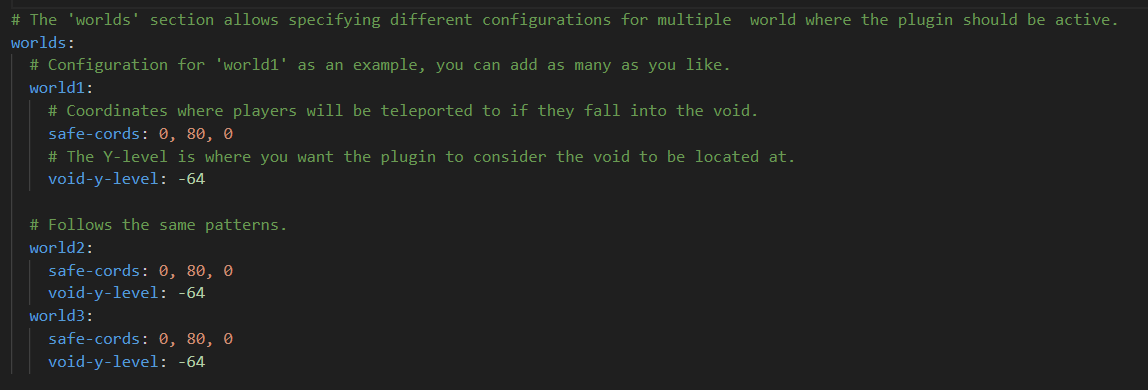
- `unvoidable.admin`: Grants the ability to execute admin commands of the plugin.
For any queries or assistance with UnVoidable, please visit the (https://github.com/Furq07/UnVoidable/issues).
## Installation Steps
1. Obtain the latest version of UnVoidable from the (modrinth.com/plugin/unvoidable). 2. Place the downloaded `.jar` file into your server's `plugins` directory. 3. Restart your server to activate the plugin. 4. Customize the `config.yml` file located in `plugins/UnVoidable/config.yml` to suit your needs.
UnVoidable is released under the (https://www.apache.org/licenses/LICENSE-2. 0).
📊 Mod Details
- Game
- Minecraft Plugins
- Author
- Furq
- Version
- 1.0.0
- Downloads
- 915
- Endorsements
- 5
- Category
- bukkit
- Created
- 5/10/2024
- Updated
- 6/20/2024
- Game Versions
- 1.8.8, 1.8.9, 1.9, 1.9.1, 1.9.2
- Tags
- management, transportation, utility
🔧 How to Install Minecraft Plugins Mods
Download from Modrinth. Use Prism Launcher or drop into your mods folder.
📖 Full step-by-step install guide for Minecraft Plugins →
Visit the official mod page for specific installation instructions for this mod.
🎮 Need cheat codes or console commands? Check ur gaming wiki for Minecraft Plugins commands, item IDs, and more.
❓ Frequently Asked Questions
Which Minecraft Plugins versions does UnVoidable support?
The author lists 1.8.8, 1.8.9, 1.9, 1.9.1, 1.9.2, 1.9.3. Other versions may work but are untested by the author.
What is the latest version of UnVoidable?
Version 1.0.0, published 2024-06-20 with 915 downloads recorded at the source.
Keep browsing — more Minecraft Plugins mods await