Armament
🟠 Updated over a year ago🖼️ Gallery (1 images)
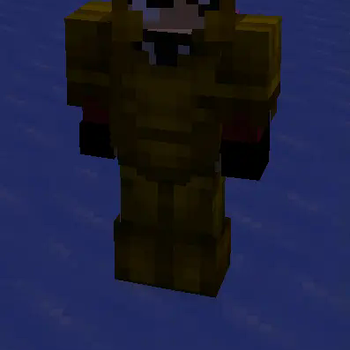
🔍 Analysis
- 👍 1.0% endorsement rate
- 🏆 #198 of 351 adventure mods in this game by downloads
📋 About This Mod
# 🧥 **Armament** Adds the ability to create configurable custom armors using resource packs. --- ## 🎧 **Key Features** | Feature | Description | | --- | --- | | **🛡️ Custom Armor Sets** | Easily add your own armor sets to Minecraft. | | **⚡ Performance Optimization** | Built to ensure smooth server performance. | | **💡 User-Friendly** | Simple commands for reloading configuration and giving armor to players. | | **⚙ Configurable** | Manage your custom armors via a straightforward `armors.yml` file. | | **🎨 Resource Pack Generation** | Automatically generate a resource pack from your configuration. | | **🔃 Cross-Version Compatibility** | Supports Minecraft versions from `1.20` to the latest. | | **🖼️ GUI Interface** | Browse and select custom armor sets through an intuitive GUI. | --- ## 💻 **Available Commands** | Command | Description | | --- | --- | | **`/armament reload`** | Reload the plugin's configuration without a server restart. | | **`/armament give <armor_name> <piece> `** | Grant a custom armor piece to a player. | | **`/armament giveset <armor_name> `** | Grant a full custom armor set to a player. | | **`/armament gui`** | Open the GUI to browse and select custom armor sets. | --- ## 🔒 **Permissions** | Permission | Description | | --- | --- | | **`armament.admin`** | Grants access to all admin commands. | --- ## 📩 **Installation Steps** 1. **Download Armament:** - Get the latest version from (https://modrinth.com/plugin/armament). 2. **Install:** - Place the `.jar` file into your server's `plugins` directory. - Example: `/plugins/Armament-x.x.x.jar` 3. **Activate:** - Restart your server to load the plugin. 4. **Customize:** - Edit the `armors.yml` file located in `plugins/Armament/armors.yml` to add your custom armor sets. - Example configuration: ```yaml armors: epic: custom_model_data: 1 helmet: name: "&6Epic Chestplate" lore: - "&7Custom Epic Lore!" chestplate: name: "&6Epic Chestplate" lore: - "&7Custom Epic Lore!" leggings: name: "&6Epic Leggings" lore: - "&7Custom Epic Lore!" boots: name: "&6Epic Boots" lore: - "&7Custom Epic Lore!" ``` 5. **Add Resources:** - Place your custom armor textures in the `source_files` directory: - Armor layers: `source_files/layer_files/` - Armor display items: `source_files/item_files/` 6. **Load Resource Pack:** - Upload the generated resource pack to (https://mc-packs.net). - Update the `server.properties` file: | Property | Value | | --- | --- | | `resource-pack` | *URL to resource pack* | | `resource-pack-sha1` | *SHA1 hash of the resource pack* | | `require-resource-pack` | `true` | - **Note:** If you're using an existing resource pack, merge it with the Armament resource pack. --- ## 🎨 **Creating Custom Armor Textures** To create custom armor textures for Armament: 1. **Open the Template:** - Locate the `armor_model.bbmodel` file in (https://github.com/Furq07/Armament/tree/main/src/main/resources). - Open this file in BlockBench to get an understanding of the armor structure. 2. **Customize the Model:** - Ensure your model adheres to Minecraft's armor structure. 3. **Export Textures:** - Export your custom armor textures. 4. **Prepare Texture Files:** The plugin requires specific naming conventions for the texture files: a) **Layer Files** (Required): In `source_files/layer_files/`: - `armorName_layer_1.png`: For helmet, chestplate, and boots - `armorName_layer_2.png`: For leggings b) **Item Files** (Optional, based on armors.yml): In `source_files/item_files/`: - `armorName_helmet.png` - `armorName_chestplate.png` - `armorName_leggings.png` - `armorName_boots.png` Replace `armorName` with the name of your custom armor set as defined in `armors.yml`. 5. **Place Textures:** - Put the armor layer textures (`*_layer_1.png` and `*_layer_2.png`) in `source_files/layer_files/`. - Put the display item textures (e.g., `*_helmet.png`) in `source_files/item_files/`. 6. **Update Configuration:** - In `armors.yml`, reference your new textures using the appropriate armor name. - Ensure the armor name in the configuration matches the prefix used in your texture file names. **Note:** The item files (helmet, chestplate, leggings, boots) are optional and depend on your `armors.yml` configuration. If you define a specific armor piece in the config, make sure to provide the corresponding item texture. --- ## 📞 **Support** For assistance, visit the (https://github.com/furq07/armament/issues) or join our (https://discord.gg/7ugrBEKza4). --- ## 📜 **License** Armament is released
# 🧥 Armament
Adds the ability to create configurable custom armors using resource packs.
## 🎧 Key Features
| Feature | Description | | --- | --- | | 🛡️ Custom Armor Sets | Easily add your own armor sets to Minecraft. | | ⚡ Performance Optimization | Built to ensure smooth server performance. | | 💡 User-Friendly | Simple commands for reloading configuration and giving armor to players. | | ⚙ Configurable | Manage your custom armors via a straightforward `armors.yml` file. | | 🎨 Resource Pack Generation | Automatically generate a resource pack from your configuration. | | 🔃 Cross-Version Compatibility | Supports Minecraft versions from `1. 20` to the latest. | | 🖼️ GUI Interface | Browse and select custom armor sets through an intuitive GUI. |
## 💻 Available Commands
| Command | Description |
| --- | --- |
| `/armament reload` | Reload the plugin's configuration without a server restart. |
| `/armament give
## 🔒 Permissions
| Permission | Description | | --- | --- | | `armament.admin` | Grants access to all admin commands. |
## 📩 Installation Steps
1. Download Armament: - Get the latest version from (https://modrinth.com/plugin/armament).
2. Install: - Place the `.jar` file into your server's `plugins` directory. - Example: `/plugins/Armament-x.x.x.jar`
3. Activate: - Restart your server to load the plugin.
4. Customize: - Edit the `armors.yml` file located in `plugins/Armament/armors.yml` to add your custom armor sets. - Example configuration: ```yaml armors: epic: custom_model_data: 1 helmet: name: "&6Epic Chestplate" lore: - "&7Custom Epic Lore!" chestplate: name: "&6Epic Chestplate" lore: - "&7Custom Epic Lore!" leggings: name: "&6Epic Leggings" lore: - "&7Custom Epic Lore!" boots: name: "&6Epic Boots" lore: - "&7Custom Epic Lore!" ```
5. Add Resources: - Place your custom armor textures in the `source_files` directory: - Armor layers: `source_files/layer_files/` - Armor display items: `source_files/item_files/`
6. Load Resource Pack: - Upload the generated resource pack to (https://mc-packs.net). - Update the `server.properties` file: | Property | Value | | --- | --- | | `resource-pack` | URL to resource pack | | `resource-pack-sha1` | SHA1 hash of the resource pack | | `require-resource-pack` | `true` | - Note: If you're using an existing resource pack, merge it with the Armament resource pack.
## 🎨 Creating Custom Armor Textures
To create custom armor textures for Armament:
1. Open the Template: - Locate the `armor_model.bbmodel` file in (https://github.com/Furq07/Armament/tree/main/src/main/resources). - Open this file in BlockBench to get an understanding of the armor structure.
2. Customize the Model: - Ensure your model adheres to Minecraft's armor structure.
3. Export Textures: - Export your custom armor textures.
4. Prepare Texture Files: The plugin requires specific naming conventions for the texture files:
a) Layer Files (Required): In `source_files/layer_files/`: - `armorName_layer_1.png`: For helmet, chestplate, and boots - `armorName_layer_2.png`: For leggings
b) Item Files (Optional, based on armors.yml): In `source_files/item_files/`: - `armorName_helmet.png` - `armorName_chestplate.png` - `armorName_leggings.png` - `armorName_boots.png`
Replace `armorName` with the name of your custom armor set as defined in `armors.yml`.
5. Place Textures: - Put the armor layer textures (`_layer_1.png` and `_layer_2.png`) in `source_files/layer_files/`. - Put the display item textures (e.g., `*_helmet.png`) in `source_files/item_files/`.
6. Update Configuration: - In `armors.yml`, reference your new textures using the appropriate armor name. - Ensure the armor name in the configuration matches the prefix used in your texture file names.
## 📞 Support
For assistance, visit the (https://github.com/furq07/armament/issues) or join our (https://discord.gg/7ugrBEKza4).
## 📜 License
Armament is released
📊 Mod Details
- Game
- Minecraft Plugins
- Author
- Furq
- Version
- 1.0
- Downloads
- 518
- Endorsements
- 5
- Category
- adventure
- Created
- 10/3/2024
- Updated
- 10/1/2024
- Game Versions
- 1.20, 1.20.1, 1.20.2, 1.20.3, 1.20.4
- Tags
- adventure, equipment, game-mechanics
🔧 How to Install Minecraft Plugins Mods
Download from Modrinth. Use Prism Launcher or drop into your mods folder.
📖 Full step-by-step install guide for Minecraft Plugins →
Visit the official mod page for specific installation instructions for this mod.
🎮 Need cheat codes or console commands? Check ur gaming wiki for Minecraft Plugins commands, item IDs, and more.
❓ Frequently Asked Questions
Which Minecraft Plugins versions does Armament support?
The author lists 1.20, 1.20.1, 1.20.2, 1.20.3, 1.20.4, 1.20.5. Other versions may work but are untested by the author.
What is the latest version of Armament?
Version 1.0, published 2024-10-01 with 518 downloads recorded at the source.
Keep browsing — more Minecraft Plugins mods await