Simple Welcome Message
🟡 Updated this year🖼️ Gallery (1 images)
🔍 Analysis
- 👍 0.1% endorsement rate
- 🏆 #83 of 99 fabric mods in this game by downloads
📋 About This Mod
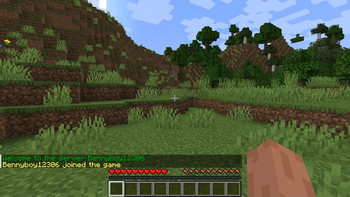
# Welcome Message Plugin This is a simple welcome message plugin/mod for paper or fabric servers. Customise a message, with colour codes or the players name, that will be displayed to your players every time they join ## Usage: - Simply drag and drop the jar into your servers plugins/mods folder depending on which version you are using. If you are using the fabric version you also need to install fabric api. - Modify config.yml (Paper) or config/welcome-message/config.json to customise your message. - Use %player% as a placeholder for the players name. - Use &<minecraft-format-code> to specify a color. - If you are using the paper version run /welcome-message-reload or restart your server to apply changes, If you are using the fabric version you must restart the server to apply the changes. ## Commands (Only on Paper Version): - Get - Gets the current welcome message: ``` /welcome-message-get ``` - Set - Sets the welcome message: ``` /welcome-message-set <value> ``` - Reload - Reloads the config (use after editing the config.yml): ``` /welcome-message-reload ```
# Welcome Message Plugin This is a simple welcome message plugin/mod for paper or fabric servers. Customise a message, with colour codes or the players name, that will be displayed to your players every time they join
## Usage:
- Simply drag and drop the jar into your servers plugins/mods folder depending on which version you are using. If you are using the fabric version you also need to install fabric api.
- Modify config.yml (Paper) or config/welcome-message/config.json to customise your message.
- Use %player% as a placeholder for the players name.
- Use &
## Commands (Only on Paper Version): - Get - Gets the current welcome message: ``` /welcome-message-get ```
- Set - Sets the welcome message:
- ```
- /welcome-message-set
- ```
- Reload - Reloads the config (use after editing the config.yml):
``` /welcome-message-reload ```
📊 Mod Details
- Game
- Minecraft Plugins
- Author
- Bennyboy12306
- Version
- 1.0
- Downloads
- 1,796
- Endorsements
- 1
- Category
- fabric
- Created
- 10/12/2024
- Updated
- 6/3/2026
- Game Versions
- 26.1.2
- Tags
- social, utility
🔧 How to Install Minecraft Plugins Mods
Download from Modrinth. Use Prism Launcher or drop into your mods folder.
📖 Full step-by-step install guide for Minecraft Plugins →
Visit the official mod page for specific installation instructions for this mod.
🎮 Need cheat codes or console commands? Check ur gaming wiki for Minecraft Plugins commands, item IDs, and more.
❓ Frequently Asked Questions
Which Minecraft Plugins versions does Simple Welcome Message support?
The author lists 26.1.2. Other versions may work but are untested by the author.
What is the latest version of Simple Welcome Message?
Version 1.0, published 2026-06-03 with 1,796 downloads recorded at the source.
Keep browsing — more Minecraft Plugins mods await