Relocation
🟡 Updated this year🖼️ Gallery (4 images)
🔍 Analysis
- 🏆 #130 of 208 management mods in this game by downloads
📋 About This Mod
此插件完全支持简体中文,其他语言玩家只需看懂下面内容即可愉快游玩 This is a simple building relocation plugin, with particle effects and sound effects included. Preview: !(https://cdn.modrinth.com/data/cached_images/66e20873d79a6013e9307002d80fbce9c9b98cf0.png) !(https://cdn.modrinth.com/data/cached_images/67ee26bc23404d5311a3815a848a33c101ad5a99.png) !(https://cdn.modrinth.com/data/cached_images/e6111f916299b29e0c2d2389215ca95fcf63144c.png) !(https://cdn.modrinth.com/data/cached_images/2e42f1f6424bfbbebd6a9244203e202531c3b8e8.png) By default, the plugin can be used by all players. You can change it to false in the configuration file to allow only administrators and whitelisted players to use it. Player command: /r help Show help information /r selection Enter selection mode to use the hoe's left and right buttons to choose the two points of the building to be moved /r destination Use the hoe left-click to select the point where the building will be moved Right-click with the hoe to rotate the angle /r execute Enter to confirm information migration (needs to be entered twice) /r cancel Cancel all modes Administrator Command: /r add <Player> Add player to whitelist (available when the configuration file blocks everyone from use) /r remove <Player> Remove player from the whitelist (available when the configuration file is set to disable use for everyone) /r list View whitelist list /r reload Reload plugin Attention: Relocating pure block buildings is the best. Please turn off all switches before moving the redstone machine Entities cannot be moved, and rotating migrated buildings may cause some connected blocks to malfunction and require manual placement. The containers and signboard content cannot be relocated; they will be destroyed. If you cannot fully trust the server, it is recommended that other players disable all publicly available configurations. Incorrect use can lead to irreversible consequences. Any suggestions or feedback are welcome, you can contact me at xzm5749@163.com
此插件完全支持简体中文,其他语言玩家只需看懂下面内容即可愉快游玩
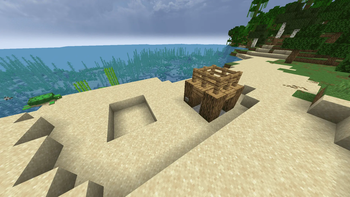
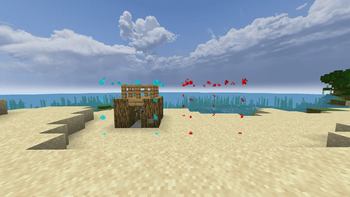
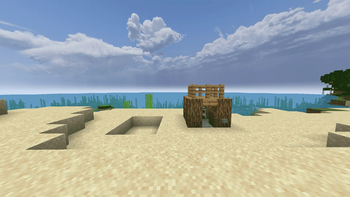
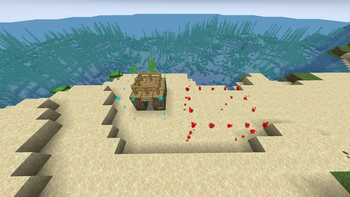
This is a simple building relocation plugin, with particle effects and sound effects included. Preview:
!(https://cdn.modrinth.com/data/cached_images/66e20873d79a6013e9307002d80fbce9c9b98cf0.png) !(https://cdn.modrinth.com/data/cached_images/67ee26bc23404d5311a3815a848a33c101ad5a99.png) !(https://cdn.modrinth.com/data/cached_images/e6111f916299b29e0c2d2389215ca95fcf63144c.png) !(https://cdn.modrinth.com/data/cached_images/2e42f1f6424bfbbebd6a9244203e202531c3b8e8.png)
By default, the plugin can be used by all players. You can change it to false in the configuration file to allow only administrators and whitelisted players to use it.
Player command:
Show help information
/r selection
Enter selection mode to use the hoe's left and right buttons to choose the two points of the building to be moved
/r destination
Use the hoe left-click to select the point where the building will be moved Right-click with the hoe to rotate the angle
Enter to confirm information migration (needs to be entered twice)
Cancel all modes
Administrator Command:
/r add
/r remove
View whitelist list
Reload plugin
Relocating pure block buildings is the best.
Please turn off all switches before moving the redstone machine
Entities cannot be moved, and rotating migrated buildings may cause some connected blocks to malfunction and require manual placement.
The containers and signboard content cannot be relocated; they will be destroyed.
If you cannot fully trust the server, it is recommended that other players disable all publicly available configurations. Incorrect use can lead to irreversible consequences.
Any suggestions or feedback are welcome, you can contact me at xzm5749@163.com
📊 Mod Details
- Game
- Minecraft Plugins
- Author
- topDress
- Version
- 1
- Downloads
- 19
- Endorsements
- 0
- Category
- management
- Created
- 5/31/2026
- Updated
- 5/28/2026
- Game Versions
- 1.21, 1.21.1, 1.21.2, 1.21.3, 1.21.4
- Tags
- management, utility, worldgen
🔧 How to Install Minecraft Plugins Mods
Download from Modrinth. Use Prism Launcher or drop into your mods folder.
📖 Full step-by-step install guide for Minecraft Plugins →
Visit the official mod page for specific installation instructions for this mod.
🎮 Need cheat codes or console commands? Check ur gaming wiki for Minecraft Plugins commands, item IDs, and more.
❓ Frequently Asked Questions
Which Minecraft Plugins versions does Relocation support?
The author lists 1.21, 1.21.1, 1.21.2, 1.21.3, 1.21.4, 1.21.5. Other versions may work but are untested by the author.
What is the latest version of Relocation?
Version 1, published 2026-05-28 with 19 downloads recorded at the source.
Keep browsing — more Minecraft Plugins mods await