QAPlugin
🟠 Updated over a year ago🖼️ Gallery (4 images)
🔍 Analysis
- 🏆 #27 of 38 cursed mods in this game by downloads
📋 About This Mod
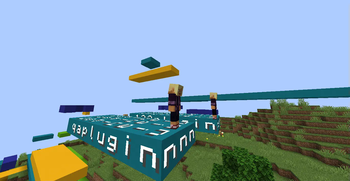
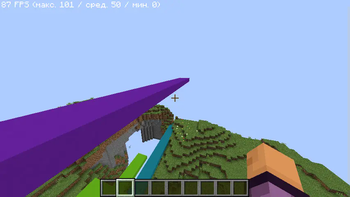
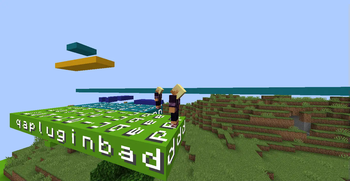
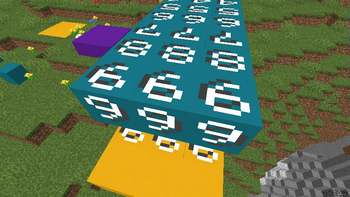
# Question and Answer Plugin (QAPlugin) 🎮 Play the Question and Answer game in **Minecraft**! The plugin will add a question and answer race to your server! In which the one who knows the longest words wins!👑 **🥇 Just try it!** ## How to use 1. A player with game creation permissions uses the command **/creategame <game name> <args for game>**, specifying the required arguments. 2. The player who created the game must then create paths for the players using the command **/path <game name> **. - **NOTE**: The direction and starting location are set based on the command sender's current position. 3. After setting paths for all players, the command **/startgame <game name>** must be executed. This will initialize the game, create the necessary blocks, and teleport all players to their starting points. - ### ⚠️ Before using it **Be sure to test the plugin on a local server, and be sure to check the performance.** ## ⭐️ Features - ✅ **Display Text**, **Sound**, **Particles** is support ❤️ - ✅ **Custom questions** support - ✅ You choose the correct answers, and no one else! - ✅ Automatic removal of all built blocks at the end of the game. - ✅ The ability to enable the indestructibility of the world! - **✅ The plugin is great for playing with friends! ⭐️** ## Gamemodes - `CLASSIC` - Classic Mode - `PLEONASMS` - Elimination mode ### Classic The winner is the one who has reached the required number of blocks. (There may be several winners) ### Plonasms The winner is the last one left, the game requires at least two players. ## Commands - `/question <question text>` - Ask the players a question - `/answer <answer>` - Answer the current question - `/creategame <name> <args for gamemode>` - Create a new game - `/startgame <name>` - Start the game - `/deletegame <name>` - Delete the game - `/path <game name> ` - Invite the player to the game or join the game yourself - `/acceptgame ` - Accept the invitation to the game - `/denygame ` - Deny the invitation to the game - `/deleteplayer <game name> <player>` - Remove a player from the game - `/deleteblock <playername> ` - Delete layers from the path for Player - `/qareload` - Reload the plugin configuration ## Permissions - `qaplugin.game.base` - Basic commands for players - `qaplugin.game.creator` - Basic commands for game management - `qaplugin.plugin.base` - Basic commands for plugin management - `qaplugin.*` - Full access to all plugin commands
# Question and Answer Plugin (QAPlugin) 🎮 Play the Question and Answer game in Minecraft!
The plugin will add a question and answer race to your server! In which the one who knows the longest words wins!👑
🥇 Just try it!
## How to use
1. A player with game creation permissions uses the command /creategame
## ⭐️ Features - ✅ Display Text, Sound, Particles is support ❤️ - ✅ Custom questions support - ✅ You choose the correct answers, and no one else! - ✅ Automatic removal of all built blocks at the end of the game. - ✅ The ability to enable the indestructibility of the world! - ✅ The plugin is great for playing with friends! ⭐️
## Gamemodes - `CLASSIC` - Classic Mode - `PLEONASMS` - Elimination mode
### Classic The winner is the one who has reached the required number of blocks. (There may be several winners)
### Plonasms The winner is the last one left, the game requires at least two players.
## Commands
- `/question
## Permissions - `qaplugin.game.base` - Basic commands for players - `qaplugin.game.creator` - Basic commands for game management - `qaplugin.plugin.base` - Basic commands for plugin management - `qaplugin.*` - Full access to all plugin commands
📊 Mod Details
- Game
- Minecraft Plugins
- Author
- Kredwi
- Version
- 0.6.9
- Downloads
- 212
- Endorsements
- 1
- Category
- cursed
- Created
- 6/8/2025
- Updated
- 6/27/2025
- Game Versions
- 1.19.4, 1.20, 1.20.1, 1.20.2, 1.20.3
- Tags
- cursed, game-mechanics, minigame
🔧 How to Install Minecraft Plugins Mods
Download from Modrinth. Use Prism Launcher or drop into your mods folder.
📖 Full step-by-step install guide for Minecraft Plugins →
Visit the official mod page for specific installation instructions for this mod.
🎮 Need cheat codes or console commands? Check ur gaming wiki for Minecraft Plugins commands, item IDs, and more.
❓ Frequently Asked Questions
Which Minecraft Plugins versions does QAPlugin support?
The author lists 1.19.4, 1.20, 1.20.1, 1.20.2, 1.20.3, 1.20.4. Other versions may work but are untested by the author.
What is the latest version of QAPlugin?
Version 0.6.9, published 2025-06-27 with 212 downloads recorded at the source.
Keep browsing — more Minecraft Plugins mods await