NPDiscordPlugin
🟡 Updated this year🖼️ Gallery (2 images)
🔍 Analysis
- 🏆 #110 of 222 paper mods in this game by downloads
📋 About This Mod
# NPDiscordPlugin > Bring your community together — link Minecraft and Discord, automatically. --- ## Why install this? Your Discord and your server shouldn't feel like two different communities. NPDiscordPlugin links each player's Minecraft account to their Discord profile, keeps their rank in sync on both sides automatically, and pipes server activity into Discord so your staff can keep an eye on things without alt-tabbing into the console. **Requires**: (https://modrinth.com/project/npplugincore) + **LuckPerms**, and a free Discord bot application (five minutes to set up — steps below). --- ## What it does for your server - **One-click linking** — staff post a "Link my account" button in Discord, players redeem a code in-game with `/npdiscord link`. - **Ranks that sync themselves** — promote someone in-game and their Discord role updates automatically, and vice versa. You decide once which LuckPerms rank maps to which Discord role. - **Your community, mirrored in Discord** — chat, joins/leaves, punishments, economy, item and block events, routed to whichever channels you choose. - **Server health in your pocket** — a live feed of server logs (errors, warnings, whatever levels you pick), stack traces included, straight into a Discord channel. Find out about a crash before your players do. --- ## Setup 1. Create a Discord bot application (see below) — takes a few minutes. 2. Drop `NPDiscordPlugin-<version>.jar` in `plugins/`, restart once to generate the config. 3. Fill in your bot token, server ID, and channel IDs in `plugins/NorrionProject/discord-config.yml`. 4. Restart again — your bot comes online and starts syncing. ### Setting up the bot 1. Go to the (https://discord.com/developers/applications) and create a new application. 2. Under **Bot**, reset and copy the token, and enable the **Message Content**, **Server Members**, and **Presence** intents. 3. Under **OAuth2 → URL Generator**, tick the `bot` and `applications.commands` scopes plus Send Messages / Embed Links / Manage Roles / Read Message History / Use Slash Commands, then open the generated link to invite the bot to your server. 4. Copy the **Application ID** (General Information tab) into your config. --- ## Commands | Command | Who | What it does | |---|---|---| | `/npdiscord link <code>` | Players | Link their account | | `/npdiscord create-link <channel-id>` | Staff | Post the "Link my account" button | --- ## FAQ **Bot won't come online?** Double-check the token, and that all three intents are enabled in the developer portal. **Roles aren't syncing?** Verify your guild ID is correct, and make sure the bot's own role sits above every role it needs to assign. **Does this need LuckPerms?** Rank sync does, yes. Linking and log monitoring work without it. --- ## Missing something? No plugin fits every server out of the box. If there's a feature, an integration with another plugin, or a tweak you need and don't see here, come tell us on Discord — that's exactly how this plugin keeps improving. --- ## Links - **Website & Wiki**: (https://norrion.eu) - **Support**: (https://discord.gg/WHUZNQe) --- *Requires NorrionProjectCorePlugin + LuckPerms*
# NPDiscordPlugin
> Bring your community together — link Minecraft and Discord, automatically.
## Why install this?
Your Discord and your server shouldn't feel like two different communities. NPDiscordPlugin links each player's Minecraft account to their Discord profile, keeps their rank in sync on both sides automatically, and pipes server activity into Discord so your staff can keep an eye on things without alt-tabbing into the console.
Requires: (https://modrinth.com/project/npplugincore) + LuckPerms, and a free Discord bot application (five minutes to set up — steps below).
## What it does for your server
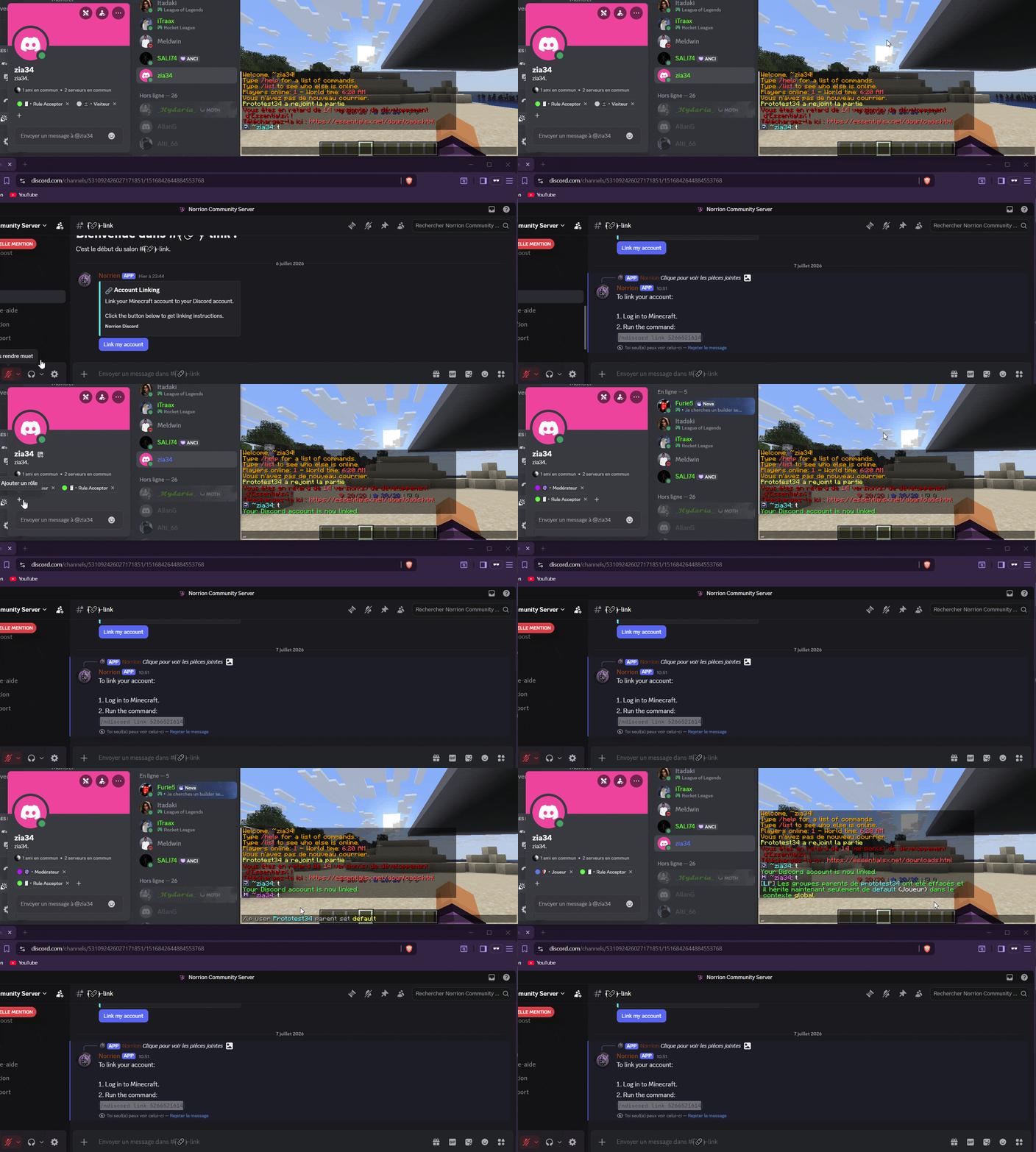
- One-click linking — staff post a "Link my account" button in Discord, players redeem a code in-game with `/npdiscord link`.
- Ranks that sync themselves — promote someone in-game and their Discord role updates automatically, and vice versa. You decide once which LuckPerms rank maps to which Discord role.
- Your community, mirrored in Discord — chat, joins/leaves, punishments, economy, item and block events, routed to whichever channels you choose.
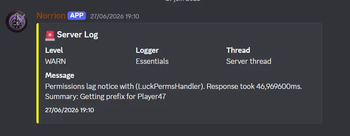
- Server health in your pocket — a live feed of server logs (errors, warnings, whatever levels you pick), stack traces included, straight into a Discord channel. Find out about a crash before your players do.
1. Create a Discord bot application (see below) — takes a few minutes.
2. Drop `NPDiscordPlugin-
### Setting up the bot
1. Go to the (https://discord.com/developers/applications) and create a new application. 2. Under Bot, reset and copy the token, and enable the Message Content, Server Members, and Presence intents. 3. Under OAuth2 → URL Generator, tick the `bot` and `applications.commands` scopes plus Send Messages / Embed Links / Manage Roles / Read Message History / Use Slash Commands, then open the generated link to invite the bot to your server. 4. Copy the Application ID (General Information tab) into your config.
## Commands
| Command | Who | What it does |
|---|---|---|
| `/npdiscord link ` | Players | Link their account |
| `/npdiscord create-link
Bot won't come online? Double-check the token, and that all three intents are enabled in the developer portal.
Roles aren't syncing? Verify your guild ID is correct, and make sure the bot's own role sits above every role it needs to assign.
Does this need LuckPerms? Rank sync does, yes. Linking and log monitoring work without it.
## Missing something?
No plugin fits every server out of the box. If there's a feature, an integration with another plugin, or a tweak you need and don't see here, come tell us on Discord — that's exactly how this plugin keeps improving.
- Website & Wiki: (https://norrion.eu)
- Support: (https://discord.gg/WHUZNQe)
Requires NorrionProjectCorePlugin + LuckPerms
📊 Mod Details
- Game
- Minecraft Plugins
- Author
- prototest34
- Version
- 1.1.4
- Downloads
- 19
- Endorsements
- 0
- Category
- paper
- Created
- 8/2/2026
- Updated
- 8/25/2026
- Game Versions
- 26.1, 26.1.1, 26.1.2
- Tags
- utility
🔧 How to Install Minecraft Plugins Mods
Download from Modrinth. Use Prism Launcher or drop into your mods folder.
📖 Full step-by-step install guide for Minecraft Plugins →
Visit the official mod page for specific installation instructions for this mod.
🎮 Need cheat codes or console commands? Check ur gaming wiki for Minecraft Plugins commands, item IDs, and more.
❓ Frequently Asked Questions
Which Minecraft Plugins versions does NPDiscordPlugin support?
The author lists 26.1, 26.1.1, 26.1.2. Other versions may work but are untested by the author.
What is the latest version of NPDiscordPlugin?
Version 1.1.4, published 2026-08-25 with 19 downloads recorded at the source.
Keep browsing — more Minecraft Plugins mods await