NPPartiesPlugin
🟡 Updated this year🖼️ Gallery (3 images)
🔍 Analysis
- 🏆 #97 of 222 paper mods in this game by downloads
📋 About This Mod
# NPPartiesPlugin > Give your players a party menu they'll actually enjoy using. --- ## Why install this? Parties by AlessioDP is powerful, but it's built for chat commands. Your players are used to menus — this is that menu. Browse every party on the server, check who's online, invite with a click, and leave or kick with a safety net against fat-fingered mistakes. It slots straight into your existing Parties setup — no migration, no new commands to learn. **Requires**: (https://modrinth.com/project/npcoreplugin) + **Parties** **Optional**: **MMOCore** — party menus show off each member's class and level too. --- ## What players get - **Every party, one menu** — a clean, paginated list instead of squinting at chat. - **Who's really online** — status, since-when, and (with MMOCore) class and level for every member. - **Invite with a click** instead of typing `/party invite Steve_the_Miner99` and hoping it's spelled right. - **No accidental ragequits** — leaving, kicking, and disbanding all require a confirmation click. - Fully translated — English and French included. --- ## Setup 1. Drop `NPPartiesPlugin-<version>.jar` in `plugins/` alongside NorrionProjectCorePlugin and Parties. 2. Restart — that's it, no configuration needed to get going. 3. Want to change icons, colors, or wording? Everything lives in `plugins/NorrionProject/parties-config.yml` and the language files. --- ## For your players Just `/party` — the menu takes it from there. Every existing Parties command still works underneath; this plugin only changes how players interact with them. --- ## FAQ **Does this replace Parties?** No — it's a visual layer on top of it. You still need Parties installed and running. **Classes/levels not showing?** Make sure MMOCore is installed and loads before NPPartiesPlugin, then restart. **Can I run this alongside another Parties GUI plugin?** Disable the other one first — both will fight over the same events. --- ## Missing something? No plugin fits every server out of the box. If there's a feature, an integration with another plugin, or a tweak you need and don't see here, come tell us on Discord — that's exactly how this plugin keeps improving. --- ## Links - **Website & Wiki**: (https://norrion.eu) - **Support**: (https://discord.gg/WHUZNQe) --- *Requires NorrionProjectCorePlugin + Parties — Optional: MMOCore*
# NPPartiesPlugin
> Give your players a party menu they'll actually enjoy using.
## Why install this?
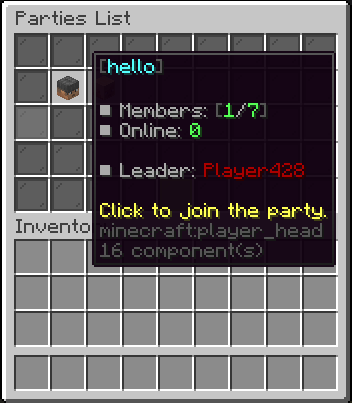
Parties by AlessioDP is powerful, but it's built for chat commands. Your players are used to menus — this is that menu. Browse every party on the server, check who's online, invite with a click, and leave or kick with a safety net against fat-fingered mistakes. It slots straight into your existing Parties setup — no migration, no new commands to learn.
Requires: (https://modrinth.com/project/npcoreplugin) + Parties Optional: MMOCore — party menus show off each member's class and level too.
## What players get
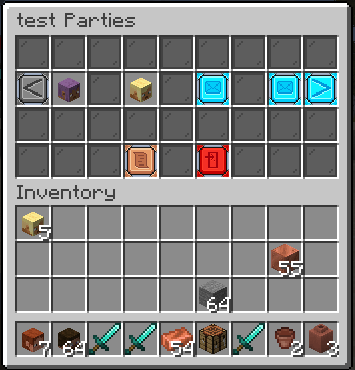
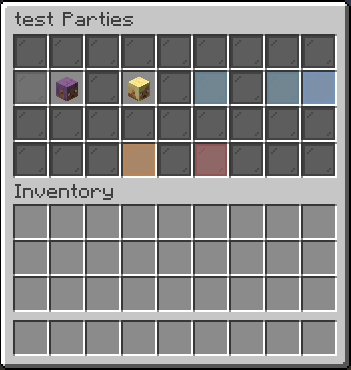
- Every party, one menu — a clean, paginated list instead of squinting at chat.
- Who's really online — status, since-when, and (with MMOCore) class and level for every member.
- Invite with a click instead of typing `/party invite Steve_the_Miner99` and hoping it's spelled right.
- No accidental ragequits — leaving, kicking, and disbanding all require a confirmation click.
- Fully translated — English and French included.
1. Drop `NPPartiesPlugin-
## For your players
Just `/party` — the menu takes it from there. Every existing Parties command still works underneath; this plugin only changes how players interact with them.
Does this replace Parties? No — it's a visual layer on top of it. You still need Parties installed and running.
Classes/levels not showing? Make sure MMOCore is installed and loads before NPPartiesPlugin, then restart.
Can I run this alongside another Parties GUI plugin? Disable the other one first — both will fight over the same events.
## Missing something?
No plugin fits every server out of the box. If there's a feature, an integration with another plugin, or a tweak you need and don't see here, come tell us on Discord — that's exactly how this plugin keeps improving.
- Website & Wiki: (https://norrion.eu)
- Support: (https://discord.gg/WHUZNQe)
Requires NorrionProjectCorePlugin + Parties — Optional: MMOCore
📊 Mod Details
- Game
- Minecraft Plugins
- Author
- prototest34
- Version
- 1.2.4
- Downloads
- 21
- Endorsements
- 0
- Category
- paper
- Created
- 8/2/2026
- Updated
- 8/25/2026
- Game Versions
- 26.1, 26.1.1, 26.1.2
- Tags
- social, utility
🔧 How to Install Minecraft Plugins Mods
Download from Modrinth. Use Prism Launcher or drop into your mods folder.
📖 Full step-by-step install guide for Minecraft Plugins →
Visit the official mod page for specific installation instructions for this mod.
🎮 Need cheat codes or console commands? Check ur gaming wiki for Minecraft Plugins commands, item IDs, and more.
❓ Frequently Asked Questions
Which Minecraft Plugins versions does NPPartiesPlugin support?
The author lists 26.1, 26.1.1, 26.1.2. Other versions may work but are untested by the author.
What is the latest version of NPPartiesPlugin?
Version 1.2.4, published 2026-08-25 with 21 downloads recorded at the source.
Keep browsing — more Minecraft Plugins mods await