Video Player
⚪ Last updated 2024⚠️ Install Order · 2 steps
Install in this order, then this mod last — most mods fail to load without their framework and dependencies in place.
🖼️ Gallery (1 images)
🔍 Analysis
- 👍 0.1% endorsement rate
- 🏆 #326 of 335 decoration mods in this game by downloads
📋 About This Mod
<h1 style="color: #00ffcc; text-align: center; font-size: 3em; font-family: 'Arial Black', sans-serif; text-shadow: 2px 2px 4px #000000;">🎬 Video Player Mod</h1> <h2 style="color: #ff6600; text-align: center; font-family: 'Verdana', sans-serif; font-size: 2em;">✨ Revolutionize Your Minecraft Experience! ✨</h2> <p style="text-align: center; font-size: 1.5em; color: #ffffff; font-family: 'Courier New', Courier, monospace;"> The <strong>Video Player Mod</strong> lets you <span style="color: #00ffcc;">play videos, music, and international radio</span> directly within the Minecraft GUI. Whether you're hosting a server or playing solo, this mod brings your favorite content straight to your game! </p> <h3 style="color: #ff6600; font-family: 'Verdana', sans-serif; font-size: 1.8em;">🔊 <strong>Key Features</strong></h3> <ul style="color: #ffffff; font-size: 1.2em; line-height: 1.5em; list-style-type: none;"> <li>🎵 <strong>Music & International Radio:</strong> Tune in to your favorite stations or play music directly via URLs.</li> <li>📺 <strong>TV in Minecraft:</strong> Place TV models and enjoy video playback within the game world.</li> <li>🖥️ <strong>Fullscreen Video Playback:</strong> Immerse yourself with videos in fullscreen, perfect for sharing content across all connected players.</li> <li>🎶 <strong>Background music</strong> Immerse yourself with custom sounds or music that can be shared across all connected players.</li> </ul> <h3 style="color: #ff6600; font-family: 'Verdana', sans-serif; font-size: 1.8em;">🛠️ <strong>Customizable Commands</strong></h3> <p style="color: #ffffff; font-size: 1.2em; line-height: 1.5em;"> <strong>/playvideo</strong>: Simple and effective. Play videos with basic options like volume and control locks.<br> <strong>/playgovideo</strong>: Advanced command with customizable screen modes, positions, and fade effects.<br> <strong>/playmusic</strong>: Play music or radio streams with customizable volume and control options.<br> <strong>/stopvideo</strong>: Stop the actual videos of the players that you want.<br> <strong>/stopmusic</strong>: Stop the actual musics of the players that you want. </p> <h3 style="color: #ff6600; font-family: 'Verdana', sans-serif; font-size: 1.8em;">📜 <strong>How to Use Commands</strong></h3> <p style="color: #ffffff; font-size: 1.2em; line-height: 1.5em;"> <strong>1. /playvideo <TARGETS/PLAYER> <VOLUME> <URL> </strong><br> This command allows you to play a video for the specified players with customizable options: </p> <ul style="color: #ffffff; font-size: 1.2em; line-height: 1.5em; list-style-type: none;"> <li>🎯 <strong>TARGETS/PLAYER</strong>: Specify the player(s) who will see the video. Example: @a for all players.</li> <li>🔊 <strong>VOLUME</strong>: Set the volume level (0-100).</li> <li>🌐 <strong>URL</strong>: The video URL to be played (e.g., YouTube link).</li> <li>🚫 <strong>control_blocked</strong>: (Optional) Block fast forward/rewind controls. Default is <strong>false</strong>.</li> <li>⏭️ <strong>can_skip</strong>: (Optional) Disable <strong>SHIFT + ESCAPE</strong> to prevent skipping. Default is <strong>true</strong>.</li> </ul> <p style="color: #ffffff; font-size: 1.2em;"> <em>Example:</em> <strong>/playvideo @a 100 https://www.youtube.com/watch?v=C0DPdy98e4c</strong><br> Plays the video for all players at maximum volume. </p> <p style="color: #ffffff; font-size: 1.2em; line-height: 1.5em;"> <strong>2. /playgovideo <TARGETS/PLAYER> <VOLUME> <URL> <MODE> </strong><br> This advanced command offers more customization: </p> <ul style="color: #ffffff; font-size: 1.2em; line-height: 1.5em; list-style-type: none;"> <li>🎯 <strong>TARGETS/PLAYER</strong>: Specify the player(s) who will see the video.</li> <li>🔊 <strong>VOLUME</strong>: Set the volume level (0-100).</li> <li>🌐 <strong>URL</strong>: The video URL to be played.</li> <li>🖥️ <strong>MODE</strong>: Choose 0 for fullscreen or 1 for partial screen (under development).</li> <li>🚫 <strong>control_blocked</strong>: (Optional) Block fast forward/rewind controls.</li> <li>⏭️ <strong>can_skip</strong>: (Optional) Disable <strong>SHIFT + ESCAPE</strong>.</li> <li>📍 <strong>position</strong>: (Mode 1 only) Customize the video position (under development).</li> <li>💨 <strong>option_mode & option_secs</strong>: Define fade-in and fade-out effects with specified durations.</li> </ul> <p style="color: #ffffff; font-size: 1.2em;"> <em>Example:</em> <strong>/playgovideo @a 100 https://www.youtube.com/watch?v=C0DPdy98e4c 0 false true 0 5 1 3</strong><br> Plays the video in fullscreen with a 5-second fade-in and a 3-second
🎬 Video Player Mod
✨ Revolutionize Your Minecraft Experience! ✨
The Video Player Mod lets you play videos, music, and international radio directly within the Minecraft GUI. Whether you're hosting a server or playing solo, this mod brings your favorite content straight to your game!
🔊 Key Features
- 🎵 Music & International Radio: Tune in to your favorite stations or play music directly via URLs.
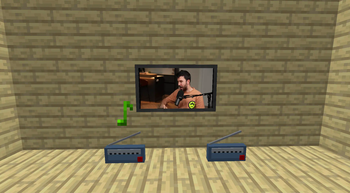
- 📺 TV in Minecraft: Place TV models and enjoy video playback within the game world.
- 🖥️ Fullscreen Video Playback: Immerse yourself with videos in fullscreen, perfect for sharing content across all connected players.
- 🎶 Background music Immerse yourself with custom sounds or music that can be shared across all connected players.
🛠️ Customizable Commands
/playvideo: Simple and effective. Play videos with basic options like volume and control locks.
/playgovideo: Advanced command with customizable screen modes, positions, and fade effects.
/playmusic: Play music or radio streams with customizable volume and control options.
/stopvideo: Stop the actual videos of the players that you want.
/stopmusic: Stop the actual musics of the players that you want.
📜 How to Use Commands
1. /playvideo <TARGETS/PLAYER> <VOLUME> <URL> [<control_blocked>] [<can_skip>]
This command allows you to play a video for the specified players with customizable options:
- 🎯 TARGETS/PLAYER: Specify the player(s) who will see the video. Example: @a for all players.
- 🔊 VOLUME: Set the volume level (0-100).
- 🌐 URL: The video URL to be played (e.g., YouTube link).
- 🚫 control_blocked: (Optional) Block fast forward/rewind controls. Default is false.
- ⏭️ can_skip: (Optional) Disable SHIFT + ESCAPE to prevent skipping. Default is true.
Example: /playvideo @a 100 https://www.youtube.com/watch?v=C0DPdy98e4c
Plays the video for all players at maximum volume.
2. /playgovideo <TARGETS/PLAYER> <VOLUME> <URL> <MODE> [<control_blocked>] [<can_skip>] [<option_mode _in option_secs_in option_mode_out option_secs_out>]
This advanced command offers more customization:
- 🎯 TARGETS/PLAYER: Specify the player(s) who will see the video.
- 🔊 VOLUME: Set the volume level (0-100).
- 🌐 URL: The video URL to be played.
- 🖥️ MODE: Choose 0 for fullscreen or 1 for partial screen (under development).
- 🚫 control_blocked: (Optional) Block fast forward/rewind controls.
- ⏭️ can_skip: (Optional) Disable SHIFT + ESCAPE.
- 📍 position: (Mode 1 only) Customize the video position (under development).
- 💨 option_mode & option_secs: Define fade-in and fade-out effects with specified durations.
Example: /playgovideo @a 100 https://www.youtube.com/watch?v=C0DPdy98e4c 0 false true 0 5 1 3
Plays the video in fullscreen with a 5-second fade-in and a 3-second
📊 Mod Details
- Game
- Minecraft Mods
- Author
- NGoedix
- Version
- 3.0.5
- Downloads
- 90,972
- Endorsements
- 77
- Category
- decoration
- Created
- 6/15/2024
- Updated
- 8/26/2024
- Game Versions
- 1.20, 1.20.1, 1.20.2, 1.20.3, 1.20.4
- Tags
- decoration, technology, utility
🔧 How to Install Minecraft Mods Mods
Download from Modrinth. Use Prism Launcher or drop into your mods folder.
📖 Full step-by-step install guide for Minecraft Mods →
Visit the official mod page for specific installation instructions for this mod.
🎮 Need cheat codes or console commands? Check ur gaming wiki for Minecraft Mods commands, item IDs, and more.
❓ Frequently Asked Questions
Which Minecraft Mods versions does Video Player support?
The author lists 1.20, 1.20.1, 1.20.2, 1.20.3, 1.20.4, 1.20.5. Other versions may work but are untested by the author.
What is the latest version of Video Player?
Version 3.0.5, published 2024-08-26 with 90,972 downloads recorded at the source.
Keep browsing — more Minecraft Mods mods await