NPC Studio
🟡 Updated this year⚠️ Install Order · 2 steps
Install in this order, then this mod last — most mods fail to load without their framework and dependencies in place.
🖼️ Gallery (4 images)
🔍 Analysis
- 👍 0.2% endorsement rate
- 🏆 #222 of 1032 fabric mods in this game by downloads
📋 About This Mod
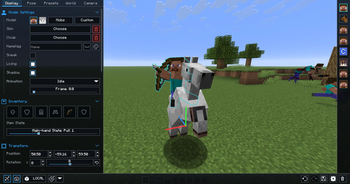
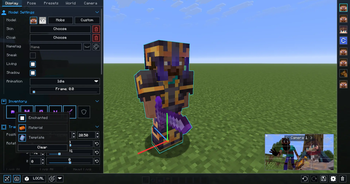
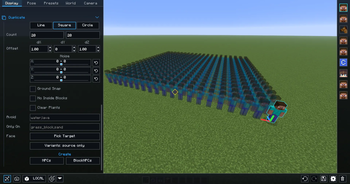
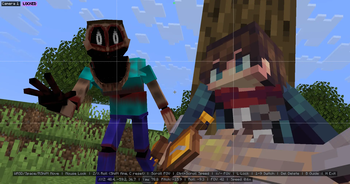
!(https://cdn.modrinth.com/data/cached_images/59133307d10a042a299ca1d47e08e063688ce4ac.png) [!(https://raw.githubusercontent.com/intergrav/devins-badges/v3/assets/cozy/social/discord-plural_vector.svg)](https://discord.gg/mdh) [!(https://raw.githubusercontent.com/intergrav/devins-badges/v3/assets/cozy/donate/kofi-plural_vector.svg)](https://ko-fi.com/seltop) # Be the director of your best thumbnail yet. Stage the shot, pose the characters, control the world, and capture it all inside Minecraft. # Create with control - Advanced character posing - Custom mob & item support - Detailed world and lighting control - Powerful in-game camera tools - Pose presets, scene saving, and more # Watch the full showcase
# FAQ
Where can I report bugs or suggest features?
Join the Discord at discord.gg/mdh. For bug reports, include your Minecraft version, NPC Studio version, mod loader, what you expected to happen, what actually happened, and any useful logs or screenshots.
How do I import custom models?
Open the model picker, then use the import folder button. NPC Studio supports `.bbmodel`, `.geo.json`, and `.jar` files. For `.bbmodel` and `.geo.json` models, place the matching `.png` texture beside the model file and use the same file name.
How do I share presets?
Open the preset folder from the Presets tab, then share the preset `.json` file or the folder that contains it. The other person can place it in their `config/npcstudio/presets` folder and load it from the Presets tab.
How do I make batch screenshots automatically cut out the player?
Install Iris and a WEM cutout-compatible shaderpack, then enable WEM Cutout in the Batch Screenshots screen. If you have more than one compatible shaderpack installed, choose the one you want to use for the cutout pass before running the batch.
📊 Mod Details
- Game
- Minecraft Mods
- Author
- Seltop
- Version
- 1.3.7
- Downloads
- 272,619
- Endorsements
- 423
- Category
- fabric
- Created
- 1/19/2024
- Updated
- 8/15/2026
- Game Versions
- 1.21.11
- Tags
- management, technology, utility
🔧 How to Install Minecraft Mods Mods
Download from Modrinth. Use Prism Launcher or drop into your mods folder.
📖 Full step-by-step install guide for Minecraft Mods →
Visit the official mod page for specific installation instructions for this mod.
🎮 Need cheat codes or console commands? Check ur gaming wiki for Minecraft Mods commands, item IDs, and more.
❓ Frequently Asked Questions
Which Minecraft Mods versions does NPC Studio support?
The author lists 1.21.11. Other versions may work but are untested by the author.
What is the latest version of NPC Studio?
Version 1.3.7, published 2026-08-15 with 272,619 downloads recorded at the source.
Keep browsing — more Minecraft Mods mods await