Timewarp
🟠 Updated over a year ago⚠️ Install Order · 2 steps
Install in this order, then this mod last — most mods fail to load without their framework and dependencies in place.
🖼️ Gallery (6 images)
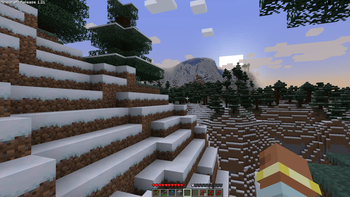
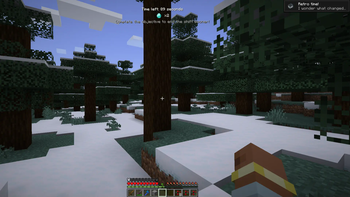
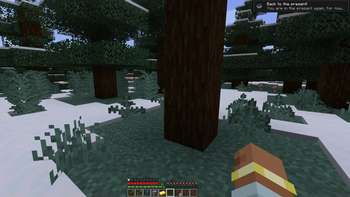
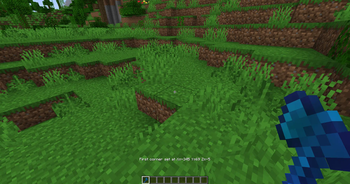
🔍 Analysis
- 👍 0.3% endorsement rate
- 🏆 #343 of 557 adventure mods in this game by downloads
📋 About This Mod
# Timewarp (https://cdn.modrinth.com/data/cached_images/3b57a6c281e514bc6d3bb36f3dd5621b015a0185.png)](https://modfest.net/1.21) **Requires Fabric API. Also compatible with NeoForge, using Sinytra Connector, requires Forgified Fabric API.** **Timewarp** is a Minecraft mod that brings back classic game mechanics with a fun twist! It adds random challenges with old gameplay and lets you create areas where old-school mechanics can be enabled. Customize everything to bring back the feel of older Minecraft versions. The mod’s data is saved in the world’s root folder as `timewarp_data.json`. This includes all configuration settings, timewarp areas, and shift settings, making your Timewarp setup world-specific. ## Usage To set up a Timewarp area: 1. Use the *Timewarp Axe* to select corners: - **Left-click** on a block to set the first corner. - **Right-click** on a block to set the second corner. 2. Run `/timewarp create ` to create the area using the selected corners. Replace `` with a custom name for your area, e.g., `/timewarp create "Minecraft Alpha"`. If you hold the *Timewarp Axe*, you will visually see areas that are within your render distance. ## Old Mechanics <details> <summary>Overview</summary> - **`allowStacking`**: Prevents stacking of food items. - **`oldMinecart`**: The player’s head moves according to the minecart's direction. - **`oldAnimalBehavior`**: Sheep, chickens, and cows don’t drop food. Punching sheep drops wool. - **`allowSprinting`**: Toggles whether sprinting is allowed, as in early Minecraft versions. - **`versionText`**: Displays classic version text on the screen. - **`oldGUI`**: Mimics the classic player HUD. Enables the old eating system where food replenishes health directly (no hunger bar) and removes the eating animation. - **`noFrontView`**: Disables the front-facing player view, as in early versions. - **`noSneaking`**: Disables sneaking. - **`noSwimming`**: Disables swimming, as in pre-1.13 versions. - **`oldCombat`**: Reverts combat mechanics to earlier versions, removing the attack cooldown. - **`noTrading`**: Disables trading with villagers. - **`oldLook`**: Uses old textures. - **`noSmoothLighting`**: Disables smooth lighting. </details> ## Commands <details> <summary><code>/timewarp</code> - General command to access Timewarp functions</summary> - **Grants** the player a *Timewarp Axe*, allowing manipulation of Timewarp areas. </details> <details> <summary><code>/timewarp create </code> - Create a Timewarp Area</summary> - **Creates** a Timewarp area using two selected corners. - **Parameters**: `name` - the name of the area. - **Example**: `/timewarp create "Minecraft Alpha"` </details> <details> <summary><code>/timewarp edit </code> - Edit a feature in a Timewarp Area</summary> - **Edits** specific features of an area by ID. - **Parameters**: - `id`: ID of the area. - `feature`: Name of the feature to edit. - `enabled`: true/false to enable or disable the feature. - **Features**: - `allowStacking`, `oldMinecart`, `oldAnimalBehavior`, `allowSprinting`, `versionText`, `oldGUI`, `noFrontView`, `noSneaking`, `noSwimming`, `oldCombat`, `noTrading`, `oldLook`, `noSmoothLighting` - **Example**: `/timewarp edit 1 oldCombat true` </details> <details> <summary><code>/timewarp delete </code> - Delete a Timewarp Area</summary> - **Deletes** a Timewarp area by its ID. - **Example**: `/timewarp delete 2` </details> <details> <summary><code>/timewarp trigger </code> - Trigger a Time Shift</summary> - **Forces** a time shift on a specified player, applying random old mechanics. - **Example**: `/timewarp trigger Player1` </details> <details> <summary><code>/timewarp tp </code> - Teleport to a Timewarp Area</summary> - **Teleports** the player to the specified area by ID. - **Example**: `/timewarp tp 2` </details> <details> <summary><code>/timewarp config </code> - Manage Timewarp Configuration</summary> - **reload**: Reloads all configuration settings from the data file. - **edit**: Modify specific config variables. - **Parameters** for `edit`: - `variable`: Setting to edit (`shiftDurationMin`, `shiftDurationMax`, `timeUntilShiftMin`, `timeUntilShiftMax`, `saveInterval`, `opCommandLevel`, `enableTriggering`, `debugMode`) - `value`: New value for the variable. - **Example**: `/timewarp config edit shiftDurationMax 300` </details> ## Configuration **Customization options** are available to change how the time shifts work. Use these configurations in the `config` command or edit directly in the `timewarp_data.json` file in the world folder. <details> <summary>Shift Duration</summary> - **`shiftDurationMin`** - Minimum duration of a time shift. - **`shiftDurationMax`** - Maximum duration of a time shift. </details> <details> <summary>Time Until Shift</summary> - **`timeUntilShiftMin`** - Minimum time before a new shift starts. - **`timeUntilShift
[!(https://cdn.modrinth.com/data/cached_images/3b57a6c281e514bc6d3bb36f3dd5621b015a0185.png)](https://modfest.net/1. 21)
Requires Fabric API. Also compatible with NeoForge, using Sinytra Connector, requires Forgified Fabric API.
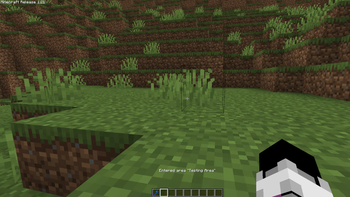
Timewarp is a Minecraft mod that brings back classic game mechanics with a fun twist! It adds random challenges with old gameplay and lets you create areas where old-school mechanics can be enabled. Customize everything to bring back the feel of older Minecraft versions.
The mod’s data is saved in the world’s root folder as `timewarp_data.json`. This includes all configuration settings, timewarp areas, and shift settings, making your Timewarp setup world-specific. ## Usage
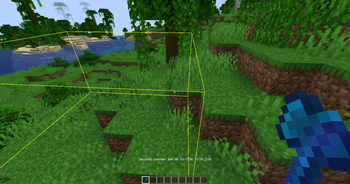
To set up a Timewarp area:
1. Use the Timewarp Axe to select corners: - Left-click on a block to set the first corner. - Right-click on a block to set the second corner. 2. Run `/timewarp create ` to create the area using the selected corners. Replace `` with a custom name for your area, e.g., `/timewarp create "Minecraft Alpha"`.
If you hold the Timewarp Axe, you will visually see areas that are within your render distance. ## Old Mechanics
Overview
- `allowStacking`: Prevents stacking of food items.
- `oldMinecart`: The player’s head moves according to the minecart's direction.
- `oldAnimalBehavior`: Sheep, chickens, and cows don’t drop food. Punching sheep drops wool.
- `allowSprinting`: Toggles whether sprinting is allowed, as in early Minecraft versions.
- `versionText`: Displays classic version text on the screen.
- `oldGUI`: Mimics the classic player HUD. Enables the old eating system where food replenishes health directly (no hunger bar) and removes the eating animation.
- `noFrontView`: Disables the front-facing player view, as in early versions.
- `noSneaking`: Disables sneaking.
- `noSwimming`: Disables swimming, as in pre-1. 13 versions.
- `oldCombat`: Reverts combat mechanics to earlier versions, removing the attack cooldown.
- `noTrading`: Disables trading with villagers.
- `oldLook`: Uses old textures.
- `noSmoothLighting`: Disables smooth lighting.
## Commands
/timewarp - General command to access Timewarp functions
- Grants the player a Timewarp Axe, allowing manipulation of Timewarp areas.
/timewarp create - Create a Timewarp Area
- Creates a Timewarp area using two selected corners.
- Parameters: `name` - the name of the area.
- Example: `/timewarp create "Minecraft Alpha"`
/timewarp edit - Edit a feature in a Timewarp Area
- Edits specific features of an area by ID.
- Parameters:
- - `id`: ID of the area.
- - `feature`: Name of the feature to edit.
- - `enabled`: true/false to enable or disable the feature.
- Features:
- - `allowStacking`, `oldMinecart`, `oldAnimalBehavior`, `allowSprinting`, `versionText`, `oldGUI`, `noFrontView`, `noSneaking`, `noSwimming`, `oldCombat`, `noTrading`, `oldLook`, `noSmoothLighting`
- Example: `/timewarp edit 1 oldCombat true`
/timewarp delete - Delete a Timewarp Area
- Deletes a Timewarp area by its ID.
- Example: `/timewarp delete 2`
/timewarp trigger - Trigger a Time Shift
- Forces a time shift on a specified player, applying random old mechanics.
- Example: `/timewarp trigger Player1`
/timewarp tp - Teleport to a Timewarp Area
- Teleports the player to the specified area by ID.
- Example: `/timewarp tp 2`
/timewarp config - Manage Timewarp Configuration
- reload: Reloads all configuration settings from the data file.
- edit: Modify specific config variables.
- Parameters for `edit`:
- - `variable`: Setting to edit (`shiftDurationMin`, `shiftDurationMax`, `timeUntilShiftMin`, `timeUntilShiftMax`, `saveInterval`, `opCommandLevel`, `enableTriggering`, `debugMode`)
- - `value`: New value for the variable.
- Example: `/timewarp config edit shiftDurationMax 300`
## Configuration
Customization options are available to change how the time shifts work. Use these configurations in the `config` command or edit directly in the `timewarp_data.json` file in the world folder.
Shift Duration
- `shiftDurationMin` - Minimum duration of a time shift.
- `shiftDurationMax` - Maximum duration of a time shift.
Time Until Shift
- `timeUntilShiftMin` - Minimum time before a new shift starts.
- **`timeUntilShift
📊 Mod Details
- Game
- Minecraft Mods
- Author
- Dooji
- Version
- 1.1.7
- Downloads
- 3,275
- Endorsements
- 10
- Category
- adventure
- Created
- 11/1/2024
- Updated
- 11/26/2024
- Game Versions
- 1.21, 1.21.1
- Tags
- adventure, game-mechanics, minigame
🔧 How to Install Minecraft Mods Mods
Download from Modrinth. Use Prism Launcher or drop into your mods folder.
📖 Full step-by-step install guide for Minecraft Mods →
Visit the official mod page for specific installation instructions for this mod.
🎮 Need cheat codes or console commands? Check ur gaming wiki for Minecraft Mods commands, item IDs, and more.
❓ Frequently Asked Questions
Which Minecraft Mods versions does Timewarp support?
The author lists 1.21, 1.21.1. Other versions may work but are untested by the author.
What is the latest version of Timewarp?
Version 1.1.7, published 2024-11-26 with 3,275 downloads recorded at the source.
Keep browsing — more Minecraft Mods mods await