Server Notify
🟠 Updated over a year ago⚠️ Install Order · 2 steps
Install in this order, then this mod last — most mods fail to load without their framework and dependencies in place.
🖼️ Gallery (2 images)
🔍 Analysis
- 👍 0.6% endorsement rate
- 🏆 #50 of 280 decoration mods in this game by downloads
📋 About This Mod
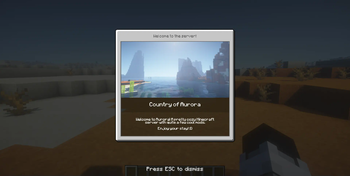
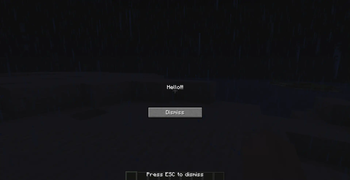
# Server Notify **Server Notify** is a Minecraft mod that lets you display notifications to players joining your Minecraft server. Easily set up notifications using commands, with options for texture, text, or URL-based notifications. **Required on Client and Server!** ## Notification Types 1. **Texture Notifications**: Display textures from any loaded resource pack. 2. **Text-only Notifications**: Display simple messages. 3. **Image from URL**: Display images from a specified URL. ## Getting Started 1. **Command-based**: All features are accessed via commands in-game. 2. **Commands**: Type `/server-notify` to view available options. !(https://cdn.modrinth.com/data/cached_images/7f02cd2aa929d68d5ecadac2262bc86a0c11ad91.png) ### Command Options: - **Edit**: Modify a notification's properties. - **Info**: View details of a specific notification. - **List**: Display all notifications. - **New**: Create a new notification. - **Remove**: Delete a notification. - **UUID-List**: Show all notifications with their UUIDs. ## Creating Notifications Use the command `/server-notify new type "Notification Name"` to create a notification, replacing `"Notification Name"` with your preferred name and `type` with **texture**, **text**, or **url**. ### Notification Types and Commands <details> <summary>Text-only Notification</summary> A text notification lets you display any message as a notification. An example command would be: ``` /server-notify new text "Notification Name" <sound_namespace> <sound_path> <message> <dismissButton> <dismissMessage> <alwaysShow> ``` **"Notification Name"** can be anything, however it must be in quotation marks. It is for you to identify the notification later on. **<sound_namespace>** is the namespace of the sound you'd like to play when the notification is shown. **<sound_path>** is the path of the sound you'd like to play when the notification is shown. **<message>** is your message in quotation marks. **<dismissButton>** displays a "Dismiss" button on the screen. **<dismissMessage>** displays a "Press ESC to dismiss" text at the bottom of the screen. **<alwaysShow>** shows the notification to a player when they join even if they have already seen it. **Another Text Notification example would be:** ``` /server-notify new text "Notification Test" minecraft "ambient.cave" "hey, testing" false true true ``` </details> <details> <summary>Image from URL Notification</summary> An image notification lets you display any image from a URL. An example command would be: ``` /server-notify new url "Notification Name" <sound_namespace> <sound_path> <url> <width> <height> <dismissMessage> <alwaysShow> ``` **"Notification Name"** can be anything, however it must be in quotation marks. It is for you to identify the notification later on. **<sound_namespace>** is the namespace of the sound you'd like to play when the notification is shown. **<sound_path>** is the path of the sound you'd like to play when the notification is shown. **<url>** is your image URL in quotation marks. **<width>** is the width of your image (you might have to use a scaled down resolution to accomodate for Minecraft's GUI scale, for example for an image that's 1920x1080, scaled down while also keeping the aspect ratio would be 480 by 270). **<height>** is the height of your image (you might have to use a scaled down resolution to accomodate for Minecraft's GUI scale, for example for an image that's 1920x1080, scaled down while also keeping the aspect ratio would be 480 by 270). **<dismissMessage>** displays a "Press ESC to dismiss" text at the bottom of the screen. **<alwaysShow>** shows the notification to a player when they join even if they have already seen it. **Another Image Notification example would be:** ``` /server-notify new url "Image Test" minecraft "ambient.cave" "https://some_direct_image_url" 480 270 true true ``` </details> </details>
# Server Notify
Server Notify is a Minecraft mod that lets you display notifications to players joining your Minecraft server. Easily set up notifications using commands, with options for texture, text, or URL-based notifications.
Required on Client and Server!
## Notification Types 1. Texture Notifications: Display textures from any loaded resource pack. 2. Text-only Notifications: Display simple messages. 3. Image from URL: Display images from a specified URL.
## Getting Started 1. Command-based: All features are accessed via commands in-game. 2. Commands: Type `/server-notify` to view available options.
!(https://cdn.modrinth.com/data/cached_images/7f02cd2aa929d68d5ecadac2262bc86a0c11ad91.png)
### Command Options: - Edit: Modify a notification's properties. - Info: View details of a specific notification. - List: Display all notifications. - New: Create a new notification. - Remove: Delete a notification. - UUID-List: Show all notifications with their UUIDs.
## Creating Notifications
Use the command `/server-notify new type "Notification Name"` to create a notification, replacing `"Notification Name"` with your preferred name and `type` with texture, text, or url.
### Notification Types and Commands
Text-only Notification
A text notification lets you display any message as a notification.
An example command would be:
```
/server-notify new text "Notification Name"
"Notification Name" can be anything, however it must be in quotation marks. It is for you to identify the notification later on.
is the namespace of the sound you'd like to play when the notification is shown.
is the path of the sound you'd like to play when the notification is shown.
is your message in quotation marks.
displays a "Dismiss" button on the screen.
displays a "Press ESC to dismiss" text at the bottom of the screen.
shows the notification to a player when they join even if they have already seen it.
Another Text Notification example would be: ``` /server-notify new text "Notification Test" minecraft "ambient.cave" "hey, testing" false true true ```
Image from URL Notification
An image notification lets you display any image from a URL.
An example command would be:
```
/server-notify new url "Notification Name"
"Notification Name" can be anything, however it must be in quotation marks. It is for you to identify the notification later on.
is the namespace of the sound you'd like to play when the notification is shown.
is the path of the sound you'd like to play when the notification is shown.
is your image URL in quotation marks.
displays a "Press ESC to dismiss" text at the bottom of the screen.
shows the notification to a player when they join even if they have already seen it.
Another Image Notification example would be: ``` /server-notify new url "Image Test" minecraft "ambient.cave" "https://some_direct_image_url" 480 270 true true ```
📊 Mod Details
- Game
- Minecraft Mods
- Author
- Dooji
- Version
- 1.0.4
- Downloads
- 3,838
- Endorsements
- 22
- Category
- decoration
- Created
- 4/7/2024
- Updated
- 1/12/2025
- Game Versions
- 1.21, 1.21.1
- Tags
- decoration, social, utility
🔧 How to Install Minecraft Mods Mods
Download from Modrinth. Use Prism Launcher or drop into your mods folder.
📖 Full step-by-step install guide for Minecraft Mods →
Visit the official mod page for specific installation instructions for this mod.
🎮 Need cheat codes or console commands? Check ur gaming wiki for Minecraft Mods commands, item IDs, and more.
❓ Frequently Asked Questions
Which Minecraft Mods versions does Server Notify support?
The author lists 1.21, 1.21.1. Other versions may work but are untested by the author.
What is the latest version of Server Notify?
Version 1.0.4, published 2025-01-12 with 3,838 downloads recorded at the source.
Keep browsing — more Minecraft Mods mods await