Slo
🟠 Updated over a year ago⚠️ Install Order · 2 steps
Install in this order, then this mod last — most mods fail to load without their framework and dependencies in place.
🖼️ Gallery (3 images)
🔍 Analysis
- 👍 1.9% endorsement rate — high engagement, a strong quality signal
- 🏆 #619 of 945 fabric mods in this game by downloads
📋 About This Mod
<center><h2>Slo: <u>S</u>erver <u>Lo</u>ader</h2></center> With **Slo** installed, Minecraft servers in your `saves` directory will be available during world selection. With the right configuration, you can even choose the server type when creating a world! ### Additional Features - Open the server console in-game (<code>`</code> by default) - Autodetect server JAR files, auto-accept EULA - Seamless integration with Minecraft's UI ## How It Works When developing a Minecraft server, it's good practice to run it on your machine and connect to it locally. **Slo** automates this process: given a server world, the mod starts the server JAR, listens to its output, and connects to `localhost` when ready. If anything goes wrong, or if the player disconnects, the server process exits gracefully. **Slo is a client-side mod**—it integrates local server processes into Minecraft's UI. However, the mod may require you to be connected to the internet; server software usually downloads Minecraft's files on first launch. ## Configuration **Slo** supports *server presets*—templates for a server save—that users can choose from when creating a world. The mod loads these presets from the configuration directory; alternatively, users can drag and drop presets into the selection screen. To learn how to create these presets, (https://github.com/acikek/slo/wiki). ## License MIT © 2025 Skye Prince > **Note: by running this mod, you agree to (https://www.minecraft.net/en-us/eula)**
Slo: Server Loader
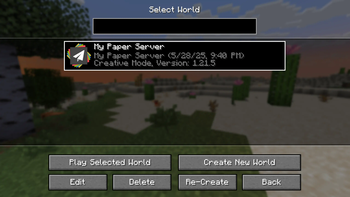
With Slo installed, Minecraft servers in your `saves` directory will be available during world selection. With the right configuration, you can even choose the server type when creating a world!
### Additional Features
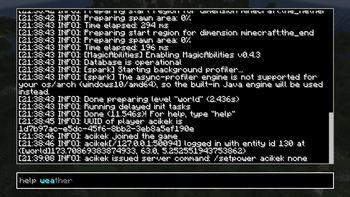
- Open the server console in-game (
`by default) - Autodetect server JAR files, auto-accept EULA
- Seamless integration with Minecraft's UI
## How It Works
When developing a Minecraft server, it's good practice to run it on your machine and connect to it locally. Slo automates this process: given a server world, the mod starts the server JAR, listens to its output, and connects to `localhost` when ready. If anything goes wrong, or if the player disconnects, the server process exits gracefully.
Slo is a client-side mod—it integrates local server processes into Minecraft's UI. However, the mod may require you to be connected to the internet; server software usually downloads Minecraft's files on first launch.
## Configuration
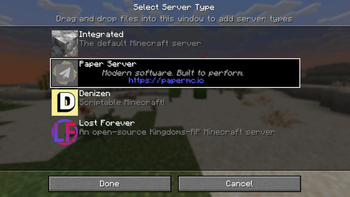
Slo supports server presets—templates for a server save—that users can choose from when creating a world. The mod loads these presets from the configuration directory; alternatively, users can drag and drop presets into the selection screen. To learn how to create these presets, (https://github.com/acikek/slo/wiki).
MIT © 2025 Skye Prince
> **Note: by running this mod, you agree to (https://www.minecraft.net/en-us/eula)**
📊 Mod Details
- Game
- Minecraft Mods
- Author
- acikek
- Version
- 1.1.0+1.21.5
- Downloads
- 2,350
- Endorsements
- 45
- Category
- fabric
- Created
- 6/3/2025
- Updated
- 6/6/2025
- Game Versions
- 1.21.5
- Tags
- optimization, utility
🔧 How to Install Minecraft Mods Mods
Download from Modrinth. Use Prism Launcher or drop into your mods folder.
📖 Full step-by-step install guide for Minecraft Mods →
Visit the official mod page for specific installation instructions for this mod.
🎮 Need cheat codes or console commands? Check ur gaming wiki for Minecraft Mods commands, item IDs, and more.
❓ Frequently Asked Questions
Which Minecraft Mods versions does Slo support?
The author lists 1.21.5. Other versions may work but are untested by the author.
What is the latest version of Slo?
Version 1.1.0+1.21.5, published 2025-06-06 with 2,350 downloads recorded at the source.
Keep browsing — more Minecraft Mods mods await