AutoShutdown
⚪ Last updated 2024⚠️ Install Order · 2 steps
Install in this order, then this mod last — most mods fail to load without their framework and dependencies in place.
🖼️ Gallery (1 images)
🔍 Analysis
- 👍 0.7% endorsement rate
- 🏆 #5 of 13 bukkit mods in this game by downloads
📋 About This Mod
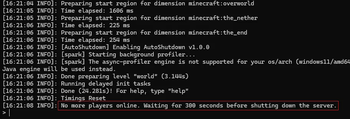
# AutoShutdown Automatically stop/shutdown your server after no players have been online for a specific amount of time. Nothing more, nothing less. **Why?** This frees up resources on your system and can minimize the risk of unwanted attention to your server while no one is there to monitor it. ## Installation - Put the .jar file in your plugins or mods folder (depending on server loader you are using). - Run the server once to generate the config file and stop it again - Change any config values if wanted - Run the server again - The plugin/mod should now be working ## Config | value | loader * | explanation | | ----- | ------- | ----------- | | initial_delay | bukkit, fabric | Specifies the delay before the first check for 'online players'. | | polling_delay | fabric | The amount of time between each check for 'online players' | | shutdown_delay | bukkit, fabric | Timeframe after the last person has left the server (or after the initial delay has ended), until the server is actually shut down. If a new player joins the server within this timeframe, the shutdown process will be cancelled. | | enable_logging | bukkit, fabric | Whether or not basic information should be logged to the console. When disabled, warnings and errors will still be logged but no basic information. | _* Depending on the version of the plugin/mod you are using (e.g. bukkit or fabric) some values might or might not be relevant to you and thus not exist within your config file. The plugin/mod itself however will still work perfectly fine :). For the values that do exist, you can find their explanation here._ ## Help! Which version do I use? - For any minecraft servers based on fabric (e.g. **fabric**, **quilt**, etc.) use the version annotated with ****. - For servers based on bukkit (e.g. **craftbukkit**, **spigot**, **paper**, etc.) use the **** annotated version. ## Newer minecraft version needed? Just try the newest version of the plugin for your loader (see "Help! Which version do I use?" above), it will likely work anyway. I don't update the supported versions section often enough to keep up with the rate at which new minecraft versions drop, srry! ## Questions, bugs or feature requests? Please use the (https://github.com/incogn1/AutoShutdown/issues) for this as I will probably not read this modrinth page that often.
AutoShutdown: Automatically Shutdown/Stop your server at a set time every day. Version: v2. 4 This plugin is designed to allow you to simply set a time to have the server shut down at the same time every day, without any manual intervention, and provide users ample warning before it does so. You should use a script to automatically restart the server when it stops. In that script, you could perform any backups or other maintenance you'd like to perform. I use this plugin to keep a server healthy for longer than a few days by pre-emptively restarting it before it can get sick. Example restart script in the forum thread. Features: Time can be set persistently in the configuration file. Multiple times can be specified. Shutdown time can be set temporarily via commands You can cancel the running shutdown. You can view the current scheduled shutdown time. You can gracefully stop the server with a configurable grace time. The warning message times are configurable. All connected users can be kicked from the server before the shutdown. Download AutoShutdown 2. 4 JAR (for 1. 4. 2 craftbukkit prerelease) Source Code Requirements: SuperPerms compatible permissions plugin. Currently won't limit access to commands without some kind of permissions support. Installation Drop the AutoShutdown.jar file into your plugins directory. At first start, the configuration file is created. Edit the config.yml file created in plugins/AutoShutdown/ and change the settings to what you would prefer. Either reload the server for the changes to take effect, or use /as reload from within the game. Also, all commands work from the console without the slash. Upgrading From all previous versions to 2. 2: AutoShutdown.properties file is no longer read. Use the config.yml. I'm not a fan of YAML, but its the standard, and as much as I disagree with bukkit's choice of YAML for configuration files, I have to live with it. An uncommented config.yml file will be created on first start. Start the server, make changes, then do an /as reload. Or just use /as set HH:MM to set the shutdown times you want. Configuration Options shutdowntimes - the time in HH:MM format to stop the server. You can specify multiple, times, separated by comma. kickreason - the reason to provide users when they are kicked. kickonshutdown - kick users before shutting the server down. (Better than an end of stream error) warntimes - seconds before the shutdown time you would like a warning message broadcast to all users, separated by comma. gracetime - seconds to wait before shutting the server down in response to an /as now Permissions Nodes autoshutdown.admin - Access to all autoshutdown commands. Commands /as help - displays in-game help /as reload - reload the configuration file (replacing any shutdown you have scheduled currently in memory) /as cancel - cancel the currently scheduled shutdown /as set HH:MM - set the schedule to a new time. Writes to config.yml to persist the setting. /as set now - set the shutdown sc
📊 Mod Details
- Game
- Minecraft Mods
- Author
- Incogn1
- Version
- fabric-1.0.1
- Downloads
- 2,532
- Endorsements
- 18
- Category
- bukkit
- Created
- 9/24/2024
- Updated
- 9/22/2024
- Game Versions
- 1.19.2, 1.19.3, 1.19.4, 1.20, 1.20.1
- Tags
- management, optimization, utility
🔧 How to Install Minecraft Mods Mods
Download from Modrinth. Use Prism Launcher or drop into your mods folder.
📖 Full step-by-step install guide for Minecraft Mods →
Visit the official mod page for specific installation instructions for this mod.
🎮 Need cheat codes or console commands? Check ur gaming wiki for Minecraft Mods commands, item IDs, and more.
❓ Frequently Asked Questions
Which Minecraft Mods versions does AutoShutdown support?
The author lists 1.19.2, 1.19.3, 1.19.4, 1.20, 1.20.1, 1.20.2. Other versions may work but are untested by the author.
What is the latest version of AutoShutdown?
Version fabric-1.0.1, published 2024-09-22 with 2,532 downloads recorded at the source.
Keep browsing — more Minecraft Mods mods await