SitOnEverything
🟡 Updated this year⚠️ Install Order · 2 steps
Install in this order, then this mod last — most mods fail to load without their framework and dependencies in place.
🖼️ Gallery (3 images)

🔍 Analysis
- 👍 0.1% endorsement rate
- 🏆 #827 of 945 fabric mods in this game by downloads
📋 About This Mod
[!(https://img.shields.io/badge/JOIN%20OUR%20DISCORD-5865F2?style=for-the-badge&logo=discord&logoColor=white)](https://discord.gg/HTkn94BXmA) [!(https://img.shields.io/badge/CURSEFORGE-F16436?style=for-the-badge&logo=curseforge&logoColor=white)](https://www.curseforge.com/minecraft/mc-mods/sitoneverything)
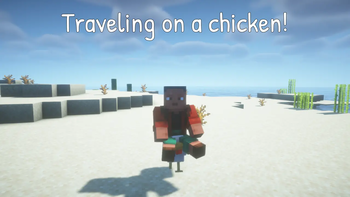
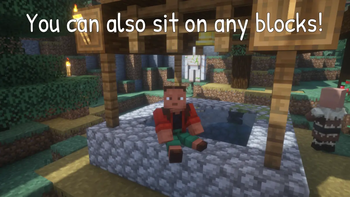
Sit On Everything lets you sit on almost any block or entity. It automatically creates sitting positions for vanilla and modded content, while giving you full control over exact seat positions, allowed targets, and interaction methods.
Install on the server — client installation is optional. Vanilla clients can use `/sit` and, when enabled by the server, Sneak + Right Click. Client-side installation adds keybinds and Ctrl + Right Click sitting.
Fully compatible with singleplayer.
## What it does - Sit Almost Anywhere — sit on blocks, mobs, players, and content added by other mods. - No Client Mod Required — `/sit` and the optional Sneak + Right Click interaction work entirely server-side. - Automatic Defaults — generates sitting positions for registered blocks and entities automatically, including modded content. - Precise Seat Positions — configure exact X, Y, and Z offsets for individual blocks and entities. - Baby Entity Support — configure separate positions for variants such as `minecraft:cow#baby`. - Allow / Deny Filters — control exactly what players can sit on using IDs and `` wildcard patterns. - Multiple Sitting Controls — use `/sit`, Ctrl + Right Click, a configurable keybind, or an optional server-side Sneak + Right Click gesture.
## How to sit - `/sit` — sits you on the block or entity you are looking at. Works without the mod installed on the client. - Ctrl + Right Click — client-side shortcut. Enabled by default. - Sit on target keybind — client-side and unbound by default. Assign it under Options → Controls → Sit On Everything. - Toggle Ctrl + Right Click keybind — client-side and unbound by default. Toggles the Ctrl shortcut without editing the config. - Sneak + Right Click with empty hands — optional server-side interaction. Disabled by default. - To stand up — press Sneak, just like dismounting a vanilla entity.
## Configuration The mod uses two JSON configuration files inside your `config/` folder. Config files are upgraded automatically when needed while keeping your existing edits.
### Client Config `config/sitoneverything-client.json`
Controls client-side sitting shortcuts:
- `hotkeySittingEnabled` — enables the dedicated sitting keybind. Default: `true`.
- `ctrlRightClickSittingEnabled` — enables Ctrl + Right Click. Default: `true`.
### Server / Common Config `config/sitoneverything.json`
Controls seat positions, permission filters, and server-side interactions:
- `blocks` — sitting positions for blocks.
- `entities` — sitting positions for entities, including baby variants.
- `allow` / `deny` — controls which targets players are allowed to sit on.
- `sneakRightClickSitting` — enables server-side Sneak + Right Click sitting.
## Choosing what players can sit on The `blocks` and `entities` sections are generated from the game's registries on launch. New blocks and entities — including ones added by other mods — receive entries automatically, while your changes to existing entries are preserved.
Deleting an entry does not disable sitting on that target. Missing entries can be generated again on the next launch. Use the `allow` and `deny` sections to control what can actually be used as a seat.
Both sections accept exact IDs and `` wildcard patterns. `deny` always takes priority.
```json "allow": { "blocks": ["_stairs", "_slab", "*_carpet"], "entities": ["minecraft:player"] }, "deny": { "blocks": ["minecraft:oak_stairs"], "entities": [] } ```
An empty `allow` list allows everything that is not denied. A non-empty `allow` list permits only matching targets.
Baby variants follow the rules of their adult entity unless a pattern specifically targets the baby key.
## Sitting without a client mod The `/sit` command works entirely on the server, so players do not need the mod installed locally.
Servers can also enable a vanilla-compatible sitting interaction:
```json "sneakRightClickSitting": true ```
When enabled, sneaking and right-clicking a block with both hands empty attempts to sit the player without requiring a client mod or command.
This option is disabled by default because Sneak + Right Click is also used for normal Minecraft interactions. Blocks with block entities, such as chests, barrels, furnaces, beds, and lecterns, are skipped automatically. Some interactive blocks without block entities — including crafting tables, anvils, grindstones, looms, and stonecutters — can still conflict with this gesture.
For that reason, it is recommended to use `sneakRightClickSitting` together with an `allow` list contain
📊 Mod Details
- Game
- Minecraft Mods
- Author
- Nikrecs
- Version
- 1.1.1
- Downloads
- 2,181
- Endorsements
- 3
- Category
- fabric
- Created
- 3/30/2026
- Updated
- 8/8/2026
- Game Versions
- 26.2
- Tags
- game-mechanics, social, transportation
🔧 How to Install Minecraft Mods Mods
Download from Modrinth. Use Prism Launcher or drop into your mods folder.
📖 Full step-by-step install guide for Minecraft Mods →
Visit the official mod page for specific installation instructions for this mod.
🎮 Need cheat codes or console commands? Check ur gaming wiki for Minecraft Mods commands, item IDs, and more.
❓ Frequently Asked Questions
Which Minecraft Mods versions does SitOnEverything support?
The author lists 26.2. Other versions may work but are untested by the author.
What is the latest version of SitOnEverything?
Version 1.1.1, published 2026-08-08 with 2,181 downloads recorded at the source.
Keep browsing — more Minecraft Mods mods await