Saro´s Creative Tab
🟡 Updated this year⚠️ Install Order · 2 steps
Install in this order, then this mod last — most mods fail to load without their framework and dependencies in place.
🖼️ Gallery (1 images)
🔍 Analysis
- 👍 0.2% endorsement rate
- 🏆 #211 of 269 equipment mods in this game by downloads
📋 About This Mod
!(https://www.bisecthosting.com/images/CF/Saros_Creative_Tab/BH_SCT_header2.webp) !(https://www.bisecthosting.com/images/CF/Saros_Creative_Tab/BH_SCT_overview.webp)
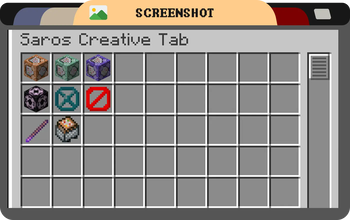
The Saros Creative Tab mod adds a custom creative tab to Minecraft, allowing players to easily access essential vanilla items like the Command Block and Barrier, which are not available in the default creative inventory.
For version 1. 20. 1 and above, this mod features a powerful Dynamic Custom Tab Management System that allows server administrators to create, manage, and configure multiple custom creative tabs through in-game commands!
!(https://www.bisecthosting.com/images/CF/Saros_Creative_Tab/BH_SCT_features.webp)
## Features (Version 1. 19. 4 and earlier) - Custom Creative Tab: A new tab named "Saros Creative Tab" is added to the creative inventory, this tab adds Vanilla Items like Command blocks and more.
## Features (Version 1. 20. 1+) - Dynamic Tab Creation: Create unlimited custom creative tabs with unique names and icons - Command-Based Management: Full control through intuitive in-game commands - Item Organization: Add, remove, and organize items in your custom tabs - Permission System: Configurable permission levels for tab management (per-tab and global) - Server Synchronization: All players see the same custom tabs configured by administrators - Persistent Storage: Custom tabs are saved and persist across server restarts - Flexible Configuration: Configure default permissions and behavior through config files
### Commands (1. 20. 1+)
- `/customtab create
### Permission Levels (1. 20. 1+) - EVERYONE - All players can manage the tab (default for tab modification) - OP_LEVEL_2 - Only operators with level 2+ (default for tab creation/deletion) - OP_LEVEL_3 - Only operators with level 3+ - OP_LEVEL_4 - Only operators with level 4 (server owner)
Permissions can be configured globally in the config file or per-tab using commands.
Note: Changes to tabs require rejoining the world to take effect in the creative inventory.
!(https://www.bisecthosting.com/images/CF/Saros_Creative_Tab/BH_SCT_screenshot.webp)
!(https://www.bisecthosting.com/images/CF/Saros_Creative_Tab/BH_SCT_supported.webp) - 1. 21. 1 Forge/Fabric/NeoForge (New Dynamic Tab Management System) - 1. 20. 1 Forge/Fabric/NeoForge (New Dynamic Tab Management System) - 1. 19. 4 - 1. 19. 2 - 1. 18. 2 - 1. 16. 5 > _Port wishes welcome_
!(https://www.bisecthosting.com/images/CF/Saros_Creative_Tab/BH_SCT_community.webp)
Connect with us on (https://discord.gg/H8a8CJe) and be part of the Saro's Mod community!
[!(https://www.bisecthosting.com/images/CF/Saros_Creative_Tab/BH_SCT_promo.webp)](https://server.sarocesch.de/refersaro.php)
Project Support & Usage
Hosting: For the best performance, I recommend using BisectHosting linked in the banner.
Modpacks: You are free to include my work in any modpack. Please ensure proper credit is given by providing a link to this project page.
📊 Mod Details
- Game
- Minecraft Mods
- Author
- Sarocesch
- Version
- 2.1.1
- Downloads
- 1,282
- Endorsements
- 2
- Category
- equipment
- Created
- 6/14/2024
- Updated
- 7/15/2026
- Game Versions
- 26.2
- Tags
- equipment
🔧 How to Install Minecraft Mods Mods
Download from Modrinth. Use Prism Launcher or drop into your mods folder.
📖 Full step-by-step install guide for Minecraft Mods →
Visit the official mod page for specific installation instructions for this mod.
🎮 Need cheat codes or console commands? Check ur gaming wiki for Minecraft Mods commands, item IDs, and more.
❓ Frequently Asked Questions
Which Minecraft Mods versions does Saro´s Creative Tab support?
The author lists 26.2. Other versions may work but are untested by the author.
What is the latest version of Saro´s Creative Tab?
Version 2.1.1, published 2026-07-15 with 1,282 downloads recorded at the source.
Keep browsing — more Minecraft Mods mods await