Replant+
🟡 Updated this year⚠️ Install Order · 2 steps
Install in this order, then this mod last — most mods fail to load without their framework and dependencies in place.
🖼️ Gallery (4 images)


🔍 Analysis
- 👍 0.3% endorsement rate
- 🏆 #769 of 945 fabric mods in this game by downloads
📋 About This Mod
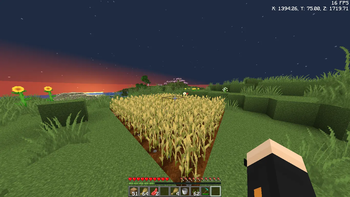
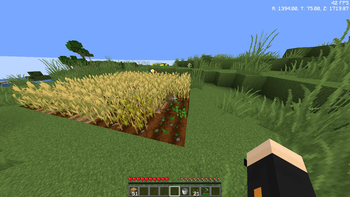
📄 Description : Replant+ is a clean and efficient auto-replanting mod for Minecraft. Whenever you break a fully-grown crop, the mod instantly places the seed back into the farmland — no extra inputs, no settings, no hassle. Designed for SMP players, farmers, and grinders, Replant+ saves time and keeps your farms perfectly working without macros or illegal clients. Also toggleable button 'R' or You can customize
Seed Protect is a simple utility mod that stops farmland from being trampled. No more accidentally destroying your crops when you jump, and no more uprooted fields from wandering mobs. Install it and your crops stay safe — automatically. 📦 Installation Install the mod loader of your choice ( Fabric , Forge , or NeoForge ). Place the seedprotect- version .jar file into your .minecraft/mods folder. Launch Minecraft and enjoy — no configuration needed. Works on: single-player worlds, LAN worlds, and dedicated servers. 🎥 How It Works The moment you step onto your farmland or a mob wanders across it, the game tries to turn the farmland into dirt — destroying your planted crops. Seed Protect cancels that change before it happens. Your farmland stays as farmland, your crops stay planted, and you never have to replant after a clumsy jump or a zombie stroll. ✨ Features No more accidental trampling — Players can jump, sprint, or walk on farmland without turning it to dirt. Mob-proof fields — Cows, zombies, villagers, and any other mobs cannot uproot your crops. Fall damage preserved — Jumping on farmland still hurts the player (as in vanilla), but the farmland stays intact. Zero configuration — Install the mod and it runs immediately; no commands, no items, no menus. Server-side logic — Works on dedicated servers without requiring clients to install the mod (though clients are also supported). Multi-loader support — Available for Fabric, Forge, and NeoForge across multiple Minecraft versions. 🧩 Compatibility Minecraft Version Loader Status 1. 20. 1 Forge ✅ Supported 1. 20. 1 Fabric ✅ Supported 1. 21. 1 Fabric ✅ Supported 1. 21. 1 NeoForge ✅ Supported 1. 21. 11 Fabric ✅ Supported 26. 1. 2 Fabric ✅ Supported Required dependencies: None. Known incompatibilities: None known. Works alongside: All performance mods (Sodium, Lithium, etc.), shader loaders (Iris, Oculus), and content mods. ❓ FAQ Does this need to be installed on the server? Yes. The mod is required on both the client and the server for full functionality. On dedicated servers, the server must have the mod installed to prevent mob trampling. If you're playing single-player or LAN, install it on the client side. Does this change vanilla mechanics? It suppresses farmland trampling, but does not alter anything else. Fall damage, crop growth, and all other mechanics remain unchanged. Is it compatible with OptiFine? Yes, Seed Protect has no rendering changes and works fine alongside OptiFine. Does this mod work with modded crops? Yes. Seed Protect prevents farmland from turning into dirt regardless of what crop is planted on it — it works with any mod that uses vanilla farmland mechanics. I found a bug, where do I report it? Please use the issue tracker . Include your Minecraft version, mod loader, and any crash/log files. 💖 Support the Project If you find this mod useful, consider supporting development: 📝 Modpacks License Licensed under the MIT License . You are free to include this mod in any modpack (Modrin
📊 Mod Details
- Game
- Minecraft Mods
- Author
- syedanam1417
- Version
- 1.0.0
- Downloads
- 2,229
- Endorsements
- 7
- Category
- fabric
- Created
- 12/9/2025
- Updated
- 12/5/2025
- Game Versions
- 1.21, 1.21.1, 1.21.2, 1.21.3, 1.21.4
- Tags
- food, management, optimization
🔧 How to Install Minecraft Mods Mods
Download from Modrinth. Use Prism Launcher or drop into your mods folder.
📖 Full step-by-step install guide for Minecraft Mods →
Visit the official mod page for specific installation instructions for this mod.
🎮 Need cheat codes or console commands? Check ur gaming wiki for Minecraft Mods commands, item IDs, and more.
❓ Frequently Asked Questions
Which Minecraft Mods versions does Replant+ support?
The author lists 1.21, 1.21.1, 1.21.2, 1.21.3, 1.21.4, 1.21.5. Other versions may work but are untested by the author.
What is the latest version of Replant+?
Version 1.0.0, published 2025-12-05 with 2,229 downloads recorded at the source.
Keep browsing — more Minecraft Mods mods await