Dynamic Height
🟡 Updated this year⚠️ Install Order · 2 steps
Install in this order, then this mod last — most mods fail to load without their framework and dependencies in place.
🖼️ Gallery (3 images)

🔍 Analysis
- 👍 0.2% endorsement rate
- 🏆 #151 of 647 adventure mods in this game by downloads
📋 About This Mod
### **English Description** Dynamic Height is a Minecraft mod that allows you to change both the maximum and minimum world height. You can freely decide how high or low your world extends — build massive skyscrapers, floating sky cities, or deep underground complexes without limitations. > **Support the Project** > If you enjoy the mod and want to speed up the release of new updates, consider supporting me on **PayPal**. Your support helps a lot! A major update is now available, introducing experimental support for world heights up to 32,000 blocks (32k). At the moment, this feature is only available for NeoForge 1.21.1, Fabric 1.20–1.21.4, 26.1.1 (0.3.x). Previously, the maximum and minimum world height could reach approximately 2,060 blocks, which exceeds the limits of Minecraft’s vanilla chunk system (0.2.x). You can use the **Distant Horizons** mod for a better rendering experience at extreme heights. **Server Usage** *Important:* To use custom world heights on a server, you must: 1. Create a world in singleplayer with the desired height. 2. Allow the world to fully generate. 3. Upload the generated world to the server and start it. Changing world height directly on a server without pre-generating the world may result in errors or world corruption. **Performance** When using very large world heights, long save and load times are expected, as the game needs to process a significantly higher number of vertical chunks. You may experience: * Increased memory usage. * Long world loading and saving times. This is normal behavior when working with extreme world heights. The mod does not affect world generation and has minimal performance impact, making it suitable even for low-end PCs with reasonable height settings. **Important Notice** If you remove the mod or modify height values incorrectly, your world may fail to load until the heights are reset to vanilla values: 1. Open the `data` folder inside your world directory (and inside all dimension folders: overworld, nether, end). 2. Locate the height configuration file, for example: `dynamic_height_minecraft_overworld.dat` (or `.json` if your version is 0.3.5 or higher; in this case, you don't need an NBT editor, any standard text editor will do). 3. Reset the height values using an NBT editor or generate a new world with vanilla heights and copy the corresponding `.dat` file. After the world has been generated, this file can be freely edited with any NBT editor to change world heights without recreating the world. **Incompatible Mods:** * Lithium * Axiom (works only for 1.21.1 (from 0.3.75 and higher). If you encounter any bugs or issues, please report them on our **Discord** server. Follow updates to stay informed about new features and improvements! <details> <summary><b> Описание на русском (Click to expand)</b></summary> ### **Русское описание** Dynamic Height — это мод для Minecraft, который позволяет изменять максимальную и минимальную высоту мира. Вы можете самостоятельно выбирать, насколько высоко или низко простирается ваш мир — стройте огромные небоскрёбы, города в небе или глубокие подземные комплексы без ограничений. > **Поддержать разработку** > Если вам нравится мод и вы хотите ускорить выход новых обновлений, вы можете поддержать меня на **PayPal**. Ваша поддержка очень мотивирует! В настоящее время доступно крупное обновление с экспериментальной поддержкой высоты до 32 000 блоков (32k). На данный момент эта функция доступна только для NeoForge 1.21.1, Fabric 1.20–1.21.4, 26.1.1 (0.3.x). Ранее максимальная и минимальная высота мира могла достигать примерно 2060 блоков, что превышает ограничения стандартной чанковой системы Minecraft (0.2.x). Вы можете использовать мод **Distant Horizons** для лучшего графического опыта на больших высотах. **Использование на сервере** *Важно:* Чтобы установить нестандартную высоту мира на сервере, необходимо сначала: 1. Создать мир в одиночной игре с нужной высотой. 2. Полностью сгенерировать мир. 3. Загрузить этот мир на сервер и запустить его. Изменение высоты напрямую на сервере без предварительной генерации мира может привести к ошибкам или повреждению мира. **Производительность** При использовании больших высот долгое сохранение и загрузка мира — это нормально, так как увеличивается количество вертикальных чанков, которые необходимо обработать. Возможны: * Повышенное потребление памяти. * Длительная загрузка и сохранение мира. Это ожидаемое поведение при использовании больших значений высоты. Мод не влияет на генерацию мира и оказывает минимальное влияние на общую производительность, поэтому хорошо работает даже на слабых компьютерах при разумных настройках. **Важное предупреждение** Если вы удалили мод или изменили параметры высоты некорректно, мир может перестать загружаться, пока высоты не будут возвращены к ванильным значениям: 1. Откройте папку `data` внутри папки мира (а также внутри папок измерений: overworld, nether, end). 2. Найдите файл конфигурации высоты, н
### English Description
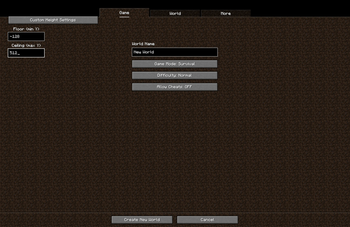
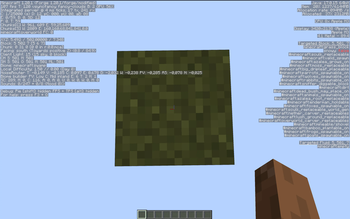
Dynamic Height is a Minecraft mod that allows you to change both the maximum and minimum world height. You can freely decide how high or low your world extends — build massive skyscrapers, floating sky cities, or deep underground complexes without limitations.
> Support the Project > If you enjoy the mod and want to speed up the release of new updates, consider supporting me on PayPal. Your support helps a lot!
A major update is now available, introducing experimental support for world heights up to 32,000 blocks (32k). At the moment, this feature is only available for NeoForge 1. 21. 1, Fabric 1. 20–1. 21. 4, 26. 1. 1 (0. 3.x).
Previously, the maximum and minimum world height could reach approximately 2,060 blocks, which exceeds the limits of Minecraft’s vanilla chunk system (0. 2.x). You can use the Distant Horizons mod for a better rendering experience at extreme heights.
Server Usage
Important: To use custom world heights on a server, you must:
1. Create a world in singleplayer with the desired height. 2. Allow the world to fully generate. 3. Upload the generated world to the server and start it.
Changing world height directly on a server without pre-generating the world may result in errors or world corruption.
Performance
When using very large world heights, long save and load times are expected, as the game needs to process a significantly higher number of vertical chunks.
You may experience:
Increased memory usage. Long world loading and saving times.
This is normal behavior when working with extreme world heights. The mod does not affect world generation and has minimal performance impact, making it suitable even for low-end PCs with reasonable height settings.
Important Notice
If you remove the mod or modify height values incorrectly, your world may fail to load until the heights are reset to vanilla values:
1. Open the `data` folder inside your world directory (and inside all dimension folders: overworld, nether, end). 2. Locate the height configuration file, for example: `dynamic_height_minecraft_overworld.dat` (or `.json` if your version is 0. 3. 5 or higher; in this case, you don't need an NBT editor, any standard text editor will do). 3. Reset the height values using an NBT editor or generate a new world with vanilla heights and copy the corresponding `.dat` file.
After the world has been generated, this file can be freely edited with any NBT editor to change world heights without recreating the world.
Incompatible Mods:
Lithium Axiom (works only for 1. 21. 1 (from 0. 3. 75 and higher).
If you encounter any bugs or issues, please report them on our Discord server. Follow updates to stay informed about new features and improvements!
Описание на русском (Click to expand)
### Русское описание
Dynamic Height — это мод для Minecraft, который позволяет изменять максимальную и минимальную высоту мира. Вы можете самостоятельно выбирать, насколько высоко или низко простирается ваш мир — стройте огромные небоскрёбы, города в небе или глубокие подземные комплексы без ограничений.
> Поддержать разработку > Если вам нравится мод и вы хотите ускорить выход новых обновлений, вы можете поддержать меня на PayPal. Ваша поддержка очень мотивирует!
В настоящее время доступно крупное обновление с экспериментальной поддержкой высоты до 32 000 блоков (32k). На данный момент эта функция доступна только для NeoForge 1. 21. 1, Fabric 1. 20–1. 21. 4, 26. 1. 1 (0. 3.x).
Ранее максимальная и минимальная высота мира могла достигать примерно 2060 блоков, что превышает ограничения стандартной чанковой системы Minecraft (0. 2.x). Вы можете использовать мод Distant Horizons для лучшего графического опыта на больших высотах.
Использование на сервере
Важно: Чтобы установить нестандартную высоту мира на сервере, необходимо сначала:
1. Создать мир в одиночной игре с нужной высотой. 2. Полностью сгенерировать мир. 3. Загрузить этот мир на сервер и запустить его.
Изменение высоты напрямую на сервере без предварительной генерации мира может привести к ошибкам или повреждению мира.
Производительность
При использовании больших высот долгое сохранение и загрузка мира — это нормально, так как увеличивается количество вертикальных чанков, которые необходимо обработать.
Повышенное потребление памяти. Длительная загрузка и сохранение мира.
Это ожидаемое поведение при использовании больших значений высоты. Мод не влияет на генерацию мира и оказывает минимальное влияние на общую производительность, поэтому хорошо работает даже на слабых компьютерах при разумных настройках.
Важное предупреждение
Если вы удалили мод или изменили параметры высоты некорректно, мир может перестать загружаться, пока высоты не будут возвращены к ванильным значениям:
1. Откройте папку `data` внутри папки мира (а также внутри папок измерений: overworld, nether, end). 2. Найдите файл конфигурации высоты, н
📊 Mod Details
- Game
- Minecraft Mods
- Author
- Multiverse
- Version
- 0.3.5+neoforge-1.21.1
- Downloads
- 14,689
- Endorsements
- 29
- Category
- adventure
- Created
- 11/6/2025
- Updated
- 6/10/2026
- Game Versions
- 1.21.1
- Tags
- adventure, decoration, game-mechanics
🔧 How to Install Minecraft Mods Mods
Download from Modrinth. Use Prism Launcher or drop into your mods folder.
📖 Full step-by-step install guide for Minecraft Mods →
Visit the official mod page for specific installation instructions for this mod.
🎮 Need cheat codes or console commands? Check ur gaming wiki for Minecraft Mods commands, item IDs, and more.
❓ Frequently Asked Questions
Which Minecraft Mods versions does Dynamic Height support?
The author lists 1.21.1. Other versions may work but are untested by the author.
What is the latest version of Dynamic Height?
Version 0.3.5+neoforge-1.21.1, published 2026-06-10 with 14,689 downloads recorded at the source.
Keep browsing — more Minecraft Mods mods await