Camera Obscura
🟡 Updated this year⚠️ Install Order · 2 steps
Install in this order, then this mod last — most mods fail to load without their framework and dependencies in place.
🖼️ Gallery (9 images)


🔍 Analysis
- 👍 0.7% endorsement rate
- 🏆 #139 of 343 decoration mods in this game by downloads
📋 About This Mod
# This mod will no longer be updated on modrinth! # See https://www.curseforge.com/minecraft/mc-mods/camera-obscura-serverside-rendering for the latest version! # Camera Obscura !(https://cdn.modrinth.com/data/RlBTYKIp/images/ed28af0b8dda6610ff393d76efb3a0fea2733253.png) Camera Obscura is a **server‑side software rasterizer** that renders the world as seen by any entity (player, mob, etc.) directly on the server, producing Photos or Videos as Minecraft **maps**. It has deep integrations for custom items (Nexo, ItemsAdder) and a custom preset system. --- ## Features - **Take photos**: Generate a map item showing what the target entity sees. - **Record videos**: Capture your world on video and play it back on item frames. - **Fully configurable**: Resolution, color mode, dithering, render distance, and more. - **Custom item support**: Create cameras/camcorders with any appearance via **Nexo** or **ItemsAdder**. - **Asynchronous rendering**: Never blocks the main server thread. - **No client mods required**: Everything is server‑side; maps/recordings work on vanilla clients. !(https://cdn.modrinth.com/data/RlBTYKIp/images/1868b6d784639eade78155529eb8385efb6ea441.png) --- ## Installation ### Fabric Server 1. Install (https://modrinth.com/mod/fabric-api) and (https://modrinth.com/mod/polymer) (for virtual items). 2. Place `camera-obscura-fabric.jar` into your `mods/` folder. 3. The configuration file will be created on start. --- ## Configuration The configuration file is `config/cameraobscura/config.json`. ```json { "renderDistance": 32, "showSystemMessages": false, "renderEntities": true, "fullbright": false, "fov": 70, "biomeBlend": 1, "ssaa": 2, "maxChunkRebuildsPerTick": 5, "debug": false, "cameraConsumesItem": true, "cameraConsumeItem": "map", "commandPermissionLevel": 2 } ``` | Option | Description | |---------------------------|------------------------------------------------------------------------------------------| | `renderDistance` | View distance in blocks (higher = longer render time). | | `showSystemMessages` | Show “Taking photo…” / “Done!” messages in chat. | | `renderEntities` | Whether to render entities (players, mobs, item frames) in the picture. | | `fullbright` | Ignore lighting (everything appears at full brightness). | | `fov` | Field of view in degrees (default is 70). | | `biomeBlend` | Radius for blending block colors (biome tint). `0` = no blending. | | `ssaa` | Supersampling anti‑aliasing factor (1 = off, 2 = 2x supersampling, 3 = 3x). | | `maxChunkRebuildsPerTick` | Maximum chunks rebuilt per frame per video recording and live-map (to limit CPU spikes). | | `debug` | Print frame timings and show FPS overlay on the output image. | | `cameraConsumesItem` | Whether taking a photo consumes an item (e.g. a map). | | `cameraConsumeItem` | Required item material (e.g. `map`, `paper`). | | `commandPermissionLevel` | Base permission level for commands. | --- ## Commands & Permissions **Base permission** `cameraobscura.command`. All commands use the root `/camera-obscura` ### 1. Take a map from your perspective ``` /camera-obscura ``` - `scale`: multiply the map resolution (1 = 128×128, 2 = 256×256, up to 3). - Gives you a **filled map** showing what *you* see. ### 2. Take a map of another entities perspective ``` /camera-obscura <entity> <player> ``` - `<entity>`: any living entity (player, mob, etc.) - `<player>`: who receives the map item. ### 3. Save as PNG image ``` /camera-obscura save ``` - Saves the rendered image as a `.png` in `config/cameraobscura/renders/`. ### 4. Reload configuration ``` /camera-obscura reload ``` Reloads the config file. ### 5. Clear resource/model cache ``` /camera-obscura clear-cache ``` ### 6. Give a camera item ``` /camera-obscura give <preset> ``` - `<preset>`: The name of a preset defined in `presets.json` (e.g. `camera`, `camcorder`, `instant`, `polaroid`, `pro_camera`, `handycam`, `cctv`). - ``: Optional player name; if omitted, gives the item to the command sender. **Examples:** - `/camera-obscura give camera` -> gives yourself the default camera. - `/camera-obscura give camcorder Pinnit` -> gives the player `Pinnit` a camcorder. - `/camera-obscura give my-preset` -> gives yourself an item from a preset. --- ## ���
# This mod will no longer be updated on modrinth! # See https://www.curseforge.com/minecraft/mc-mods/camera-obscura-serverside-rendering for the latest version!
# Camera Obscura
!(https://cdn.modrinth.com/data/RlBTYKIp/images/ed28af0b8dda6610ff393d76efb3a0fea2733253.png)
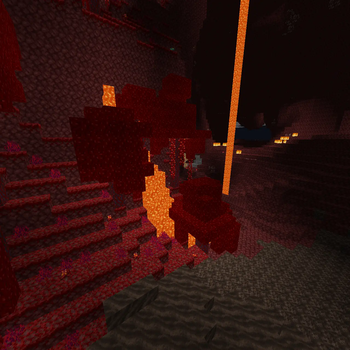
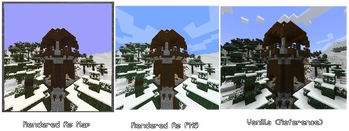
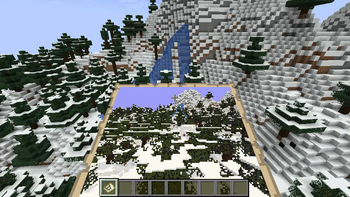
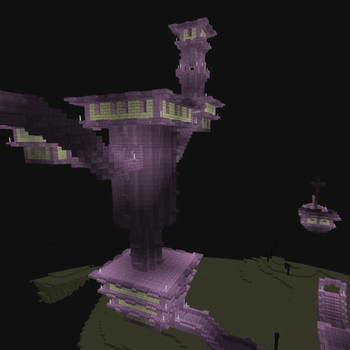
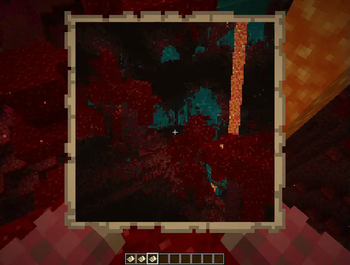
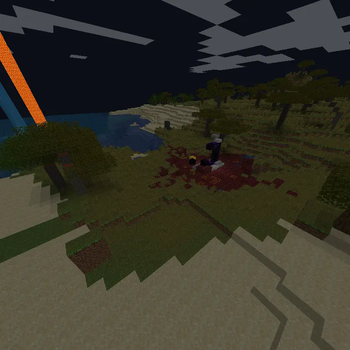
Camera Obscura is a server‑side software rasterizer that renders the world as seen by any entity (player, mob, etc.) directly on the server, producing Photos or Videos as Minecraft maps. It has deep integrations for custom items (Nexo, ItemsAdder) and a custom preset system.
## Features
- Take photos: Generate a map item showing what the target entity sees.
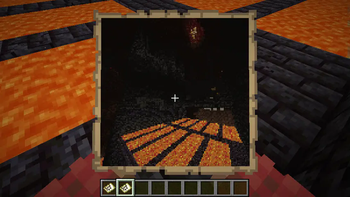
- Record videos: Capture your world on video and play it back on item frames.
- Fully configurable: Resolution, color mode, dithering, render distance, and more.
- Custom item support: Create cameras/camcorders with any appearance via Nexo or ItemsAdder.
- Asynchronous rendering: Never blocks the main server thread.
- No client mods required: Everything is server‑side; maps/recordings work on vanilla clients.
!(https://cdn.modrinth.com/data/RlBTYKIp/images/1868b6d784639eade78155529eb8385efb6ea441.png)
## Installation
### Fabric Server 1. Install (https://modrinth.com/mod/fabric-api) and (https://modrinth.com/mod/polymer) (for virtual items). 2. Place `camera-obscura-fabric.jar` into your `mods/` folder. 3. The configuration file will be created on start.
## Configuration
The configuration file is `config/cameraobscura/config.json`.
```json { "renderDistance": 32, "showSystemMessages": false, "renderEntities": true, "fullbright": false, "fov": 70, "biomeBlend": 1, "ssaa": 2, "maxChunkRebuildsPerTick": 5, "debug": false, "cameraConsumesItem": true, "cameraConsumeItem": "map", "commandPermissionLevel": 2 } ```
| Option | Description | |---------------------------|------------------------------------------------------------------------------------------| | `renderDistance` | View distance in blocks (higher = longer render time). | | `showSystemMessages` | Show “Taking photo…” / “Done!” messages in chat. | | `renderEntities` | Whether to render entities (players, mobs, item frames) in the picture. | | `fullbright` | Ignore lighting (everything appears at full brightness). | | `fov` | Field of view in degrees (default is 70). | | `biomeBlend` | Radius for blending block colors (biome tint). `0` = no blending. | | `ssaa` | Supersampling anti‑aliasing factor (1 = off, 2 = 2x supersampling, 3 = 3x). | | `maxChunkRebuildsPerTick` | Maximum chunks rebuilt per frame per video recording and live-map (to limit CPU spikes). | | `debug` | Print frame timings and show FPS overlay on the output image. | | `cameraConsumesItem` | Whether taking a photo consumes an item (e.g. a map). | | `cameraConsumeItem` | Required item material (e.g. `map`, `paper`). | | `commandPermissionLevel` | Base permission level for commands. |
## Commands & Permissions
Base permission `cameraobscura.command`.
All commands use the root `/camera-obscura`
### 1. Take a map from your perspective ``` /camera-obscura ``` - `scale`: multiply the map resolution (1 = 128×128, 2 = 256×256, up to 3). - Gives you a filled map showing what you see.
### 2. Take a map of another entities perspective
```
/camera-obscura
### 3. Save as PNG image ``` /camera-obscura save ``` - Saves the rendered image as a `.png` in `config/cameraobscura/renders/`.
### 4. Reload configuration ``` /camera-obscura reload ``` Reloads the config file.
### 5. Clear resource/model cache ``` /camera-obscura clear-cache ```
### 6. Give a camera item
```
/camera-obscura give
Examples: - `/camera-obscura give camera` -> gives yourself the default camera. - `/camera-obscura give camcorder Pinnit` -> gives the player `Pinnit` a camcorder. - `/camera-obscura give my-preset` -> gives yourself an item from a preset.
📊 Mod Details
- Game
- Minecraft Mods
- Author
- tomalbrc
- Version
- 2.0.0+26.1.2
- Downloads
- 13,443
- Endorsements
- 93
- Category
- decoration
- Created
- 5/21/2024
- Updated
- 5/14/2026
- Game Versions
- 26.1, 26.1.1, 26.1.2
- Tags
- decoration, game-mechanics, social
🔧 How to Install Minecraft Mods Mods
Download from Modrinth. Use Prism Launcher or drop into your mods folder.
📖 Full step-by-step install guide for Minecraft Mods →
Visit the official mod page for specific installation instructions for this mod.
🎮 Need cheat codes or console commands? Check ur gaming wiki for Minecraft Mods commands, item IDs, and more.
❓ Frequently Asked Questions
Which Minecraft Mods versions does Camera Obscura support?
The author lists 26.1, 26.1.1, 26.1.2. Other versions may work but are untested by the author.
What is the latest version of Camera Obscura?
Version 2.0.0+26.1.2, published 2026-05-14 with 13,443 downloads recorded at the source.
Keep browsing — more Minecraft Mods mods await