Colorly
🟡 Updated this year⚠️ Install Order · 2 steps
Install in this order, then this mod last — most mods fail to load without their framework and dependencies in place.
🖼️ Gallery (2 images)
🔍 Analysis
- 👍 0.1% endorsement rate
- 🏆 #189 of 236 equipment mods in this game by downloads
📋 About This Mod
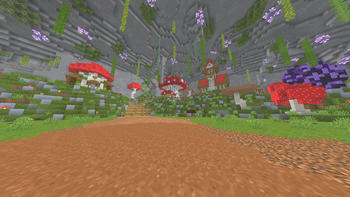
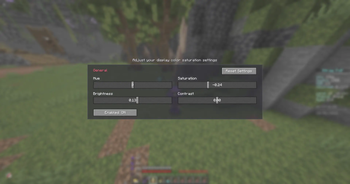
# Colorly **Colorly** gives you a clean, real-time color-grading panel for Minecraft — adjust the look of the entire game on the fly, the same way you would in a video editor. Tweak **Hue**, **Saturation**, **Brightness** and **Contrast** and watch the whole screen update instantly. Warm up your world, cool it down, crank the saturation for a vivid look, or pull it back for a cinematic, washed-out feel — it's all up to you. ## ✨ Features - 🎨 **Four live sliders** — Hue, Saturation, Brightness, Contrast - ⚡ **Instant preview** — every change is applied to the screen in real time - 🖥️ **Whole-game grading** — affects the world, not just one element - 🪶 **Lightweight & client-side** — a single full-screen shader pass, no performance baggage - 🔄 **One-click reset** — back to neutral whenever you want - 💾 **Saved automatically** — your look is remembered between sessions ## 🎛️ How to use Open the settings panel through **(https://modrinth.com/mod/modmenu)**, or bind a key in **Options → Controls → Colormatic**. Drag the sliders, enjoy the live preview, and hit **Reset Settings** to start over. ## 📦 Requirements - **Fabric Loader** + **(https://modrinth.com/mod/fabric-api)** - **(https://modrinth.com/mod/modmenu)** *(optional, recommended — adds a config button)* Client-side only — safe to use on any server. --- *Made with ♥ by **x1eqn**.*
Colorly gives you a clean, real-time color-grading panel for Minecraft — adjust the look of the entire game on the fly, the same way you would in a video editor.
Tweak Hue, Saturation, Brightness and Contrast and watch the whole screen update instantly. Warm up your world, cool it down, crank the saturation for a vivid look, or pull it back for a cinematic, washed-out feel — it's all up to you.
## ✨ Features
- 🎨 Four live sliders — Hue, Saturation, Brightness, Contrast
- ⚡ Instant preview — every change is applied to the screen in real time
- 🖥️ Whole-game grading — affects the world, not just one element
- 🪶 Lightweight & client-side — a single full-screen shader pass, no performance baggage
- 🔄 One-click reset — back to neutral whenever you want
- 💾 Saved automatically — your look is remembered between sessions
## 🎛️ How to use
Open the settings panel through (https://modrinth.com/mod/modmenu)**, or bind a key in Options → Controls → Colormatic. Drag the sliders, enjoy the live preview, and hit Reset Settings to start over.
## 📦 Requirements
- Fabric Loader + (https://modrinth.com/mod/fabric-api)**
- *(https://modrinth.com/mod/modmenu)** (optional, recommended — adds a config button)
Client-side only — safe to use on any server.
Made with ♥ by x1eqn.*
📊 Mod Details
- Game
- Minecraft Mods
- Author
- x1eqn
- Version
- 1.0.0+1.21.4
- Downloads
- 10,676
- Endorsements
- 14
- Category
- equipment
- Created
- 6/11/2026
- Updated
- 6/12/2026
- Game Versions
- 1.21.4
- Tags
- equipment, game-mechanics, library
🔧 How to Install Minecraft Mods Mods
Download from Modrinth. Use Prism Launcher or drop into your mods folder.
📖 Full step-by-step install guide for Minecraft Mods →
Visit the official mod page for specific installation instructions for this mod.
🎮 Need cheat codes or console commands? Check ur gaming wiki for Minecraft Mods commands, item IDs, and more.
❓ Frequently Asked Questions
Which Minecraft Mods versions does Colorly support?
The author lists 1.21.4. Other versions may work but are untested by the author.
What is the latest version of Colorly?
Version 1.0.0+1.21.4, published 2026-06-12 with 10,676 downloads recorded at the source.
Keep browsing — more Minecraft Mods mods await