BetterTeams
🟠 Updated over a year ago⚠️ Install Order · 2 steps
Install in this order, then this mod last — most mods fail to load without their framework and dependencies in place.
🖼️ Gallery (3 images)


🔍 Analysis
- 👍 0.1% endorsement rate
- 🏆 #4 of 30 economy mods in this game by downloads
📋 About This Mod
# BetterTeams ## Overview BetterTeams is a Fabric mod that provides a comprehensive and user-friendly team system for multiplayer servers. With colored teams and simple commands, players can collaborate, communicate, and stay organized. ## Features **Colored Teams:** Create teams with individual Minecraft colors **Comprehensive Invitation System:** Invite players, accept or decline invitations **Team Chat:** Communicate privately with your team members **Team Management:** Create teams, rename, kick members and more **Simple Commands:** Intuitive command system with tab completion **Ownership Rights:** Teams have owners with special privileges **Admin Commands:** Server administrators can remove teams **Configurable Formatting:** Toggle chat and tab-list team formatting on/off **Custom Tab-List:** Beautiful server tab-list with TPS, ping, and rotating messages **Language** Available in English and German (/bteam language en/de) ## Commands ### Player Commands - /bteam create <name> <color> - Create a new team with color - /bteam colors - Show all available team colors - /bteam invite <player> - Invite a player to your team - /bteam accept <team> - Accept a team invitation - /bteam decline <team> - Decline a team invitation - /bteam leave - Leave your current team - /bteam kick <player> - Remove a player from your team - /bteam info - Show information about your team - /bteam msg <message> - Send a message to all team members - /bteam transfer <player> - Transfer team ownership - /bteam rename <new name> - Rename your team - /bteam changecolor <color> - Change your team's color - /bteam support - Get help and show credits - /bteam help - Show all available commands ### Admin Commands (OP required) - /bteam list - Show all teams on the server - /bteam remove <team> - Remove any team from the server - /bteam config status - Show current formatting configuration - /bteam config tablist <true/false> - Toggle tab-list team formatting - /bteam config chat <true/false> - Toggle chat team formatting ## Why BetterTeams v2? BetterTeams v2 was designed to enhance the multiplayer experience through simple organization. Whether for minigames, survival servers, or roleplaying - BetterTeams v2 provides an intuitive way to group players and promote collaboration. ## Installation ### Install Download BetterTeams and place the .jar file in your mods folder on your Server and in your Client Modpack Restart your server and start creating teams! ## TabList & Chat Configuration Customize your server's appearance and control team formatting! ### Toggle Team Formatting (Admin only) ``` /bteam config tablist false # Disable in tab-list /bteam config chat false # Disable in chat /bteam config status # Check current settings ``` ### Config File Edit `config/betterteamsv2/tablist.json` to customize: ```json { "enableTabListFormatting": true, // Show teams in tab-list "enableChatFormatting": true, // Show teams in chat "serverName": "Your Server Name", "rotatingMessages": } ``` **Available colors:** DARK_RED, RED, GOLD, YELLOW, DARK_GREEN, GREEN, AQUA, DARK_AQUA, DARK_BLUE, BLUE, LIGHT_PURPLE, DARK_PURPLE, WHITE, GRAY, DARK_GRAY, BLACK ### Formatting Examples **With team formatting enabled:** - Tab-list: ` PlayerName` - Chat: ` PlayerName: Hello!` **With team formatting disabled:** - Tab-list: `PlayerName` - Chat: `PlayerName: Hello!` ## Compatibility Fabric API required Compatible with most other Fabric mods (https://modrinth.com/mod/placeholder-api) implemented ## Future Plans - Additional team customization - Extended permissions - Updating to more Versions For Help add @.t4bzzz on Discord
# BetterTeams ## Overview BetterTeams is a Fabric mod that provides a comprehensive and user-friendly team system for multiplayer servers. With colored teams and simple commands, players can collaborate, communicate, and stay organized.
- Colored Teams
- Create teams with individual Minecraft colors
- Comprehensive Invitation System
- Invite players, accept or decline invitations
- Team Chat
- Communicate privately with your team members
- Team Management
- Create teams, rename, kick members and more
- Simple Commands
- Intuitive command system with tab completion
- Ownership Rights
- Teams have owners with special privileges
- Admin Commands
- Server administrators can remove teams
- Configurable Formatting
- Toggle chat and tab-list team formatting on/off
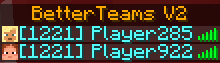
- Custom Tab-List
- Beautiful server tab-list with TPS, ping, and rotating messages
## Commands
### Player Commands
- /bteam create
### Admin Commands (OP required)
- /bteam list - Show all teams on the server
- /bteam remove
## Why BetterTeams v2? BetterTeams v2 was designed to enhance the multiplayer experience through simple organization. Whether for minigames, survival servers, or roleplaying - BetterTeams v2 provides an intuitive way to group players and promote collaboration.
## Installation ### Install Download BetterTeams and place the .jar file in your mods folder on your Server and in your Client Modpack Restart your server and start creating teams!
## TabList & Chat Configuration Customize your server's appearance and control team formatting!
### Toggle Team Formatting (Admin only) ``` /bteam config tablist false # Disable in tab-list /bteam config chat false # Disable in chat /bteam config status # Check current settings ```
### Config File Edit `config/betterteamsv2/tablist.json` to customize: ```json { "enableTabListFormatting": true, // Show teams in tab-list "enableChatFormatting": true, // Show teams in chat "serverName": "Your Server Name", "rotatingMessages": ["Message 1", "Message 2"] } ```
Available colors: DARK_RED, RED, GOLD, YELLOW, DARK_GREEN, GREEN, AQUA, DARK_AQUA, DARK_BLUE, BLUE, LIGHT_PURPLE, DARK_PURPLE, WHITE, GRAY, DARK_GRAY, BLACK
### Formatting Examples With team formatting enabled: - Tab-list: ` PlayerName` - Chat: ` PlayerName: Hello!`
With team formatting disabled: - Tab-list: `PlayerName` - Chat: `PlayerName: Hello!`
## Compatibility Fabric API required Compatible with most other Fabric mods (https://modrinth.com/mod/placeholder-api) implemented
## Future Plans - Additional team customization - Extended permissions - Updating to more Versions
For Help add @.t4bzzz on Discord
📊 Mod Details
- Game
- Minecraft Mods
- Author
- .t4bzzz
- Version
- 1.0.0
- Downloads
- 5,853
- Endorsements
- 6
- Category
- economy
- Created
- 5/17/2025
- Updated
- 6/4/2025
- Game Versions
- 1.21.1
- Tags
- economy, game-mechanics, management
🔧 How to Install Minecraft Mods Mods
Download from Modrinth. Use Prism Launcher or drop into your mods folder.
📖 Full step-by-step install guide for Minecraft Mods →
Visit the official mod page for specific installation instructions for this mod.
🎮 Need cheat codes or console commands? Check ur gaming wiki for Minecraft Mods commands, item IDs, and more.
❓ Frequently Asked Questions
Which Minecraft Mods versions does BetterTeams support?
The author lists 1.21.1. Other versions may work but are untested by the author.
What is the latest version of BetterTeams?
Version 1.0.0, published 2025-06-04 with 5,853 downloads recorded at the source.
Keep browsing — more Minecraft Mods mods await