BetaLAN StationAPI
🟡 Updated this year⚠️ Install Order · 2 steps
Install in this order, then this mod last — most mods fail to load without their framework and dependencies in place.
🖼️ Gallery (1 images)
🔍 Analysis
- 👍 0.0% endorsement rate
- 🏆 #14 of 15 babric mods in this game by downloads
📋 About This Mod
# BetaLAN StationAPI Edition for Minecraft Beta 1.7.3 A StationAPI mod for Minecraft Beta 1.7.3 that allows easily launching a server using the currently loaded single-player world and currently in use mod-set/configuration. * Configure server settings and java version using GlassConfigAPI 3 (GCAPI3). * In v1.1.0 and above, a backup world zip file is created on server launch (if the config setting is turned on). * The backup file's name begins with an underscore (`_`) and ends with `.zip` * The backup file is recreated everytime the server is launched using the most recent world files * In v2.3.0 and above, world showcase mode is available * In world showcase mode a copy of your world will be created that the server will launch with * No world or player changes will be saved and no world backup will be created (since nothing will be saved to the original world anyway) * In v2.4.0 and above, UniTweaks v0.24.0 server properties are supported (difficulty and spawn-protection radius) ## Troubleshooting * I strongly recommend launching the server jar from your .minecraft directory if the loading bar gets stuck at "Preparing World" * Most likely it crashed due to a mod incompatibility * Sometimes the client will crash when it joins the world, this seems to be a common bug even when joining normal servers * Simply close the client, relaunch, and try again usually it goes away when trying to join a server the second time ## Additional Setup * You will need to port forward and use public IP to let others join the server * This method was tested and works * It is possible that you can bypass port forwarding by using LogMeInHamachi instead * Let me know if you test this method, so we can inform players how it works ## Installation using Prism Launcher 1. Download an instance of Babric for Prism Launcher: https://github.com/babric/prism-instance 2. Install Java 17 and set the instance to use it: https://adoptium.net/temurin/releases/ 3. Add GlassConfigAPI 3.0.2+ to the mod folder for the instance: https://modrinth.com/mod/glass-config-api 4. Add Glass Networking to the mod folder for the instance: https://modrinth.com/mod/glass-networking 5. Add StationAPI to the mod folder for the instance: https://modrinth.com/mod/stationapi 6. (Optional) Add Mod Menu to the mod folder for the instance: https://modrinth.com/mod/modmenu-beta 7. Add this mod to the mod folder for the instance: https://github.com/telvarost/BetaLAN-StationAPI/releases 8. Run and enjoy! 👍 ## Feedback Got any suggestions on what should be added next? Feel free to share it by (https://github.com/telvarost/SaveAsServer-StationAPI/issues/new). Know how to code and want to do it yourself? Then look below on how to get started. ## Contributing Thanks for considering contributing! To get started fork this repository, make your changes, and create a PR. If you are new to StationAPI consider watching the following videos on Babric/StationAPI Minecraft modding: https://www.youtube.com/watch?v=9-sVGjnGJ5s&list=PLa2JWzyvH63wGcj5-i0P12VkJG7PDyo9T
# BetaLAN StationAPI Edition for Minecraft Beta 1. 7. 3
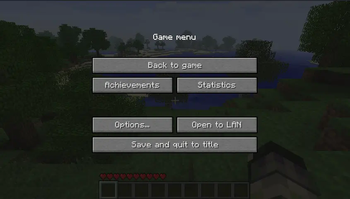
A StationAPI mod for Minecraft Beta 1. 7. 3 that allows easily launching a server using the currently loaded single-player world and currently in use mod-set/configuration. Configure server settings and java version using GlassConfigAPI 3 (GCAPI3). In v1. 1. 0 and above, a backup world zip file is created on server launch (if the config setting is turned on). The backup file's name begins with an underscore (`_`) and ends with `.zip` The backup file is recreated everytime the server is launched using the most recent world files In v2. 3. 0 and above, world showcase mode is available In world showcase mode a copy of your world will be created that the server will launch with No world or player changes will be saved and no world backup will be created (since nothing will be saved to the original world anyway) In v2. 4. 0 and above, UniTweaks v0. 24. 0 server properties are supported (difficulty and spawn-protection radius)
## Troubleshooting
I strongly recommend launching the server jar from your .minecraft directory if the loading bar gets stuck at "Preparing World" Most likely it crashed due to a mod incompatibility Sometimes the client will crash when it joins the world, this seems to be a common bug even when joining normal servers Simply close the client, relaunch, and try again usually it goes away when trying to join a server the second time
## Additional Setup
You will need to port forward and use public IP to let others join the server This method was tested and works It is possible that you can bypass port forwarding by using LogMeInHamachi instead Let me know if you test this method, so we can inform players how it works
## Installation using Prism Launcher
1. Download an instance of Babric for Prism Launcher: https://github.com/babric/prism-instance 2. Install Java 17 and set the instance to use it: https://adoptium.net/temurin/releases/ 3. Add GlassConfigAPI 3. 0. 2+ to the mod folder for the instance: https://modrinth.com/mod/glass-config-api 4. Add Glass Networking to the mod folder for the instance: https://modrinth.com/mod/glass-networking 5. Add StationAPI to the mod folder for the instance: https://modrinth.com/mod/stationapi 6. (Optional) Add Mod Menu to the mod folder for the instance: https://modrinth.com/mod/modmenu-beta 7. Add this mod to the mod folder for the instance: https://github.com/telvarost/BetaLAN-StationAPI/releases 8. Run and enjoy! 👍
## Feedback
Got any suggestions on what should be added next? Feel free to share it by (https://github.com/telvarost/SaveAsServer-StationAPI/issues/new). Know how to code and want to do it yourself? Then look below on how to get started.
## Contributing
Thanks for considering contributing! To get started fork this repository, make your changes, and create a PR.
If you are new to StationAPI consider watching the following videos on Babric/StationAPI Minecraft modding: https://www.youtube.com/watch?v=9-sVGjnGJ5s&list=PLa2JWzyvH63wGcj5-i0P12VkJG7PDyo9T
📊 Mod Details
- Game
- Minecraft Mods
- Author
- Telvarost
- Version
- 2.4.2
- Downloads
- 6,783
- Endorsements
- 3
- Category
- babric
- Created
- 12/5/2024
- Updated
- 4/11/2026
- Game Versions
- b1.7.3
- Tags
- game-mechanics, management, utility
🔧 How to Install Minecraft Mods Mods
Download from Modrinth. Use Prism Launcher or drop into your mods folder.
📖 Full step-by-step install guide for Minecraft Mods →
Visit the official mod page for specific installation instructions for this mod.
🎮 Need cheat codes or console commands? Check ur gaming wiki for Minecraft Mods commands, item IDs, and more.
❓ Frequently Asked Questions
Which Minecraft Mods versions does BetaLAN StationAPI support?
The author lists b1.7.3. Other versions may work but are untested by the author.
What is the latest version of BetaLAN StationAPI?
Version 2.4.2, published 2026-04-11 with 6,783 downloads recorded at the source.
Keep browsing — more Minecraft Mods mods await